Nintendo Switch Emulation on Android Phones
ARM phones skip the translation tax, giving Eden an edge.
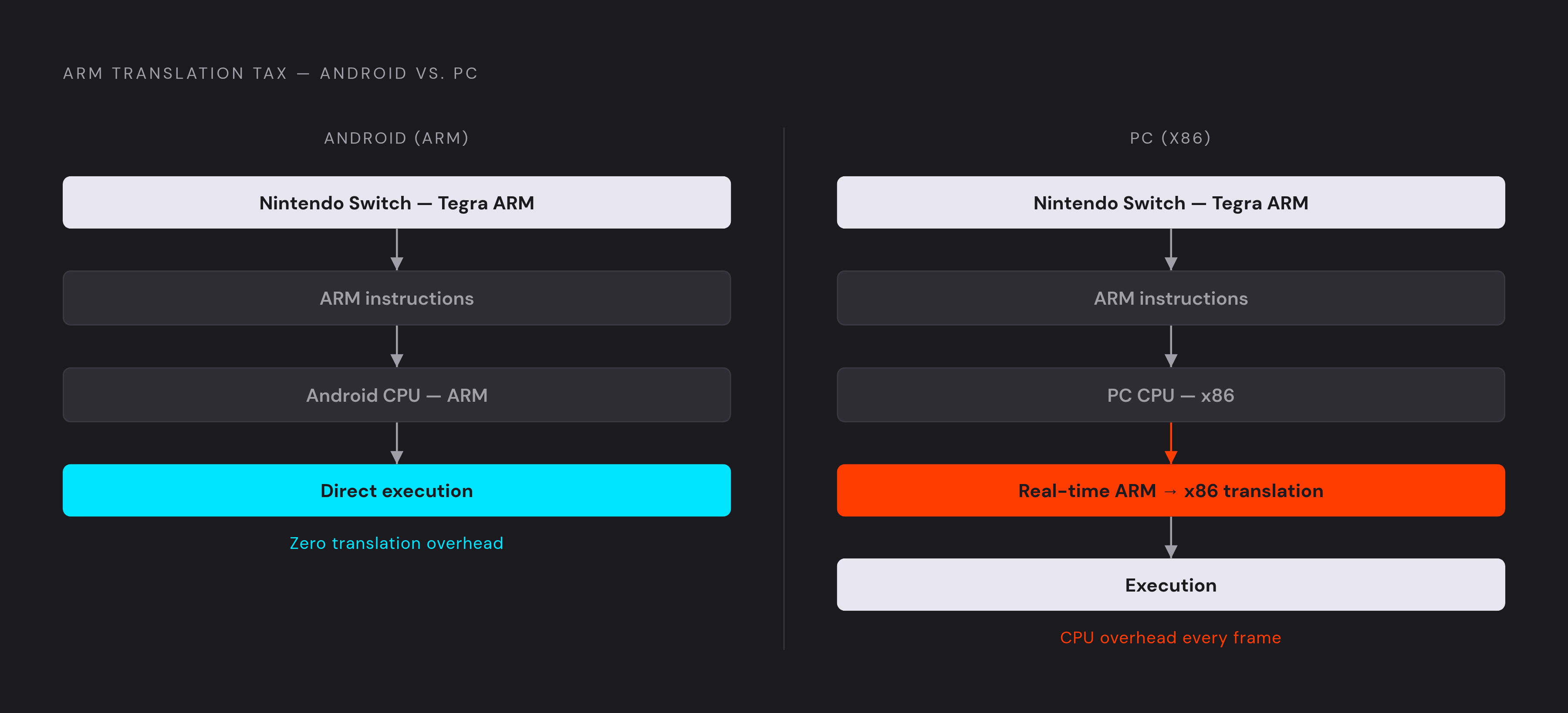
Android phones run Switch games well because of a quirk of chip design: the ARM processors inside most Android devices speak the same instruction set as the Tegra chip inside the Nintendo Switch. That shared language is the whole story. A desktop PC running an x86 processor has to run a real-time translator that converts every instruction between x86 and ARM on the fly, a process that eats CPU headroom and introduces latency with every frame. An Android phone skips that translation step entirely, because there's nothing to translate. The result is a genuine structural advantage: a well-optimized Android emulator can outperform a PC emulator running on hardware that's faster on paper because the Android version isn't paying a translation tax at every cycle, which is the design philosophy behind the Android emulator most people are recommending for 2026, built from the ground up around the idea that ARM-native code has nothing to apologize for.
The Switch emulator landscape on Android in 2026
The field has thinned out considerably from its peak, and what's left falls into two camps: a handful of actively maintained projects worth installing, and a longer list of names that show up in old tutorials but haven't shipped an update in a long while.
Eden is the top 2026 recommendation. It's free, open-source, and descended from the Yuzu and Sudachi code lineage, but unlike its predecessors it was built from day one for ARM processors rather than ported over from a PC codebase after the fact. It runs on Windows, Linux, macOS, and Android, so someone who games on a desktop and a phone can run the same emulator on both without learning two different tools. Eden also hosts its source code on a self-managed Forgejo instance at git.eden-emu.dev rather than on GitHub, which looks like a minor infrastructure footnote until the legal section of this piece explains why it matters quite a bit. Setup includes a built-in key importer (Settings → Manage Keys → Select file), and the ARM-native build produces measurably lower heat and longer battery life on identical hardware than ported emulators.
Citron is the other actively developed option, carrying Yuzu's codebase forward on both PC and Android. It isn't ARM-native the way Eden is, and it runs roughly 10 to 15 percent behind Eden on identical hardware, with that gap widening further on mid-range devices. What Citron offers instead is continuity: saves, settings, and configurations transfer between PC and Android with some adjustment, which makes it attractive to players who split time between a desktop setup and a phone. A GBAtemp community discussion noted that Citron's v0.10.0 release brought notable cross-collaboration between the Citron, Ryujinx, and Eden development teams, a sign that the surviving projects are talking to each other.
Kenji-NX, a fork of the Ryujinx project aimed at Android, released v2.1.0 in February 2026 with general performance gains, a smaller app footprint, and fixes targeted specifically at Snapdragon 8 Elite devices. Kenji-NX is worth keeping installed as a secondary option, since compatibility on any given title can vary enough that a game struggling on Eden or Citron runs fine here instead.
Strato is open-source and built for ARMv8 Android devices, and it began as a continuation of Skyline after Skyline's development was discontinued in May 2023. It remains experimental and isn't recommended for general use yet. Skyline has effectively halted development, and Eden now does everything Skyline once attempted, only better, which is worth knowing for readers running across it in an old guide.
What hardware your phone needs to run Switch games
Chipset is the one variable that matters more than any other in this equation, and the gap between a flagship processor and a mid-range one separates a game that's genuinely fun from one that's a slideshow with sound effects.
Two things determine where a phone lands. The first is Vulkan API support, which most current emulators require (some also accept OpenGL 4.6 as a fallback). Vulkan support decides whether the GPU can handle the rendering pipeline a given emulator asks of it, and older or budget chipsets that lack full Vulkan support are effectively out of the running for anything demanding. The second is thermal throttling, the process by which a phone quietly drops its own clock speeds to keep from overheating. A chipset that looks great on a spec sheet can still slide into stuttering after twenty minutes of sustained play if the phone's cooling can't keep pace.
On Eden, the practical tiers break down roughly like this. A Snapdragon 8 Gen 2, the recommended tier, handles most of the library at 720p with 30 to 60fps and some resolution scaling. Budget-tier Snapdragon 7 series chips can manage lighter titles at reduced settings, but demanding 3D games struggle significantly on that hardware. Snapdragon 6 series devices fall below Eden's supported minimum, so a phone in that range isn't a viable platform for this, which is still a meaningful stretch of the market. Plenty of players own a mid-range Snapdragon 8 Gen 2 phone already, and the takeaway isn't that only the newest flagship will do.
The Legend of Zelda: Tears of the Kingdom is the clearest stress test available, since it's the most demanding mainstream title tested on this hardware. On a Snapdragon 8 Gen 2 device, framerate shifts with environment: tighter spaces like shrines run noticeably better than the open world does, and the first stretch of play is rough with shader compilation stutter that fades once the cache finishes building. Celeste makes an odd but useful counterpoint. The original Switch hardware occasionally dips below its own 60fps target during its hardest platforming sequences, and emulation on a capable Android device can actually hold that frame lock more consistently than the console it's emulating. Somewhere, a game designer is having an existential crisis about that.
For players who want the steadiest experience without fiddling with a phone's thermal limits, dedicated Android handhelds built for emulation, the AYN Odin 2 Portal Pro and the Retroid Pocket 6 among them, pair capable chipsets with physical controls and cooling that a slim smartphone simply doesn't have room for. They're the best-case setup, not the baseline most readers are starting from.
The mandatory setup steps before any game will run
No Android Switch emulator plays a commercial game straight out of the download. Two files have to be supplied by the user first: encryption keys and firmware, both of which come from a Nintendo Switch console the user actually owns. Without the key file (commonly named prod.keys) sitting in the right directory, the emulator can't decrypt a single game file, regardless of how good the emulator is or how powerful the phone is. Firmware pulled from a real Switch is also required for a large share of the commercial library to launch at all, so this isn't a step that only matters for edge cases.
Android 11 and later versions add a wrinkle that trips up a fair number of first-time users: the OS restricts file system access in ways that block emulators from reading the files they need unless "All files access" is granted manually under Settings → Apps → Permissions. It's a small toggle, and a surprising number of guides forget to mention it, which is exactly the kind of gap that turns a five-minute setup into a forty-minute troubleshooting session.
Once keys and firmware are in place and a game actually launches, expect stuttering on that first run. The emulator is compiling shaders for that specific title's visual effects in real time, which is normal. Subsequent sessions run considerably smoother once that cache is built. For players setting up more than one emulator, EmuDeck for Android entered beta in 2026 with a one-click installer aimed at Snapdragon and MediaTek handhelds, and it cuts down on setup friction meaningfully. Since it's still in beta, treat it as a convenience layered on top of the manual process rather than a replacement for understanding what that process involves.
Switch games that run well on Android emulation
Performance isn't a simple yes-or-no question here. Titles spread across a real spectrum, from a locked 60fps down to something closer to unplayable, and where a given game lands shapes whether the whole exercise is worth the setup trouble for a specific person's library.
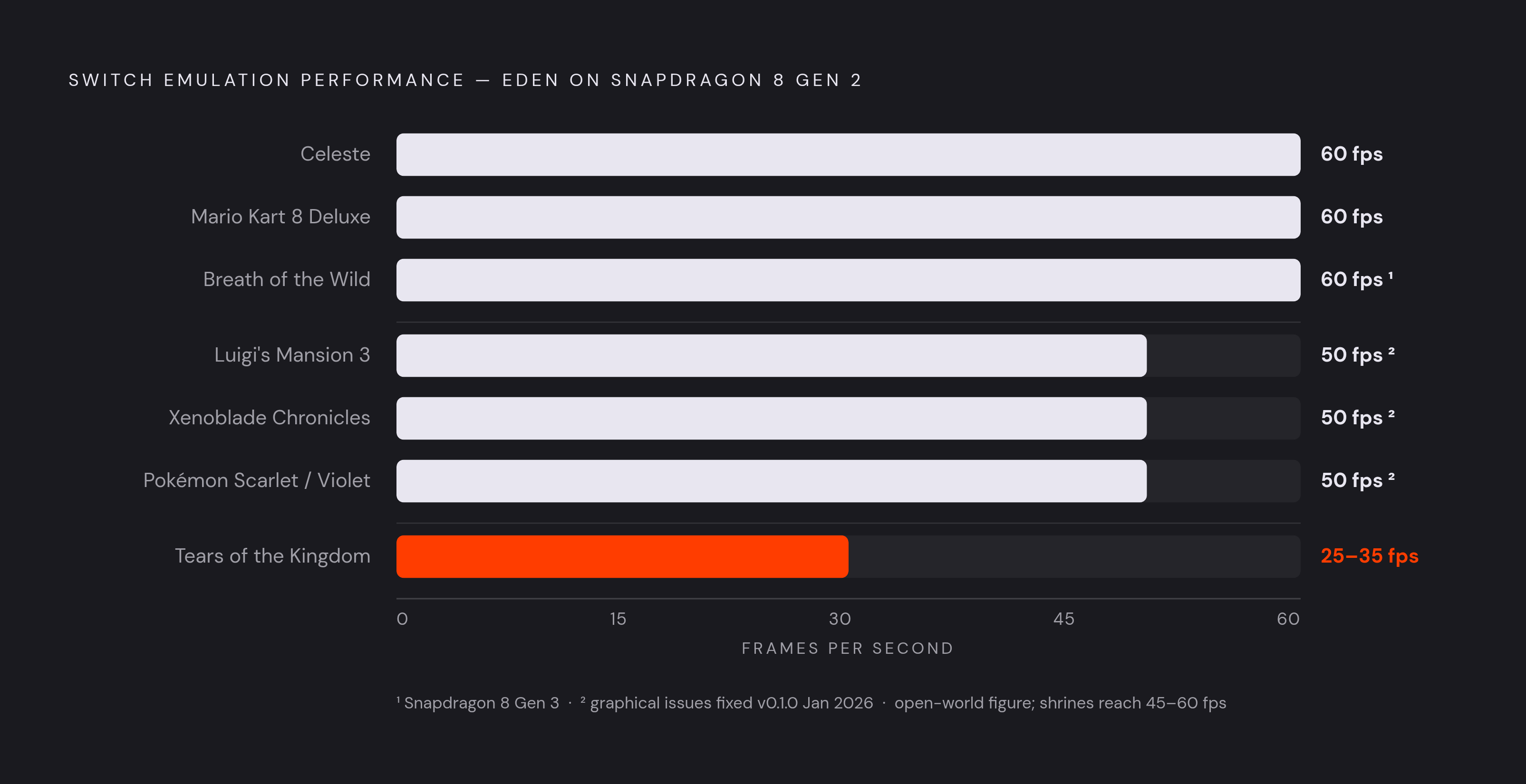
On flagship hardware with Eden, several titles run cleanly. Mario Kart 8 Deluxe holds a locked 60fps at high resolution on Snapdragon 8 Gen 2 and newer chips. The Legend of Zelda: Breath of the Wild runs at 1080p and 60fps on a Snapdragon 8 Gen 3. Celeste, as mentioned above, holds its framerate about as well as or better than the original hardware does. Luigi's Mansion 3, Xenoblade Chronicles Definitive Edition, and Pokémon Scarlet/Violet all had graphical issues addressed in Eden's January 2026 v0.1.0 update, and Metroid Prime 4: Beyond got graphical fixes in that same release.
Tears of the Kingdom is the title to calibrate expectations around, since it runs but with real caveats: 25 to 35fps in open-world areas, 45 to 60fps inside shrines, and significant shader stutter on the first session before the cache settles in. It's the most demanding game in the mainstream library by a comfortable margin.
The broader pattern is predictable once you see a few examples. Two-D games, indie titles, and older Switch releases run reliably even on mid-range phones, since they simply don't ask as much of the GPU. Open-world 3D games with long draw distances are the hardest category across the board, and how well they run tracks chipset generation more closely than any other factor. None of this is a substitute for checking a specific title before investing time in it. Compatibility databases maintained by the emulator community track performance on a per-game basis, and given how much variation exists even within one hardware tier, checking the actual title in question beats assuming anything based on a general reputation.
The legal environment surrounding Switch emulation in 2026
Every project named above exists inside a legal environment that Nintendo has actively reshaped since 2024, and understanding that environment explains both why setup is as clunky as it is and why some emulators from a year or two ago no longer exist.
The event that set the tone was Nintendo's February 2024 lawsuit against Tropic Haze LLC, the developer of Yuzu, which settled for $2.4 million. That outcome told the rest of the emulation world that Nintendo intended to pursue developers directly rather than simply tolerate the ecosystem around its hardware. A second wave followed in February 2026, when Nintendo's lawyers filed DMCA takedowns against 13 Switch-emulator projects in a single coordinated action: Citron, Eden, Kenji-NX, MeloNX, Pine, Pomelo, Ryubing, Ryujinx, Skyline, Sudachi, Sumi, Suyu, and Yuzu all appeared on that list. A third action came on August 17, 2026, when Nintendo filed several coordinated DMCA anti-circumvention notices with GitHub in a single sweep, a sweep that resulted in the removal of hundreds of repositories, including Suyu's entire repository network.
The legal theory draws a specific line between what's legal and what isn't. Nintendo's own IP lawyer, Koji Nishiura, said at the Tokyo eSports Festa that emulators themselves are technically legal. The claim Nintendo is actually making is that distributing tools which help users obtain and use encryption keys and firmware violates the anti-circumvention provisions of 17 U.S.C. §1201. That distinction has never been tested to a verdict: the Yuzu case settled before any court issued an opinion on it, so every surviving project operates in a gray zone without a binding ruling either way.
Projects have responded differently. Eden now hosts its source code on a self-managed Forgejo instance at git.eden-emu.dev rather than on GitHub, a direct response to the GitHub takedowns and the main reason it held up better than GitHub-dependent projects through the February 2026 wave. RetroDECK took the opposite route, confirming it will drop Switch support from its Flatpak collection entirely, citing the legal exposure created by Nintendo's DMCA notices. One project bet on infrastructure independence, the other bet on stepping back. Both are rational responses to the same uncertainty.
Users source keys and firmware themselves rather than finding them bundled with the emulator, since an emulator that shipped those files would be making Nintendo's circumvention argument for it. Eden's choice to self-host its code is the practical reason the project is still available to download, given that backdrop.
Switch 2 emulation on Android: where things stand
Switch 2 emulation on Android isn't a realistic option in 2026. The technical and legal groundwork is at the earliest possible stage, and no commercial game runs publicly on any platform yet. The Emulation General Wiki states that there are currently no emulators for the Switch 2 that can run commercial games and/or software, which settles the question for anyone wondering whether an early build exists somewhere worth chasing down. What work does exist is foundation-level reverse engineering, with current projects amounting to proof-of-concept experiments. The same legal pressure that reshaped Switch 1 emulation applies here too, likely with more force, since Nintendo has every incentive to act earlier this time around and not wait for an ecosystem to mature first. Everything else in this guide, emulator choice, hardware tiers, setup steps, game compatibility, applies to the original Switch library only.
Local Switch emulation versus cloud gaming on Android
Local emulation and cloud gaming are two answers to the same question: how does someone play console-quality games on a phone? They just arrive at that answer from opposite directions, trading off latency, accessibility, legal footing, and long-term reliability in ways that pull against each other.
Local emulation wins on a few fronts that are easy to take for granted. It works offline entirely, something no cloud streaming service can offer by definition. It's also immune to a company's business decisions: a locally stored library of games doesn't vanish because a server shuts down. Google Stadia's shutdown is the clearest example of what that risk actually looks like when a cloud service closes its doors and takes a library of playtime with it.
Cloud gaming wins where emulation struggles. Xbox Cloud Gaming and NVIDIA GeForce Now run on licensed game libraries, while PS Remote Play and Steam Link stream from a console or PC the user already owns, so none of them involve sourcing keys, triggering a DMCA claim, or operating inside a legal gray zone. Any Android phone with a browser and a decent connection can stream, with no flagship chipset and none of the setup friction covered earlier in this piece. For a player whose phone can't hit acceptable framerates in emulation, cloud gaming is still a path to a broad library without spending a dollar on new hardware.
The decision mostly comes down to what a player already has and wants. Someone whose library lives mostly on cloud platforms, and who wants to tap an icon and start playing, is better served by streaming. Someone who wants offline access, the lowest latency achievable, or a specific Switch title that cloud platforms don't carry has a clear reason to go the local route, provided the phone in their pocket actually clears the hardware bar this piece just laid out.