Best Handheld Gaming Consoles Ranked
Four device types compete for your handheld gaming dollar, each with different trade-offs.
Handheld gaming has split into four real categories, and each one asks you to give something up to get something else. You've got dedicated consoles like the Nintendo Switch 2, PC handhelds running full Windows or SteamOS, remote-play and cloud streaming screens, and the humble smartphone with a controller clipped to it. Ranking these honestly means admitting a phone you already own, paired with the right accessory, belongs in the same conversation as a $500 dedicated device. Some people will insist a "handheld console" needs a cartridge slot to count. That's a matter of definition, not a reason to leave phones out of the comparison.
The ceiling on what these things can run has moved fast, too. Ten years ago, playing Cyberpunk 2077 on something that fits in a jacket pocket would have seemed implausible; now it launches day-one on Switch 2. The old idea that handhelds are compromise machines you tolerate until you get home to a real setup doesn't hold up anymore. What follows is a walk through each category: what it does well, where it falls short, who should actually spend money on it, and who should save their cash for something else entirely.
Nintendo Switch 2: the best handheld console you can buy outright
Nintendo launched the Switch 2 on June 5, 2025, at $449.99, and it sold over 3.5 million units in its first four days, the fastest console launch on record according to Niko Partners. As of June 2026, worldwide sales have crossed 23 million units, with Mario Kart World as the breakout hit at more than 15 million copies sold. Those aren't small numbers for a machine that costs about as much as a decent laptop.
Under the hood sits a custom NVIDIA Ampere-based T239 chip paired with 12GB of LPDDR5X memory, driving a 7.9-inch 1080p screen that runs at 120Hz and scales up to 4K when docked. NVIDIA says graphics performance is up to 10 times that of the original Switch, and the jump feels closer to a generational leap than the usual mid-cycle refresh. DLSS and AI upscaling do a lot of the heavy lifting here; they're the reason Cyberpunk 2077: Ultimate Edition runs on this thing at all. Add ray tracing support and you get a handheld capable of games nobody expected to see outside a desktop tower.
There's also GameChat, which folds in voice and video and pushes the Switch 2 past a device that only plays Mario into something closer to a social hub. Third-party support has picked up, too. Ubisoft and EA are both actively publishing on the platform, a real shift from previous Nintendo hardware cycles, where third-party ports showed up late, broken, or not at all.
None of this comes free, though. Nintendo's own games still cost more than their Steam equivalents, often by a wide margin, and some of the more demanding third-party titles run at a reduced internal resolution, with DLSS doing reconstruction work to close the gap. It looks good, but part of what you're seeing is upscaling faking the impression of horsepower that isn't quite there. One more thing worth knowing: the US price jumps to $499.99 starting September 1, 2026. If you're on the fence, the calendar just made the decision slightly more urgent for you.
Turn it on and start playing: no drivers, no launcher soup, no Windows update eating twenty minutes of your lunch break. If Nintendo's library matters to you, nothing else really substitutes.
Steam Deck OLED: the value case for PC gaming in your hands
Valve didn't reinvent the Steam Deck with the OLED refresh so much as sand off every rough edge from the original. The new HDR screen, better battery life, and ergonomics that reviewers keep calling the most comfortable in the category add up to a device that finally feels finished.
The numbers back it up. In a standardized Cyberpunk 2077 test, the OLED model lasted 3 hours and 45 minutes, and lighter games like Stardew Valley or Hades II stretch that to 6 or 7 hours. That's the best battery life among handhelds capable of running demanding, graphically intensive titles.
A lot of the credit belongs to SteamOS itself. Suspend and resume works like a console, the controller-first interface doesn't feel like a stripped-down version of Windows, and you get per-game performance profiles without digging through five menus. You also don't get Windows deciding, mid-session, that now is a great time for a mandatory restart. As of early 2025, Steam Deck had sold roughly 5 million units, compared to fewer than 1 million for any single Windows-based competitor. That gap says something: people are buying the experience of not fighting an operating system as much as they're buying the hardware itself.
One honest caveat: Valve's increases to memory and storage pricing have pushed the Deck's cost up, and outlets like Tom's Hardware have pointed out it's no longer the deal it was at launch. Check current street prices before you assume you're getting a bargain, because that assumption isn't as safe as it used to be.
There's also a small but real feature nobody else in this roundup offers: dual trackpads. Fire up an older PC game, or a strategy title that was never built with a joystick in mind, and those trackpads become the reason the game is playable at all.
PC gamers who already have a Steam library, and want it in their hands without babysitting a Windows install, are the obvious audience here. Everyone else can keep reading.
Asus ROG Xbox Ally X and Lenovo Legion Go S: when you need full Windows power (and when you don't)
The ROG Xbox Ally X is PC Gamer's pick for best overall handheld gaming PC, and it earns that with Hall effect joysticks (which resist the drift that plagues cheaper sticks), DualSense-style impulse triggers, and strong cross-platform compatibility. It costs $1,000, real money by any measure, but the Xbox branding baked into the software makes it a natural home for Game Pass subscribers. The ecosystem hooks are a genuine reason to pick this over a generic Windows handheld, not just a marketing sticker slapped on the box.
Lenovo's Legion Go S tells a different story depending on which version you buy, and the gap is bigger than you'd expect. The SteamOS edition, which started shipping in May 2025, was the first non-Valve device to ship with SteamOS pre-installed, a real landmark for an operating system that used to live only on Valve's own hardware. It comes with an 8-inch 1920x1200 120Hz screen, the largest in this whole lineup, an AMD Ryzen Z2 Go chip with headroom above 15W, and SteamOS's stability, all for $499.
Then there's the Windows version of the same hardware at $730, and here's the part that should make buyers sit up straight: it ran noticeably slower than the SteamOS version on identical silicon. Same chip, same screen, same everything, and the operating system alone accounted for the gap. The OS choice on these devices matters as much as the processor spec you're paying for, sometimes more.
Worth a mention in passing: the MSI Claw 8 EX AI+ sits at the performance ceiling of this whole category, running an Intel Arc G3 Extreme chipset with benchmark numbers that top the field. At $1,799.99, though, it's built for a narrow slice of buyers who've already decided budget isn't the conversation they're having.
Power users, people with existing Windows game libraries, and Game Pass subscribers who want flexibility a closed console can't offer make up the crowd here.
PlayStation Portal: a strong remote-play screen, now a credible cloud device
The PlayStation Portal started life as a remote-play accessory, basically a large, comfortable screen with the full DualSense feature set (haptics, adaptive triggers, the works) bolted on. For PS5 owners on solid Wi-Fi, it's still the best remote-play experience you can buy, full stop.
The November 2025 cloud streaming update changed what this device can do. Suddenly you had access to 2,845 games through PS Plus Premium's cloud streaming service, spanning Sony's first-party catalog and a wide range of major third-party titles. It's now a cloud gaming device that happens to also do remote play. Cloud streaming usage grew 162% year-over-year after that update, which tells you the demand was sitting there waiting for Sony to flip the switch.
A March 2026 follow-up update added a 1080p High Quality mode, bumping the bitrate for both remote play and cloud streaming and making the picture noticeably cleaner on both fronts.
The catch hasn't gone anywhere: this thing lives and dies by your Wi-Fi. Take it on a train, a plane, or anywhere with spotty connectivity, and you'll spend more time waiting for the screen to catch up than playing anything. As a travel companion, it's a poor fit, and no software update is going to fix that.
What's interesting is how much the Portal's evolution says about the whole category. A device built for one narrow job, streaming from your own console down the hall, turned into a general-purpose cloud gaming screen because the infrastructure behind it kept getting better. The update simply followed where the demand already was.
PS5 owners who want to play in another room, or dip into the PS Plus cloud library without hauling a second TV into the bedroom, get the most out of this one.
Cloud streaming handhelds and Panic Playdate: the niche picks worth knowing about
Some devices in this category aren't trying to be everyone's first pick. That's fine. Some dedicated cloud streaming handhelds are built specifically for cloud and remote-play streaming, Xbox Cloud Gaming, Steam Link, all of it, wrapped in a comfortable, purpose-built shell. Where they struggle is value. They compete against the Portal on one side and, as we'll get to shortly, against the smartphone-plus-controller setup on the other, and that's a tough spot to be in.
The Panic Playdate is the genuine oddball of the bunch. It's Game Boy-sized, it has a hand crank built into the side as an actual input method, and its library is a curated set of indie games made specifically for this device. Few people buy a Playdate as their main gaming device. Most buy it because it's a well-made novelty, and for people who like owning distinctive, well-crafted things, it earns its shelf space next to whatever else they collect.
Retro fans get a nod too: devices like the AYN Thor and Miyoo Mini Plus handle DS and 3DS emulation with dual OLED screens. If your entire library is retro, that's a distinct enough use case to deserve its own hardware rather than a compromise on something built for modern games.
The thread connecting all three: they serve people who already know exactly what they want. None of them answers the harder question of what handheld a total newcomer should buy first.
Where the smartphone-plus-controller setup fits in this ranking
Some dedicated cloud streaming handhelds are, in practice, smartphones with the cellular radio removed and a controller built into the sides. Given that, why not just use a phone you already own and clip a controller onto it?
Modern flagship phones match or beat the GPU performance of budget PC handhelds; mobile chip design has advanced faster than most people noticed. What's always been missing isn't processing power, it's physical buttons. Touch controls work fine for simple mobile games and turn frustrating fast for anything needing precise stick movement.
Access to cloud libraries, Xbox Cloud Gaming, Nvidia GeForce Now, PS Remote Play, Steam Link, looks identical no matter which screen you're holding. The content renders the same whether it's on a Portal, a G Cloud, or your own phone. On top of that, a phone gives you Apple Arcade and Google Play libraries, which no dedicated handheld in this roundup touches at all.
The case for the smartphone setup is simple: it's a device you already own, paired with a controller, covering cloud gaming, remote play, and native mobile games at a fraction of what a Portal or G Cloud costs, especially if you don't own a PS5 to remote-play from in the first place.
It comes with real limits, too. Screen size runs smaller than most dedicated handhelds, and there's no single storefront tying everything together the way Steam or the Nintendo eShop does. You're juggling apps instead of browsing one library, and that adds up over a long enough session.
How a phone controller turns a smartphone into a handheld console
This is where the smartphone argument stops being theoretical. One option plugs directly into an iPhone or Android device, and a wireless variant adds connectivity for people who don't want a cable running into their charging port. Both solve the same core problem, physical controls, without making you buy a second device.
The engineering focus here is latency. The whole pitch rests on ultra-low latency passthrough, because the moment lag creeps in between a thumb press and an on-screen action, the controller stops feeling responsive and you're back to fumbling with touch overlays. Physical buttons, bumpers, and analog sticks close that gap, giving the controller a sturdier, more considered feel than a typical accessory.
The manufacturer points to over 50 research studies, more than 50 patents, and over 10,000 part iterations behind the design. The offset thumbstick layout and the weight distribution aren't defaults pulled from a template; they're deliberate choices aimed at keeping three-hour sessions from wrecking your hands. Whether every one of those 10,000 iterations mattered is hard to verify from the outside, but the comfort claim holds up in practice.
Compatibility runs the full spread: Xbox Cloud Gaming, Nvidia GeForce Now, PS Remote Play, Steam Link, Apple Arcade, Google Play. That's the entire cloud gaming stack, in one accessory, on a device you're already carrying around. The companion app adds a console-style home screen with session tracking and social features, nudging the whole thing closer to booting up a dedicated console than opening a random app.
And it's not used quietly, either. Hideo Kojima, Post Malone, MrBeast, and Nadeshot have all publicly used and talked up this kind of setup, which says something about how far it has moved past hobbyist accessory territory. If you already own a capable smartphone, this is close to the lowest-friction path into handheld gaming that exists. No new device to buy, no new subscription tier, just a controller clipped onto something already in your pocket.
How to pick the right handheld for how you actually play
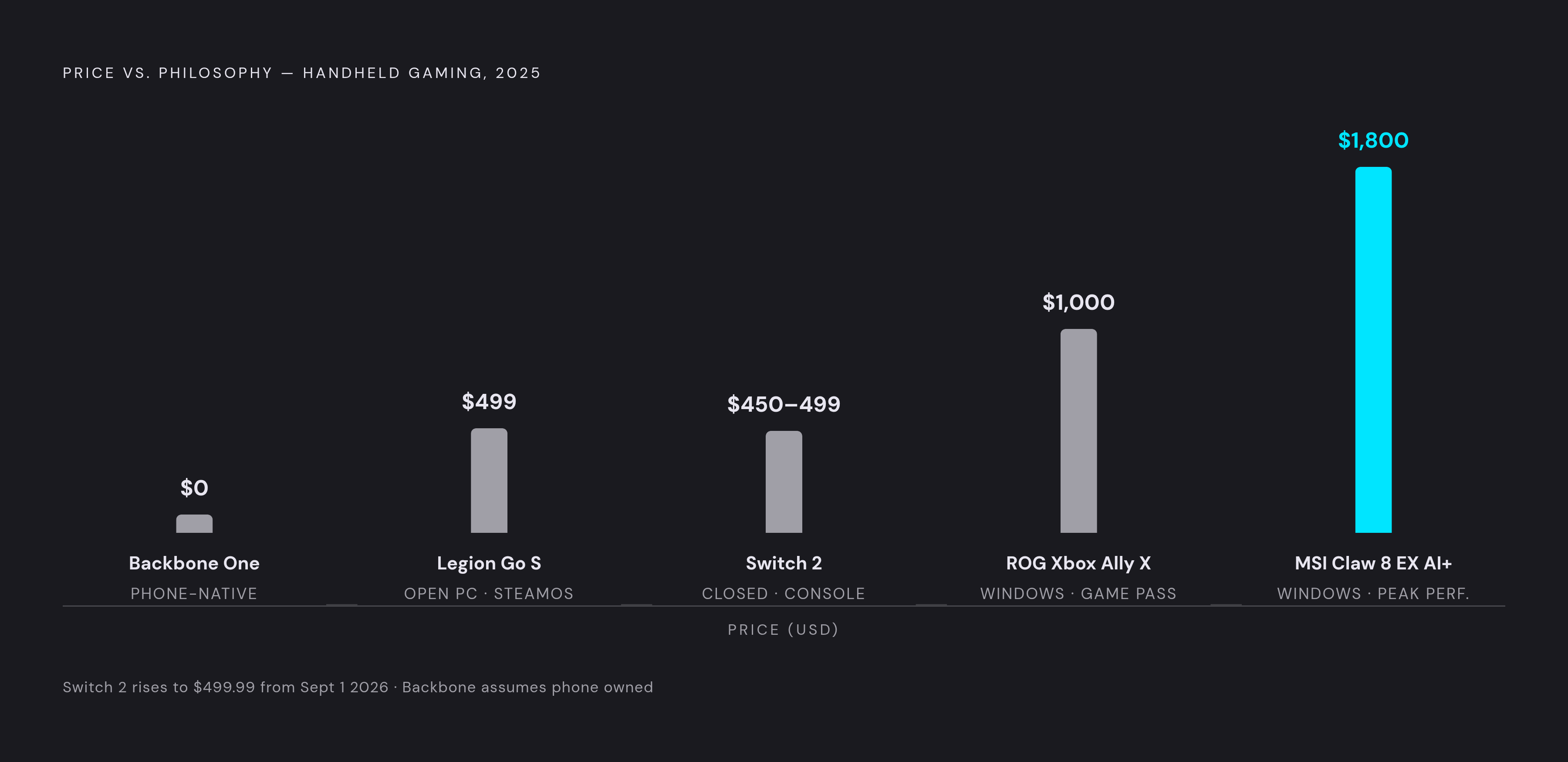
Start with the games you actually want to play. That question answers most of the others for you. Nintendo exclusives make the Switch 2 a non-negotiable pick for some people, full stop; nothing substitutes. A PC Steam library points you toward the Steam Deck OLED or the SteamOS version of the Legion Go S. PS5 owners with an active Plus subscription might find the Portal covers everything they need without buying anything else.
Budget breaks into a few clear tiers. A smartphone you already own, paired with a compatible controller accessory, is the lowest entry cost in this entire roundup and gets you full access to cloud gaming. The Legion Go S at $499 and the Switch 2 at (currently) $499.99 sit at roughly the same price but represent completely different philosophies: one open and PC-native, one closed and console-native. The ROG Xbox Ally X at $1,000 makes sense if Windows flexibility and Game Pass matter to you specifically. The MSI Claw 8 EX AI+ at $1,799.99 is the performance ceiling, built for a narrow crowd that already knows it wants the ceiling.
Where you actually play matters too. Cloud and remote-play devices, the Portal, the G Cloud, a phone with a controller attached, all need solid Wi-Fi to work well. The Steam Deck OLED and the Switch 2 run natively, no connection required, which makes them the better travel companions.
If portability without buying a new device is the goal, the smartphone-plus-controller setup is the only option here that can cost nothing extra, assuming a compatible phone is already sitting in your pocket.
This category stopped being a simple price ladder a while back. It's split into philosophies now: closed ecosystems against open ones, native hardware against streamed content, dedicated devices against the phone you're already carrying. Figure out where you play and what you play, and the rest of this decision more or less makes itself.