Handheld Console Battery Life Compared
What you play matters far more than the battery specs say.

Battery life on a handheld console has almost nothing to do with the number printed on the box, and almost everything to do with what you're actually asking the chip to do while you play. That's the whole thesis of this piece: milliamp-hours and watt-hours are ingredients, not outcomes, and the gap between the spec sheet and your actual Tuesday-night session comes down to three things working together, sometimes against you.
You know the moment. Two hours into a flight, the low-battery warning pops up, and you're nowhere near the six-hour figure the manufacturer put on the box. Nintendo's official window for Switch 2 spans roughly two hours to six and a half. Valve quotes three to twelve for the Steam Deck OLED. Ranges that wide aren't really numbers anymore; they're an admission that "it depends" doesn't fit on packaging. By the end of this piece you'll have a way to read any spec sheet that isn't just squinting at watt-hours, plus actual numbers and settings you can use on whatever's in your bag right now.
The devices on the table in 2025–2026 and what their spec sheets actually say
Two philosophies are fighting it out on shelves right now. Nintendo builds a locked-down console with one job: run Nintendo games well and predictably. The PC handheld crowd, Valve's Steam Deck, ASUS's ROG Xbox Ally X, Lenovo's Legion Go S, MSI's Claw 8 AI+, ships something closer to a tiny gaming laptop with a controller glued on, and lets you (or your favorite settings menu) decide how hard to push it.
Look at battery size alone, ignoring runtime claims for a second, and a rough order forms. The Switch 2 carries a meaningfully bigger battery than the original Switch or the OLED model that came before it. The Steam Deck LCD's pack looks modest by 2025 standards. The Steam Deck OLED bumped that up noticeably, arguably the single biggest change in that revision even though most of the marketing talked about the screen. The ROG Xbox Ally X, in both its 2024 and 2025 versions, carries the largest battery in this entire field, by a wide margin. The standard ROG Xbox Ally, released in 2025 alongside it, gets a meaningfully smaller pack. The Legion Go S sits in the middle. The MSI Claw 8 AI+ has a competitive-sized battery paired with, and this matters a lot for later, the most power-hungry chip in the group.
So on paper, the Ally X wins. It's not close. More watt-hours than anything else on this list, full stop.
Hold that thought, because it's about to get complicated.
The three forces that actually determine how long a handheld lasts
Battery size is one input among three, and the other two can erase its advantage entirely.
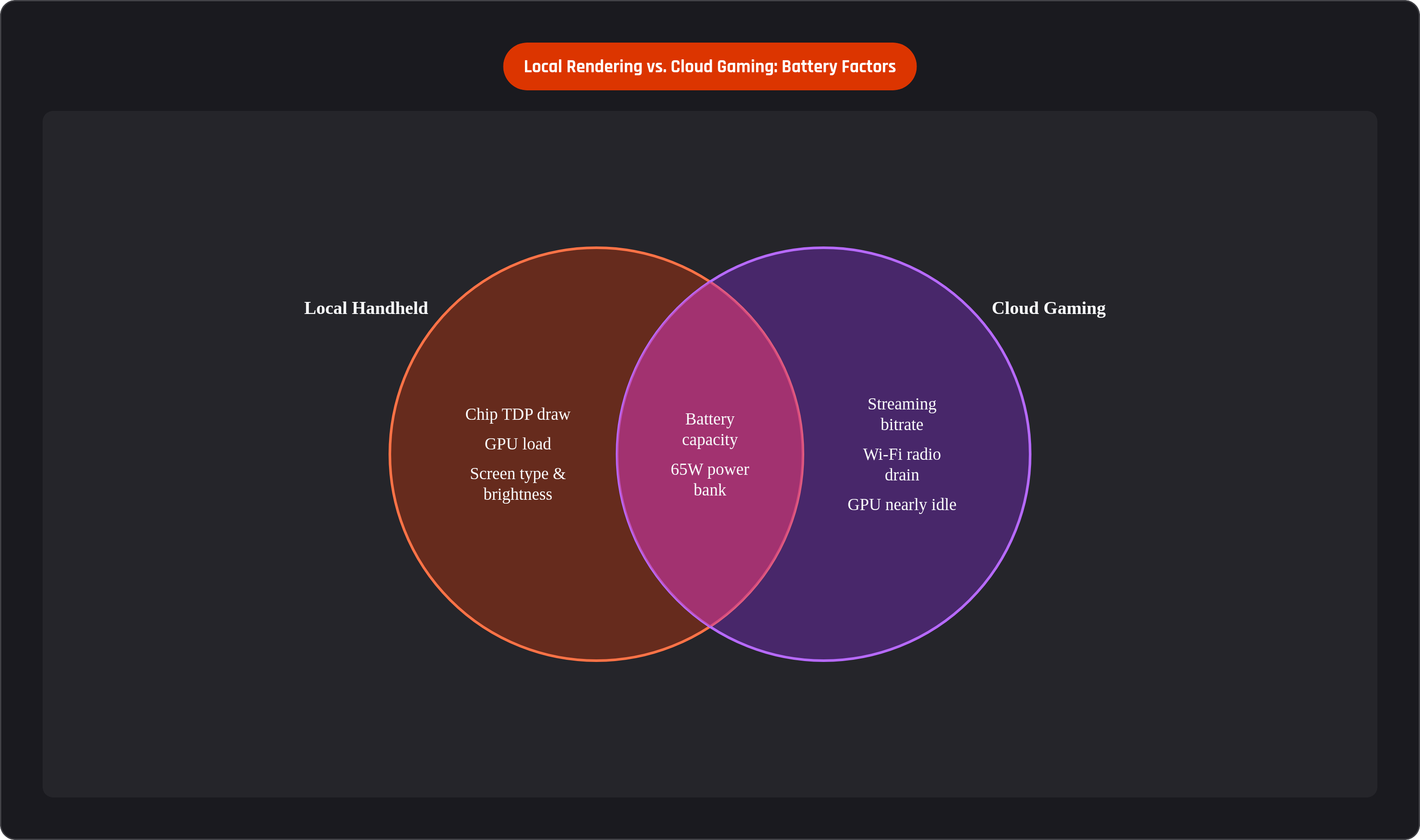
Start with chip efficiency, because it's the biggest lever in the room. PC handhelds run full desktop-class processors, chips that can scale their power draw across a huge range depending on what you throw at them. The Ally X pairs its enormous battery with a chip that has far more compute units than what's inside a Steam Deck, which sounds like an advantage until you realize more compute units means more potential hunger, not less. TDP, thermal design power, is the number that actually tells the story here. At full draw, a PC handheld chip can pull more than double the wattage it uses in a tuned-down, capped-framerate session. The Switch 2's custom ARM chip is tuned specifically for that device, and it's still been shown in community testing to draw pretty aggressively on demanding titles. Efficient silicon still has a ceiling; push past it and the battery gauge just starts moving faster.
Second force: the screen. OLED panels use less power rendering dark scenes because pixels producing black are, quite literally, switched off. That's not a firmware trick, it's physics. Part of why the Steam Deck OLED beats the LCD model on runtime is the bigger battery, but part of it is that the display itself sips less power under normal use. Brightness compounds this in a way most players never think about: dropping from full brightness down to roughly a third can shave meaningful wattage off total system draw, sometimes adding close to an hour to a session. Nobody adjusts this. Everyone should.
Third force, and arguably the most obvious once you say it out loud: what you're actually playing. A 2D pixel-art roguelike and an open-world AAA shooter are entirely different workloads on identical hardware, even though they're both "a video game" in the most useless sense of that phrase. Frame rate target compounds the gap further; a game running uncapped can pull double the power of that same game locked to 40 FPS. Resolution and shadow quality settings cascade downstream into GPU load, and GPU load is where your battery actually goes to die.
Put a hungry chip, a bright LCD, and an uncapped AAA title in the same room and you've built the worst-case scenario. Flip every one of those, tuned chip, OLED, capped at 40, and you've built the best.
Device-by-device: what real sessions actually look like
Numbers on paper are one thing. What happens when you're actually thumbing through a demanding game on a plane is another.
The Switch 2's battery is bigger than its predecessors, but real-world testing on demanding titles lands around two and a half hours, which feels underwhelming given how much larger the pack is supposed to be. Here's the part that raises an eyebrow: community testing found the older Switch OLED lasting noticeably longer than the Switch 2 on the same game. Counterintuitive, sure, until you remember that force number one, chip efficiency, doesn't automatically improve just because a device is newer. The same title on a Steam Deck ran longer still, which points to ARM's efficiency limits under heavy load rather than anything about battery capacity. Lighter games extend the Switch 2's window considerably; this is a machine that rewards sticking to its own catalog rather than treating it like a portable PC.
Steam Deck LCD versus OLED tells a cleaner story. The OLED runs substantially longer, and that gap comes from the bigger battery and the more efficient screen compounding together rather than just adding up. Even so, AAA titles at high settings push the OLED to roughly two hours at best; TechRadar's reviewer clocked some demanding 3D titles barely clearing 70 minutes in certain sessions. The LCD model is still a fine machine, but it's getting harder to recommend on battery life alone now that the OLED exists.
Then there's the Ally X, which is where the paradox from the last section pays off. Largest battery in the field, and yet real AAA sessions in Turbo mode land around two to two and a half hours. Switch to Performance or Silent mode and you'll stretch that to roughly three and four hours respectively, though Silent mode throttles the chip hard enough that some demanding titles get visibly choppier. The standard Ally, with its smaller battery, narrows that gap further still. The lesson isn't that the Ally X's battery is undersized. It's that the chip is simply that hungry, and no amount of watt-hours fully tames it at full tilt.
The Legion Go S has a mid-range battery and, on maximum settings, real sessions can be short; community testing found the highest settings draining the battery in about an hour. Part of that comes down to screen size: more pixels to push means more display power spent pushing them.
The MSI Claw 8 AI+ packs the most ambitious chip in this comparison and pays the toll for it. Demanding titles at high quality land around two and a half hours even with a competitive-sized battery underneath. Raw compute headroom is real and useful, but the battery math at full draw doesn't forgive much.
Zoom out, though, and genre changes everything. Any device on this list can run a lightweight or 2D game for hours on end; the numbers above are specific to demanding, GPU-intensive workloads. Android and emulation handhelds like the AYN Odin 2 show the extreme version of this: emulating older consoles, battery life stretches well past anything a PC handheld manages on a modern AAA title. What you play matters just as much as what you bought.
How tuning settings can recover an hour or more of playtime on any device
TDP capping is the single highest-leverage adjustment available on any PC handheld, and it's sitting right there in the Quick Menu, mostly untouched.
On Steam Deck, that menu is the control center: TDP, FPS cap, and refresh rate, all in one place. Default behavior lets the APU pull up to its max whenever it wants, and most players never touch this setting, leaving real runtime on the table without realizing it. Dropping TDP to roughly nine watts for games already capped at 30 or 40 FPS often produces zero visible difference in how the game plays while meaningfully extending how long the session lasts. As a starting point: go lower for 2D, pixel-art, or turn-based games, and closer to the chip's ceiling for 2026-era AAA titles targeting 40 FPS. Larger-chip PC handhelds in the Ally X class may need a slightly higher floor wattage to hold that same frame target steady.
Speaking of 40: locking to 40 FPS with a matching 40Hz refresh rate is widely considered the sweet spot on Steam Deck-class hardware. It's smoother than 30 and dramatically less demanding than running uncapped. Reviewers measuring power draw scene by scene have reported roughly half the consumption compared to the same game running flat out, which is a huge return for a setting most people never open a menu to find.
Brightness, again, matters more than it should. Dropping from full brightness to about a third of maximum cuts real wattage from total system draw. Stack that on top of a session already running low TDP and you can push total playtime up by close to an hour.
Firmware isn't glamorous, but it's not nothing either. A 2025 SteamOS beta update addressed Frame Limiter behavior and Steam Input polling and delivered measurable efficiency gains; keeping a device updated actually pays off in minutes of playtime, not just bug fixes nobody asked for. SteamOS also added a battery charge limit control in 2025, which helps preserve long-term capacity. A battery that's regularly stressed to a full charge can lose a real chunk of its total capacity within a couple of years, so this isn't just a today problem.
Small thing, but a real one: turn off Wi-Fi and Bluetooth when you're playing offline. Constant background scanning is a quiet drain on every device in this comparison, and it costs you nothing to switch off.
And then there's the blunt-force solution: a USB-C PD power bank rated for at least 65 watts is close to essential if you're traveling with any high-performance handheld. Fast charging at that wattage can top off most of a battery in under an hour, which effectively doubles or triples how long you can keep playing away from an outlet.
Cloud gaming rewrites the battery equation for phones entirely
Everything above assumes local rendering. Cloud gaming throws that assumption out the window, and the battery math changes completely as a result.
When a phone streams a game instead of rendering it, the local hardware is basically acting as a fancy video player. The GPU sits nearly idle. Battery drain comes almost entirely from the screen and the Wi-Fi radio doing the streaming, not from the processor grinding through frames. It's a strange feeling the first time you notice it: your phone barely gets warm playing something that would make a gaming laptop's fans scream.
Even with that advantage, though, there's a ceiling. A cloud session on a flagship phone runs roughly 90 minutes to two hours before it needs a charge. Heat isn't the bottleneck here; battery capacity still is.
The services themselves don't behave identically. Xbox Cloud Gaming runs lighter on battery than GeForce Now at comparable resolutions, largely because its streaming bitrate is lower and the radio doesn't have to work as hard. GeForce Now's premium tier streams at a much higher bitrate, 4K, high frame rate, AV1 codec, and that pushes battery drain up per hour of play. PlayStation Remote Play, through PSN Premium, got a real upgrade in its 2025 platform refresh: consistent 1080p at 60fps and a functional browser client, a meaningful step up from where Sony's service stood just a year earlier.
Data usage tracks a similar pattern, worth knowing if you're not on home Wi-Fi. GeForce Now at 4K eats up substantially more data per hour than Xbox Cloud Gaming at 1080p, which matters a lot more on a phone plan than it does on a router you're not paying by the gigabyte.
The power bank advice from earlier applies here too, maybe even more so. A 65W+ USB-C PD bank in your bag is close to mandatory for any serious portable cloud session.
Here's the part that's easy to miss: since the phone is doing all the heavy lifting, a clip-on or wireless controller adds essentially no battery drain of its own. The controller's job stops being about power and becomes entirely about comfort and precision across a long session. Some clip-on controllers fit this use case well for exactly that reason: the phone is already handling the workload, so the controller just needs to feel good in your hands for two hours straight. Because local hardware isn't rendering anything demanding, the battery math genuinely favors a phone-plus-controller setup, specifically for cloud gaming, in a way it doesn't for anything running locally.
Matching device to playstyle: who actually benefits from each battery profile
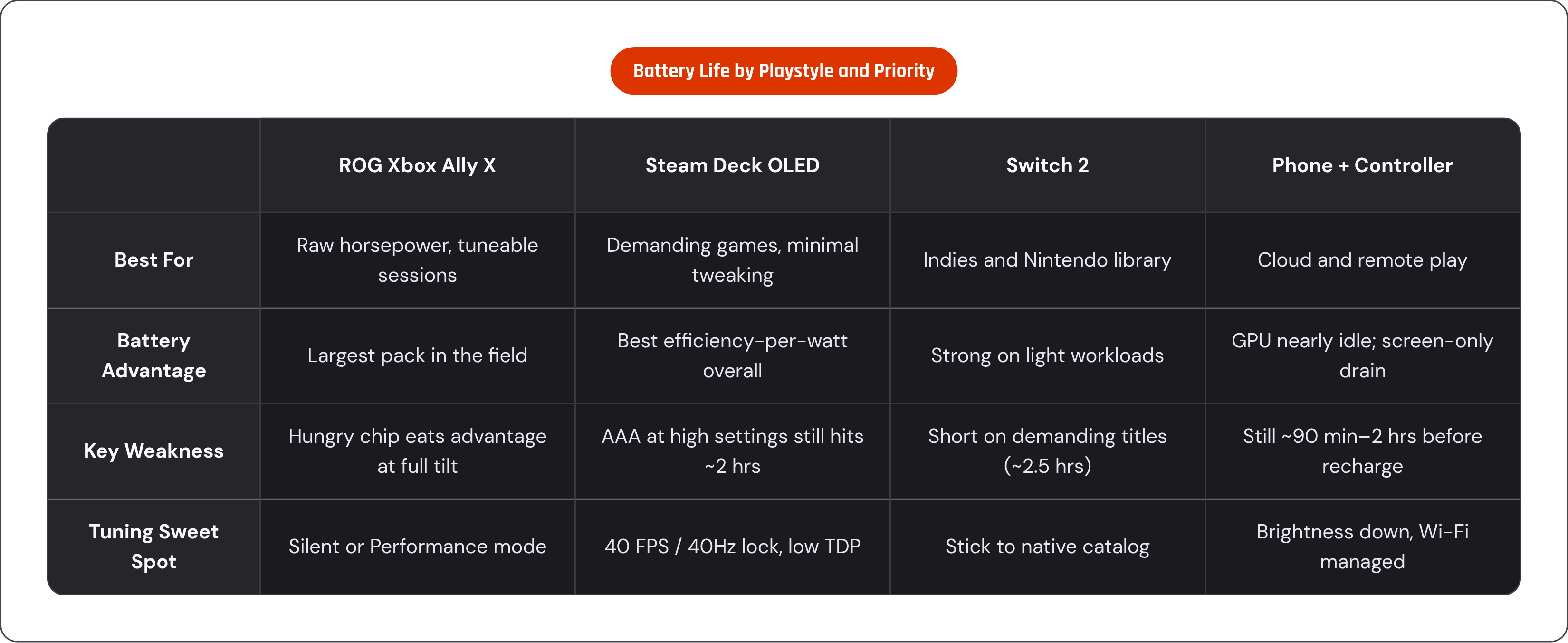
Here's the thing worth sitting with after all these numbers: there's no single "best battery life" device, because the answer depends entirely on what you play, where you play it, and how much tuning you're willing to do.
If you want raw horsepower and you've made peace with shorter sessions, the ROG Xbox Ally X is your device. Largest battery in the field, and the most room to tune down when you actually need the extra hour. Turbo mode sessions will be short, that's just the deal you're making, but Silent mode holds up fine for a lot of titles at modest settings.
If you want the longest sessions on demanding games with the least amount of menu-diving, the Steam Deck OLED is the answer. The combination of its display and its tuned APU gives it the best efficiency-per-watt in this whole comparison for most workloads, and the 40 FPS sweet spot is documented across hundreds of titles at this point, so you're not guessing.
If you're mostly playing indies or lighter genres, the battery gap between every device on this list shrinks dramatically, since none of them are being pushed hard enough to expose their weaknesses. The Switch 2 is a natural fit here, particularly for its own library, which is exactly what it was built around.
And if portability above all else is the goal, specifically for cloud and remote play, a phone paired with a good controller is the lightest, longest-lasting, and most flexible setup you can put together. It's a genuinely different category of device from everything else in this piece, and that's sort of the point: once you're not rendering locally, the whole battery equation stops being a spec-sheet argument and becomes a question about your Wi-Fi and how comfortable you are holding your phone for two hours straight.