Best Handheld Console for Kids and Families
Nintendo's newest console dominates, but durability and total cost matter more than specs.
My kid broke a Switch Lite by sitting on it. It wasn't dropped or thrown, but sat on, mid-argument with his sister over whose turn it was, and the thing folded like a taco shell that had made peace with its fate. Nintendo's warranty didn't cover "structural failure via seven-year-old glutes," so we ate the cost and learned something the spec sheets never mention: durability isn't a bullet point, it's a bet you make every time a device leaves your hands and enters a kid's.
That's the real question underneath every handheld purchase now, and there are a lot more options than there used to be. Dedicated consoles, budget retro bricks loaded with 20,000 games of dubious legality, cloud streaming, phone rigs with a controller clipped on all compete for the same shelf space. The right pick has less to do with horsepower and more to do with four things: whether the library actually suits the kid holding it, whether the hardware survives contact with a hardwood floor, what the real total cost looks like once games and subscriptions stack up, and whether the parental controls do anything besides exist. This piece goes section by section through the major options and tries not to flinch from where each one falls apart.
The Nintendo Switch 2 as the default family handheld — and what its price increase actually means
Nintendo launched the Switch 2 on June 5, 2025, at $449.99. Starting September 1, 2026, that number becomes $499.99, and Nintendo has pointed at a global memory shortage as the driver rather than simple margin expansion. Believe that or don't; either way, families budgeting for one need to plan around the new number, not the one from launch day.
Sales haven't slowed down because of it. Over 23 million units sold as of June 2026 makes this the fastest-selling console Nintendo has ever put out.
What's actually in the box: a 7.9-inch display, a real jump from the original Switch's 720p panel. Storage sits at 256GB, expandable via microSD Express cards, and docked output climbs to 4K, though handheld play caps at 1080p and 60fps in flagship titles like Mario Kart World. Battery life is the one number that stings: as little as 3 hours in demanding games, so pack the charger every single time, because the device will not remind you.
Here's what makes this an easy yes for households already invested in Nintendo: nearly the entire original Switch library, physical and digital, runs on the new hardware. A shelf of old carts or a Nintendo Account full of downloads just comes along for the ride. That matters when new first-party games carry a significant price tag on their own.
One thing worth knowing before you buy blind: some larger Switch 2 titles ship as "Game-Key Cards," physical cards that don't hold the actual game data, just a license to download it. Makes sense from a storage-cost standpoint, but it still catches people off guard when their $70 card demands a Wi-Fi connection to do anything. Better to know that going in than to think you got sold a dud.
The launch lineup earns its keep, too. Mario Kart World has sold over 15 million copies on its own, and Donkey Kong Bananza, Kirby Air Riders, and Mario Tennis Fever round things out as additional launch titles. GameChat and GameShare bring a built-in mic and a dedicated C Button for voice chat, which sounds minor until you've got two siblings gaming in separate rooms or a parent trying to referee from the kitchen without leaving the stove. The Joy-Con 2 mouse controls are a genuinely odd little addition, the kind of thing a kid pokes at for ten minutes just to see what it does.
So is $499.99 plus tens of dollars per game worth it? For plenty of families, yes. Just do that math before the card gets swiped, not three games deep when the credit statement shows up.
The original Switch lineup as a cheaper on-ramp for younger or more casual players
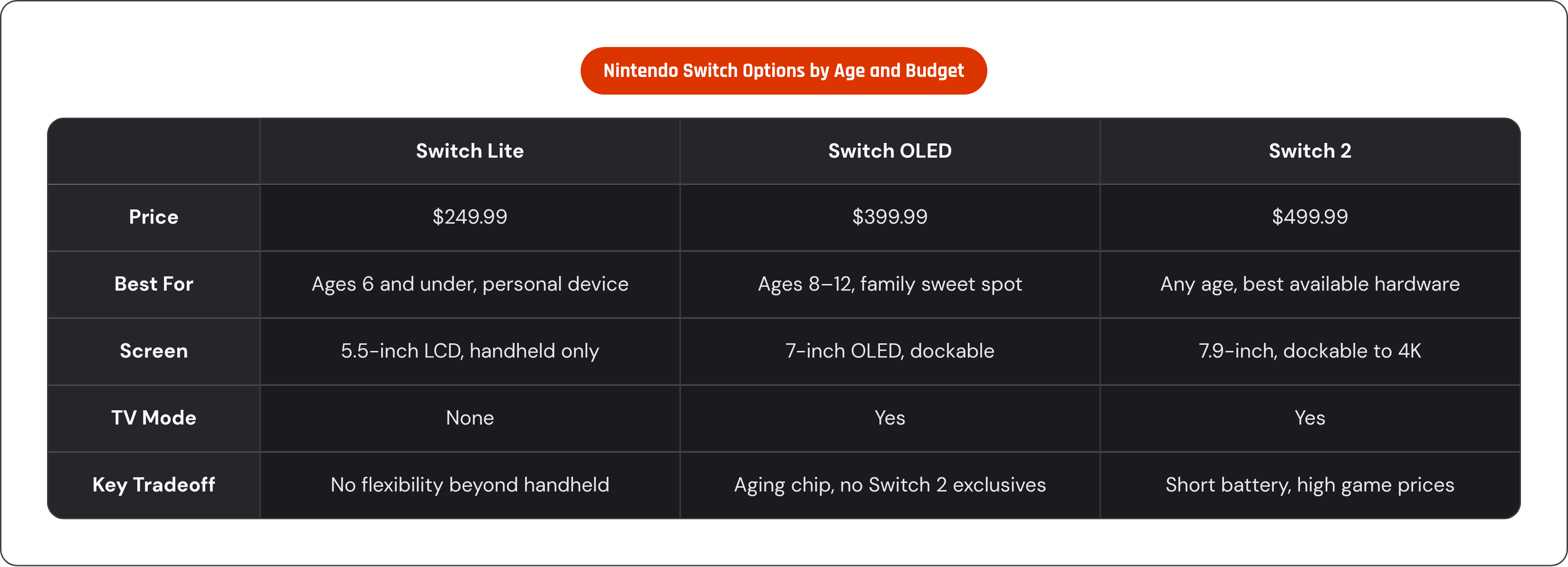
Not every family needs the newest thing, and Nintendo still sells three older machines that undercut the Switch 2 by a wide margin. The original Switch runs $349.99, with a 6.2-inch 720p screen and the aging Tegra X1 chip paired with 4GB of RAM, and it plays the full original library without complaint. The Switch OLED Model, at $399.99, steps up with an improved OLED display. The Switch Lite sits at $249.99, the cheapest door in, handheld-only with no TV output and a smaller frame that actually fits smaller hands better than the standard Joy-Con setup.
The Lite deserves its own moment here because it solves one very specific household problem: screen-time competition. No TV mode means it's a personal device by design, used entirely in handheld form. Some parents will call that a feature, and others will call it a bug, depending on how closely they want to hover during play, but either way, the tradeoff is real: no docking, no tabletop mode, no popping off a Joy-Con to hand to a sibling for co-op. Portability and price come at the cost of flexibility.
And here's the quietly good part: a kid on a Lite plays the exact same library as an older sibling on a Switch 2, minus the visual polish and enhanced editions. Nobody's buying two copies of the same catalog, since the games are shared currency across the whole ecosystem.
One warning, because old information floats around forever online: these prices reflect the August 2025 increases. If you're working off a two-year-old blog post or a memory of a Black Friday deal, toss it, because those numbers aren't walking back through that door.
Rough guide, and it's rough on purpose: age 6 and under points toward the Switch Lite, while for age 8 and up, someone who'll grow into the device over several years, the OLED holds up well. If the budget allows for the best available hardware, that's back to the Switch 2 conversation above.
Kid-specific and budget handheld options for younger children and first-time gamers
Two different animals live in this bucket: purpose-built kids' consoles, with the Nex Playground as the clearest case, and budget retro handhelds, the kind that show up in Amazon searches with names that sound like keyboard smashes and libraries claiming tens of thousands of games.
The Nex Playground is built for kids from the ground up, which means there's no door for inappropriate content to sneak through because nobody built one. It leans on motion controls, so kids actually get up and move instead of sinking into the couch cushions for the afternoon. It's done well in its category, holding ground against traditional handhelds. The tradeoff shows up fast, though: a narrower library, and no real growth path. A kid ages out of it the way they'd age out of a toy, not the way they'd grow into a Switch Lite over several years. It fits where a family is right now, but it isn't built for later.
Budget retro handhelds solve a blunter problem: no ongoing cost, ever. One common entry-level option runs a 3-inch screen with 139 preloaded 32-bit games, casual titles, puzzle stuff, light shooters, sports games, plenty of variety for a kid who's never held a controller. Step up to something like the RGB20S and you get a 3.5-inch screen, over 21,000 preloaded games spread across 20 emulators, and roughly 8 hours of battery, notably longer than the Switch 2's battery life.
Worth saying plainly: these libraries run on emulation, and the licensing behind a device claiming 21,000 preloaded games is murky, to put it kindly. Quality swings wildly too, and some of those games are genuinely fun, while a lot of them are filler nobody would pay a dollar for if it were sold individually. These devices fit best for kids age 6 to 10, new to gaming, who don't care that they're not playing this year's release. They care that Mom's phone lost Angry Birds and the car ride is forty more minutes.
Whichever budget device you're looking at, check four things before the spec sheet: no ads interrupting play, no in-app purchases waiting to drain a card, content actually curated for kids rather than dumped in bulk, and a shell that survives a fall off the back seat. At this price point, that's what separates a decent buy from something headed back to Amazon in a week.
The PlayStation Portal as a family handheld — only if a PS5 is already in the house
The PlayStation Portal is a Remote Play device. It needs a PS5 on the same network, or reachable over the internet, to do anything at all, so buying one without owning a PS5 leaves you with a device that has a screen but nothing to show on it.
For households that do own a PS5, the math flips. The full PS5 library opens up in another room, or on a trip with decent Wi-Fi, without a fight breaking out over the main TV. For households that do own a PS5, the streaming experience can be a genuine alternative to local play in another room.
The limits are just as real, though. No Wi-Fi means no gaming, full stop, since the Portal lives or dies on network quality. Cloud streaming through PS Plus Premium stacks extra latency on top of direct Remote Play, so the experience shifts depending on which service is doing the streaming. Cloud streaming quality depends on which service is doing the work, and not all enhancements available locally carry over.
So who actually wants this? A household with a PS5 already running, where a second player, or the same kid in a different room, wants access without monopolizing the television. There's no offline mode, no standalone library, and it makes a rough first or only gaming device for anybody.
Cloud gaming as a family option — what works, what doesn't, and what it actually costs
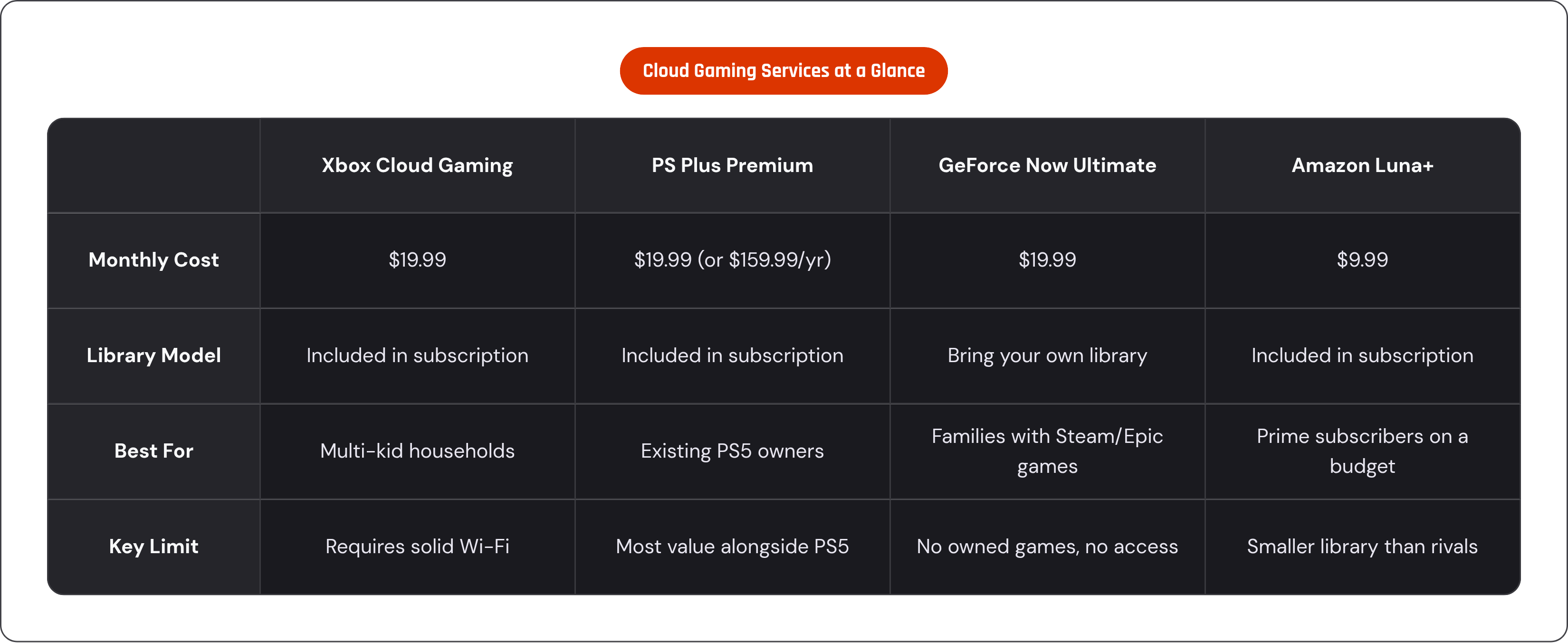
Cloud gaming hit roughly 455 million users globally in 2025. That number by itself should retire the idea that streaming games is some fringe experiment; families run these services on TVs, tablets, and phones as a matter of routine now, not a novelty act.
Five platforms cover most of the family conversation, and they're not interchangeable. Xbox Cloud Gaming, bundled into Xbox Game Pass Ultimate at $19.99 a month as of January 2026, offers games streamed up to 1440p and 60fps, a broad library that suits a house with more than one kid. PlayStation Plus Premium runs $19.99 a month or $159.99 a year, streaming up to 4K at 60fps, and makes sense mainly for households that already own a PS5. GeForce Now Ultimate, also $19.99 a month, streams up to 4K and 240fps, but it's bring-your-own-library, useful only if the family already owns games on Steam or Epic. There's a free GeForce Now tier too: one-hour sessions, capped at 1080p and 60fps, ad-supported, a genuinely free way to test whether your home internet can even handle this before spending anything. Amazon Luna comes bundled with Prime, with a Luna+ tier at $9.99 a month, about as low a barrier as exists for a household already paying for Prime. Boosteroid runs around $14.49 a month at 1080p and 60fps, the budget option for families who don't need the higher frame rates.
What does making this actually work at home require? Solid Wi-Fi is non-negotiable, with NVIDIA recommending at least 100 Mbps for its top streaming tier. On the hardware side, most smart TVs now handle these services natively. Many modern smart TVs now handle these services natively without an extra box. That bar was a lot higher two years ago.
Latency deserves an honest look here, since it's the first objection skeptics raise. For competitive multiplayer, sure, it's a real problem; every millisecond counts when you're aiming at another human being in real time. But how much of what kids actually play falls into that bucket? Single-player adventures, platformers, turn-based games, the stuff that fills most kids' actual hours, tolerate a bit of lag just fine, and the panic over latency is mostly a competitive-gaming concern, since most young kids aren't grinding ranked ladders.
The tradeoff, stated plainly: cloud gaming means renting a library instead of owning one. Cancel the subscription and the games disappear. Set that against a Switch 2, where the hardware and any physical games stay yours whether you keep paying anyone or not, and the total-cost comparison stops being obvious and starts being interesting.
Why a physical controller changes the cloud and mobile gaming experience for kids
Touch controls are the default on phones and tablets, which is a mild annoyance for adults and a bigger deal for kids than it looks. No tactile feedback means more missed inputs and faster frustration, especially for younger players still building the fine motor control adults stopped thinking about decades ago. On top of that, virtual buttons sit right on top of the screen, so a kid ends up fighting their own thumbs just to see the game underneath them.
A physical controller that clips onto a phone fixes this by turning a device the family already owns into a real handheld. Actual thumbsticks, real triggers, buttons that click, input latency low enough that it doesn't compound the cloud latency from the section above, all in one clip-on unit. These controllers cover Xbox Cloud Gaming, PlayStation Remote Play, GeForce Now, Steam Link, Apple Arcade, and Google Play titles, which is most of what a family would want without buying a second gadget.
Ergonomics matter more than people give them credit for here. Grip comfort matters more for kids whose hands fatigue faster than an adult's during a long session. Something that feels fine in a parent's hand for twenty minutes can feel wrong in a kid's hand after five.
Run the math on this one: a family already paying for a cloud subscription, with a decent phone already in someone's pocket, spends far less bolting on a controller than buying a whole new dedicated handheld. Some controllers in this category add wireless connectivity for anyone who wants off the physical dock, a nice-to-have rather than a must-have depending on household habits.
This path shines for one household in particular: families already on Xbox Game Pass Ultimate or PS Plus Premium who want their kid gaming on a phone instead of hijacking the living room TV. There's no second console and no new subscription needed, just a controller that turns an existing phone into something close enough to a Switch that nobody misses the real thing.
Matching the right handheld to the child's age, play habits, and the family's budget
Age drives more of this decision than any spec sheet, price tag, or brand loyalty combined.
Ages 4 to 7: safety and simplicity come first. The Nex Playground fits if active, motion-based play is the goal and content safety needs to be locked down by design rather than by parental vigilance. A budget retro handheld fits if the goal is simple games and zero ongoing cost, with eyes open about the licensing gray zone underneath it. The Switch Lite at $249.99 fits if the family wants a foothold in the Nintendo ecosystem the kid can actually grow into over several years.
Ages 8 to 12: the appetite for a bigger library and the occasional family co-op session kicks in. The Switch OLED at $399.99 lands in a real sweet spot, a noticeably better screen than the base Switch, the full library, TV mode for when grandparents visit. The Switch 2 at $499.99 also makes sense here if the budget stretches, buying the best screen available and access to whatever's newest as it lands.
Teens and tweens chasing cloud access or cross-platform flexibility run on a different calculus entirely. A phone plus a clip-on controller, paired with Xbox Cloud Gaming or GeForce Now, delivers the lowest hardware cost and the widest catalog of anything covered here. A PlayStation Portal fits specifically for households that already own a PS5 and want a second screen without buying a second console.
Run the total-cost lens over the whole thing one more time, because that's really the point of all this. A Switch 2 at $499.99 plus tens of dollars per first-party title adds up fast with more than one kid in the house; a cloud subscription at $19.99 a month covers hundreds of games for less than two Switch 2 titles a year. Budget retro handhelds carry zero ongoing cost, but the library stops growing the day you open the box. Phone-plus-controller setups make use of a device that's already paid for, which makes it the cheapest path of all when the phone already exists in someone's pocket.
One last thing that applies no matter which box ends up under the tree: Nintendo's family account controls are solid across its whole current lineup, Switch 2 included, and wherever a family lands, that oversight layer should be assumed, not treated as the deciding factor. The real decision comes down to how old the kid is, how the family actually plays together, and which total-cost number everyone in the house can live with for the next few years without wincing at the credit card statement.