Cloud Gaming Latency Comparison Across Devices
Device choice and network proximity matter as much as internet speed for cloud gaming lag.
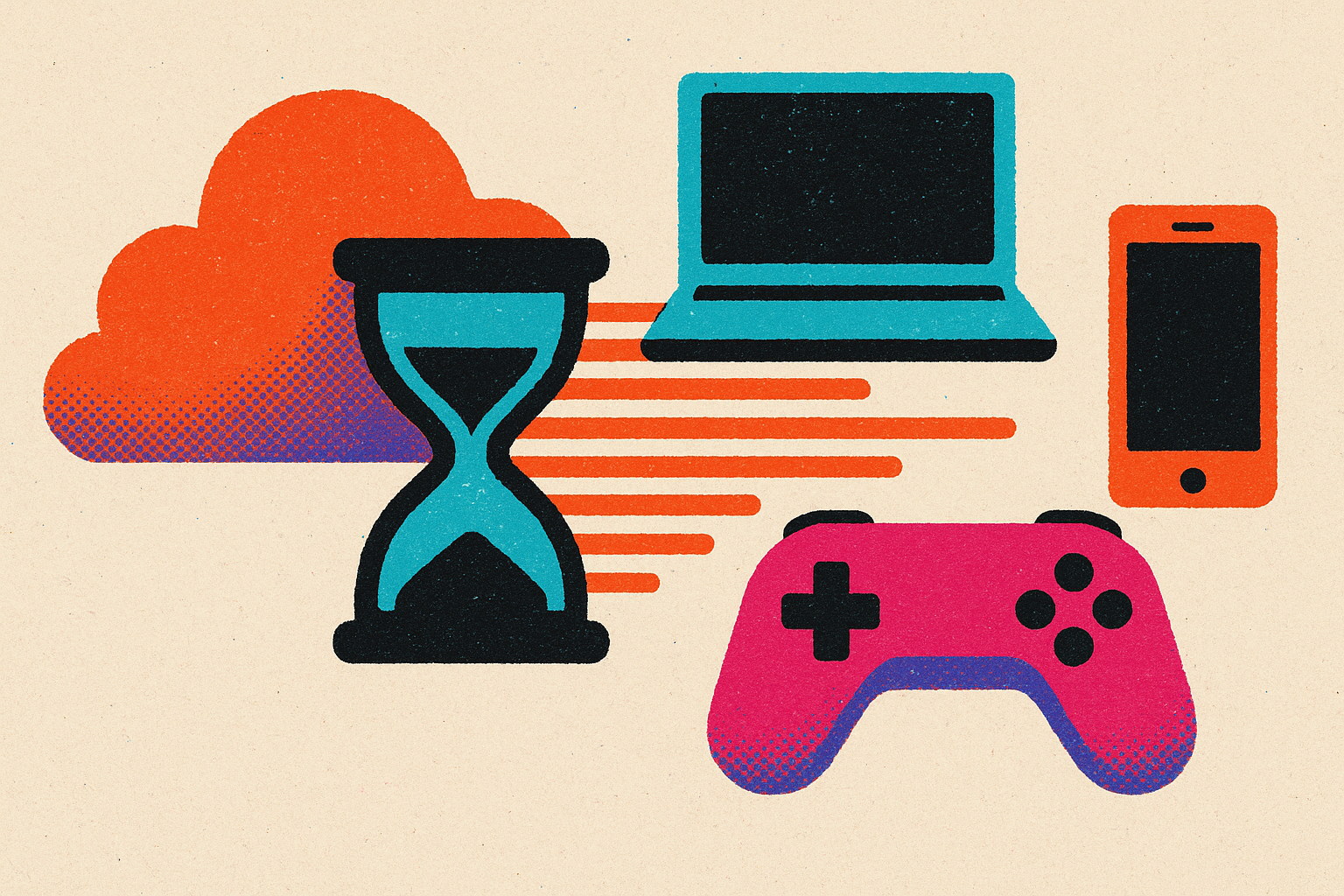
Cloud gaming lag is a chain of small delays that changes shape depending on what's in your hands and what's plugged into your wall. Most people blame their internet connection and stop there, without asking whether other parts of the chain need attention. I've spent enough time chasing milliseconds across phones, consoles, and gaming PCs to know there's more to the picture than that. This piece walks through what actually happens between your thumb hitting a button and a new frame showing up on screen, and how that chain behaves differently depending on what device you're holding.
Here's the thing that trips people up first: a 100 Mbps connection running 100 ms of ping will feel worse than a 25 Mbps line running 20 ms. Bandwidth tells you how much data can move. Latency tells you how long that data takes to get there and back. Cloud gaming cares almost entirely about the second one, and mixing up the two is where most troubleshooting goes sideways. Jitter compounds the confusion, too: a rock-steady 40 ms connection plays smoother than one that bounces between 20 ms and 100 ms, even though the second one has a better average. Averages don't catch stutter, but your eyes do.
The three-part chain that determines end-to-end input lag
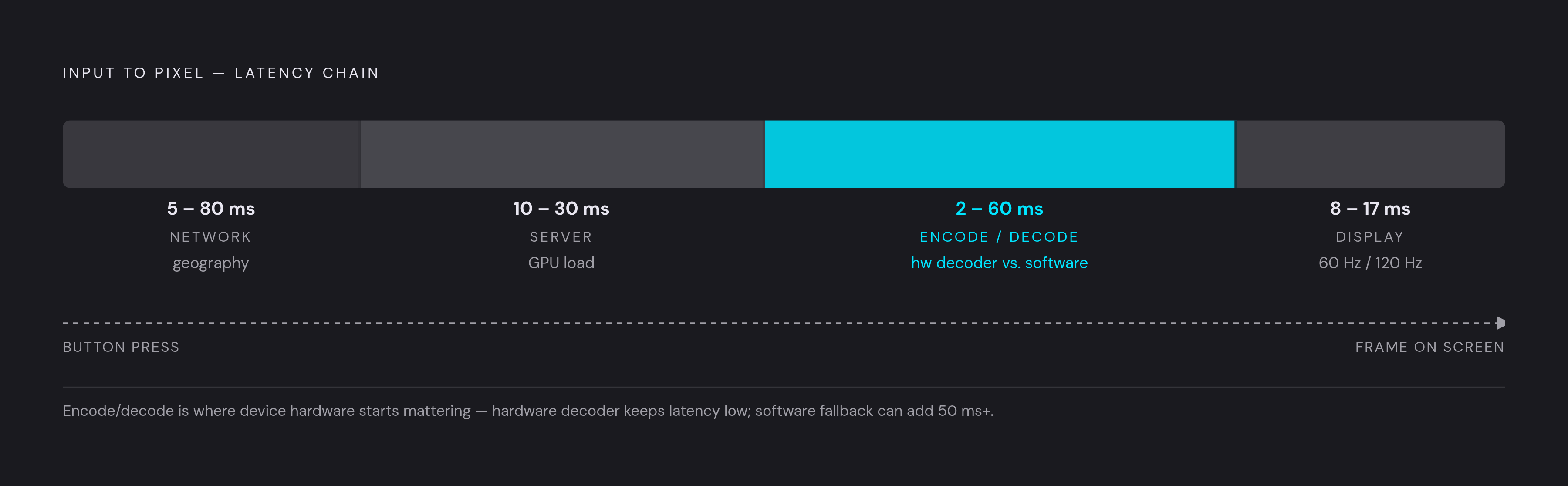
Break down what happens after you press a button and before a frame shows up, and you get three distinct stops, each with its own bottleneck.
First is network latency, the physical travel time between your device and the data center running the game. This one is mostly geography. Fiber and Ethernet hold a steadier line than Wi-Fi, but no cable beats the speed of light, so how close you sit to server infrastructure sets a hard floor no amount of device tinkering will lower.
Second is server processing time. The cloud GPU has to register your input, run the game's logic, and render a frame before anything gets sent back to you. Older server hardware just takes longer to do this than newer hardware.
Third is encode and decode delay, and this is where your device stops being a bystander and starts actually mattering. The server compresses the rendered frame into a video stream; your device has to decompress it before it can display anything. Modern codecs like AV1 and HEVC compress more efficiently at lower bitrates, so there's less data to push and a faster decode on the other end. If your device doesn't have a hardware decoder built for that codec, though, it falls back to software decoding, a noticeably slower path that adds lag no matter how good your Wi-Fi is. Two people on the same network, running the same service, can end up with different latency purely because one phone has a chip built for the job and the other one doesn't.
There's a fourth factor people tend to skip: the display itself. A phone running at 60 Hz adds roughly 16.7 milliseconds of lag just waiting for the next screen refresh; bump that to 120 Hz and you cut that wait roughly in half. TVs and monitors matter here too. Flipping on "game mode" skips image processing steps that otherwise tack on tens of milliseconds for no good reason.
Don't forget the controller, either. A wired connection skips the Bluetooth round-trip entirely, while a wireless pad adds a small but real transmission delay before your input even reaches the device doing the decoding. Add all of this up, and checking your internet speed alone starts to look like incomplete advice.
How smartphones compare to other devices as cloud gaming endpoints
Mobile is the biggest gaming platform on earth by player count. Newzoo pegged it at roughly 3 billion players in 2025, against console's roughly 645 million worldwide, so whatever happens on phones happens to most cloud gaming sessions, full stop.
The good news: flagship phones now ship with hardware AV1 and HEVC decoders, so that third step in the chain happens in silicon instead of software. On that front, a modern flagship holds its own against dedicated gaming hardware just fine.
Where phones lose ground has less to do with the chip and more to do with everything wrapped around it. Sustained cloud gaming sessions heat up the system-on-chip, and thermal throttling can quietly cut clock speeds and slow decode over time, meaning your latency might drift upward over a 90-minute session in ways a five-minute benchmark would never catch. Mid-range phones often cap out at 60 Hz while flagships hit 120 Hz, so display performance swings wildly across price tiers. Running the screen, the wireless radio, and the decoder all at once also drains a battery fast enough that session length becomes its own limiting factor.
Phones do have a few things going for them that nobody talks about enough. Native apps on iOS and Android skip the "browser tax," the extra processing overhead browser-based delivery adds (more on that in the Xbox section, where it actually bites). Portability means you can pick your network on the fly: plug in an Ethernet adapter over USB-C, hop onto the 5 GHz band, or tether to a less congested hotspot. A strong 5G signal can genuinely beat a crowded home Wi-Fi network for ping stability.
Touch controls carry their own latency tax, separate from anything happening on the network. They add input delay and lose precision, and none of that has anything to do with your connection. Swap in a physical controller, something like a Backbone One that plugs directly into the phone via USB-C or Lightning, and that whole problem disappears: no Bluetooth round-trip, no processing step between your thumb and the game, just a wire.
GeForce NOW's latency advantage and what produces it
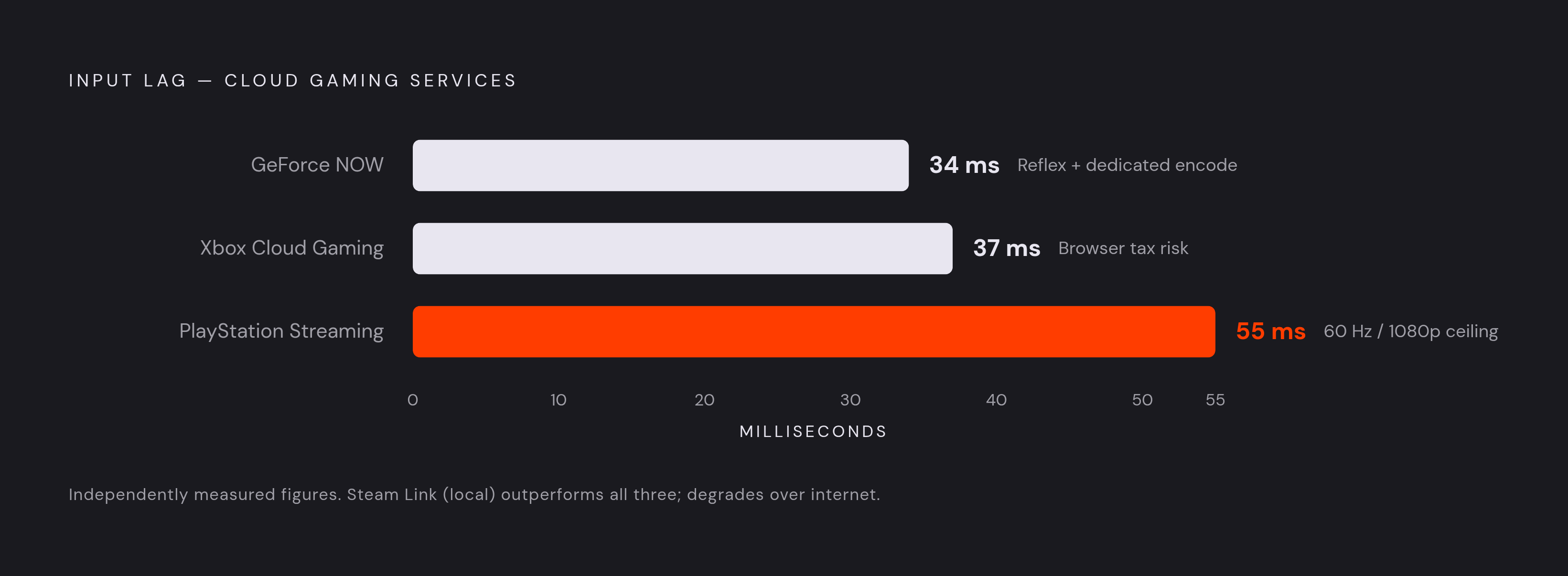
Independent testing from digitalvistaonline.com put GeForce NOW at roughly 34 ms of input lag, the lowest number among the major services tested. That number doesn't happen by accident.
NVIDIA runs dedicated server-side encode hardware tuned for low-latency AV1 output, and layers NVIDIA Reflex on top to trim the render-to-encode pipeline before a frame ever leaves the data center. Cloud G-Sync syncs frame delivery to your display's refresh rate, shaving down the display's contribution to the total. There's also client-side input prediction, where the app estimates your next move locally before the full round-trip even completes, smoothing out what you perceive even when the underlying network hasn't changed at all.
The Ultimate tier, priced at $19.99 a month, runs on RTX 5080 "Blackwell" server hardware rolling out through late 2025 into 2026, supporting up to 4K at 120 fps or 1080p at up to 360 fps for players chasing every last competitive edge. Faster server-side rendering means frames hit the encoder sooner, and that saving ripples all the way down the chain.
One caveat: 34 ms is a best-case number, measured close to the infrastructure. Sit far from an NVIDIA edge node and you'll see higher figures; the advantage is biggest exactly where the network is already good. There's a real trade-off buried in the pricing, too. GeForce NOW carries no game library of its own; you need to already own titles on Steam, Epic, or another connected storefront, and since January 2026 paid tiers carry a 100-hour monthly session cap. On mobile, the AV1 decode question matters more here than almost anywhere else: phones with hardware AV1 support get the full benefit of that 34 ms pipeline, while phones without it fall back to software decode and lose some of that edge.
Xbox Cloud Gaming's latency profile and where the browser tax bites
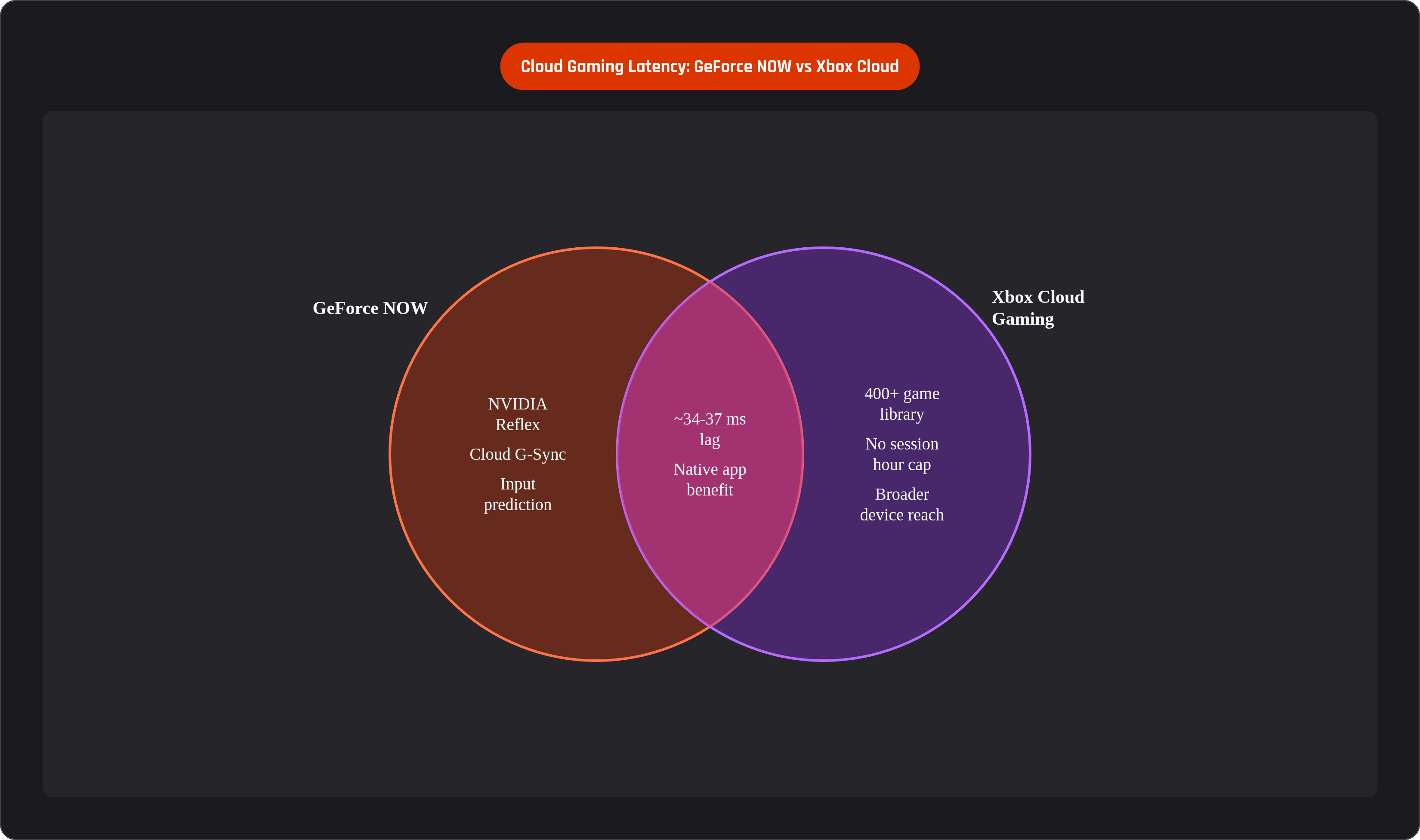
The same digitalvistaonline.com comparison measured Xbox Cloud Gaming at roughly 37 ms, just 3 ms behind GeForce NOW. In most genres that gap is invisible; in competitive shooters and fighting games it can matter, and players in those genres notice.
Games run on Azure data centers using Xbox Series X-level server hardware, and Microsoft's network optimization work through 2024 and 2025 brought felt latency down into the 30 to 45 ms range depending on distance and connection quality. Solid number, on paper.
Then there's the browser tax. Xbox Cloud Gaming gets played through a browser more often than the other services here, especially on TV sticks, Chromebooks, and some phone setups, and browsers add processing overhead a native app skips entirely. A poorly set up browser session can erase the service's inherent speed advantage without you ever touching a network setting. Using the native app on Android or iOS instead of a browser tab is one of the most useful, zero-cost changes a player can make, and it's a fix that's easy to overlook.
The Ultimate tier runs at a higher monthly price, streams up to 1440p at 60 fps, and includes a library of 400-plus games with day-one first-party releases and no session hour cap, a real point in its favor against GeForce NOW's 100-hour ceiling. Microsoft has also pushed device reach wider than anyone else on this list: iOS, Android, Chromebooks, Samsung smart TVs, Fire TV, Meta Quest. That breadth also means latency varies more across the Xbox Cloud Gaming device range than it does for services with a narrower footprint. For a mobile player using the native app on a capable phone, though, the practical latency sits close enough to GeForce NOW that only the twitchiest competitive titles will notice the gap.
PlayStation's two latency profiles: Remote Play at home versus cloud streaming away from it
PlayStation splits into two genuinely different experiences, and lumping them together is where a lot of confusion starts. Remote Play, used on your home network, streams from your PS5 to a device across a local connection instead of routing through a distant data center. That's a fundamentally shorter trip: the "server" is a box in your living room, not a rack of GPUs a hundred miles away.
That short trip regularly produces sub-30 ms input lag, close enough to native console feel that most people can't tell the difference in casual play. PS Portal builds dedicated hardware around this idea: a 1080p display, 60 Hz refresh, and controls integrated into the frame. It's purpose-built for the Remote Play use case, and it shows.
Sony then added cloud streaming for PlayStation Plus Premium subscribers in late 2025, and the Portal's job description got more complicated. Now it can stream select PS5 titles through Sony's own data centers with no physical PS5 anywhere nearby, though the feel differs from Remote Play in practice. Community feedback has been consistent: cloud streaming introduces noticeably more latency than Remote Play, and plenty of users have settled into using Remote Play at home and treating cloud streaming as a fallback for whenever they're away from the console. Cloud streaming on Portal is also confirmed only in the U.S., U.K., Germany, France, and Japan as of early 2026, so plenty of players don't even have the option yet.
The numbers back up what the community already suspected. Independent testing put PlayStation's cloud service at roughly 55 ms, the highest of the three major services benchmarked, sitting well above Xbox Cloud's 37 ms and GeForce NOW's 34 ms. Part of that gap is architectural, and part of it is the Portal's own hardware ceiling: it tops out at 1080p and 60 fps, no HDR, no VRR, and that 60 Hz display means every frame sits on screen for about 16.7 ms before the next one arrives, a fixed cost phones running 120 Hz simply don't pay. Remote Play remains the latency-optimal PlayStation experience, and cloud streaming is genuinely useful when you're away from home, but the feel is different, and Sony's own numbers don't pretend otherwise.
Steam Link: when local streaming beats everything else and when it doesn't
Steam Link runs on the same basic principle as PlayStation Remote Play: stream from a host machine on your local network instead of routing through a data center somewhere else. Here, the host is your own gaming PC.
On a strong home network, Steam Link can match or beat every cloud service on this list in raw input lag, for the simple reason that the "data center" is a GPU sitting in the next room. That's an advantage no cloud service, however well engineered, can fully replicate over a wide-area connection.
The catch, though, shows up right in the setup requirements: you need a genuinely capable gaming PC to act as host, so this isn't an option for someone who doesn't already own one. Performance is entirely bound to whatever hardware sits in that box; Steam Link moves an existing signal around your house rather than adding any speed of its own. And the moment you step outside your home network, the advantage collapses. Steam Link over the internet routes peer-to-peer, and comparison testing consistently shows GeForce NOW beating it over remote connections by a real margin, since NVIDIA's dedicated encode hardware and edge caching aren't things a home PC can match from a residential internet connection.
Steam Link is free, though, which makes it the cheapest entry point for anyone who already owns a gaming PC and mostly plays from the couch. On mobile, it runs through a free app on both iOS and Android, and it's a legitimate option, but its value lives almost entirely within Wi-Fi range of your own router.
What device variables players can actually control to reduce lag
So where does that leave an actual player trying to shave off milliseconds tonight? Connection type is the single biggest lever available. Ethernet through a USB-C adapter beats Wi-Fi for stability every time; 5 GHz Wi-Fi beats 2.4 GHz; a strong 5G signal can outperform a congested home network entirely. Start there before touching anything else.
App versus browser matters more than people expect, especially on Xbox Cloud Gaming: use the native app wherever one exists, since browser sessions carry overhead the app skips. Check whether your phone's chip actually supports hardware AV1 decode before subscribing to a service built around that codec; software fallback is slower and burns through battery faster. Bump the display to its highest refresh rate if the phone supports it, since a 120 Hz screen beats a 60 Hz screen on the exact same stream, no exceptions, no asterisks.
Controller connection is worth a second look, too. A wired or directly plugged controller removes Bluetooth transmission delay from the chain entirely, and it also kills touch-input lag, which is one of the biggest and least discussed sources of felt latency in mobile cloud gaming. No wireless round-trip, no added processing step, just a direct line from thumb to game.
Where a service lets you pick a regional server, choose the closest one; that single decision often outweighs every device tweak combined. On long sessions, keep an eye on heat, too: a phone running hot throttles its decode performance, so a stand that allows airflow, or just pausing long enough to let the thing cool down, prevents the slow latency creep that no amount of Wi-Fi optimizing will ever fix.