Phone Gaming Ergonomics During Long Sessions
Neck pain hits 41% of mobile gamers, but raising your phone and taking breaks can prevent it.
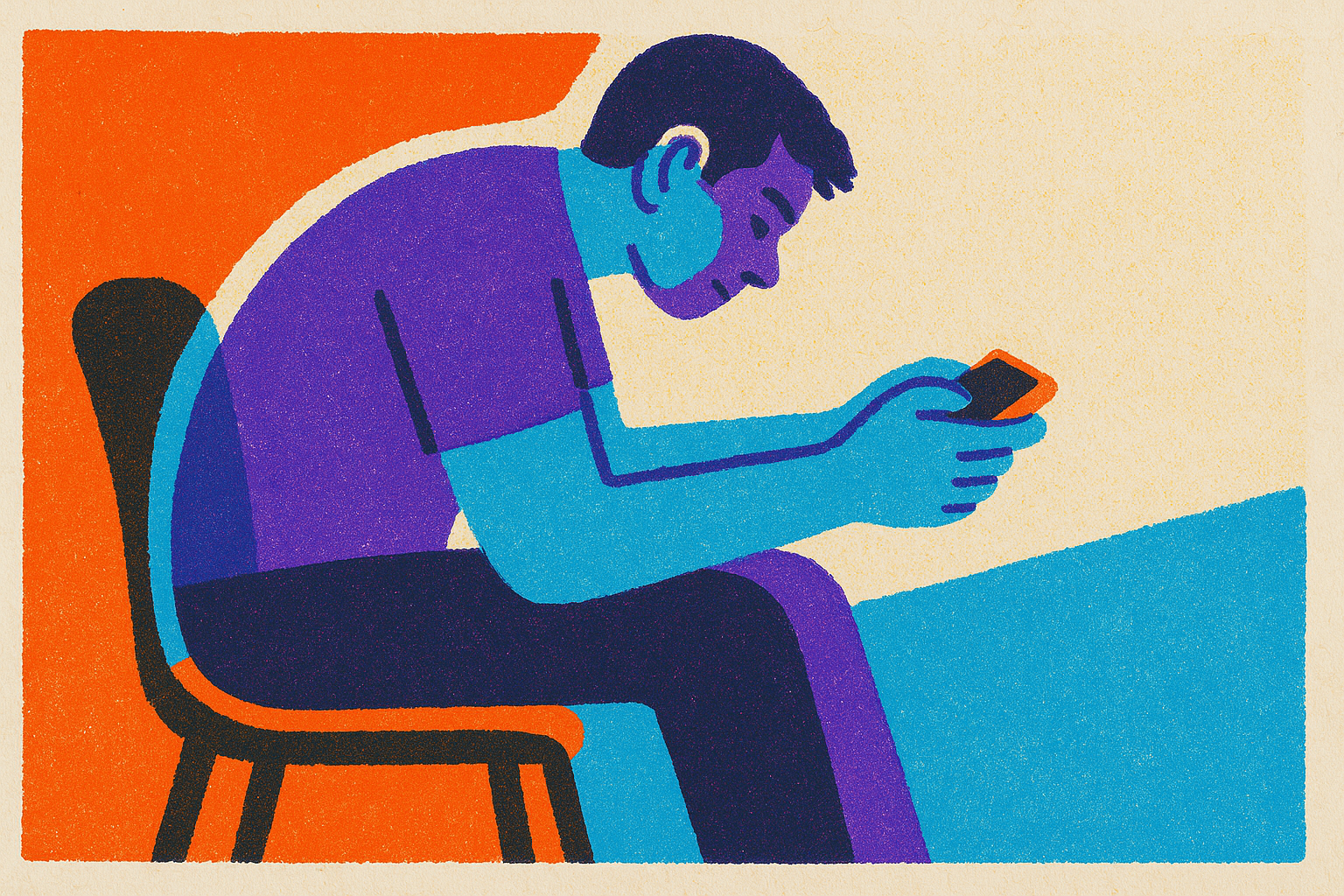
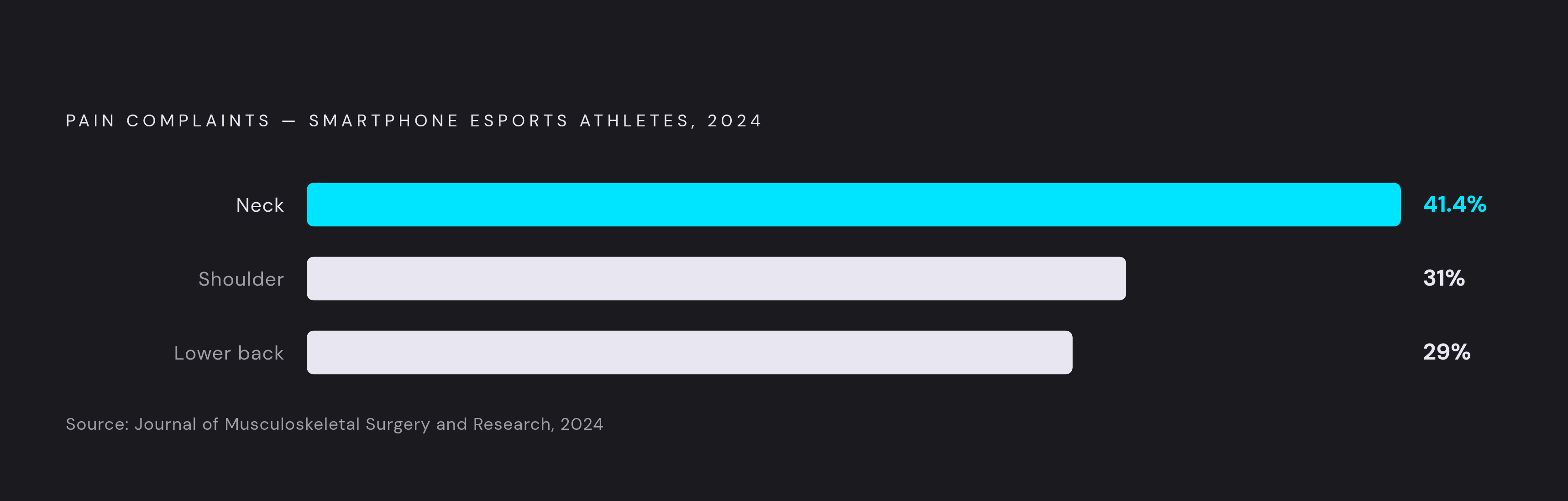
A 2024 study in the Journal of Musculoskeletal Surgery and Research looked at smartphone esports athletes and found neck pain topped the complaint list: 41.4% of players reported it, with shoulder pain following at 31% and lower back pain at 29%. I figured these numbers belonged to pro players hunched in some tournament booth, but the posture pattern behind them, head dropped, shoulders rolled forward, wrists cocked sideways, shows up in anyone who games on a phone for real stretches of time, tournament or not.
Start with the neck, because it's the worst offender by a wide margin. Forward Head Posture, or FHP, happens when you hold the phone below eye level and tip your head down to see it. Ten minutes of that does relatively little, while three hours a day of it, stacked over months, misaligns the head relative to the shoulders and dumps disproportionate load onto the cervical spine. A separate PLOS One study of smartphone gamers found the same pattern: neck discomfort led the list again, and cross-legged sitting, the position basically everyone defaults to on a couch or bed, had the highest discomfort rate at 51.2%. Two studies, two different player pools, arriving at the same result.
Eyes take their own beating. Headaches, blurred vision, and dry eyes all get worse once a session runs past a couple hours, and phones seem to cause more strain than other screens, probably because of how close people hold them and how bright the display defaults. Thumbs and wrists come next, absorbing repetitive load that a controller was built to distribute and a slab of glass was never designed for. Touch controls ask one thumb to move, aim, and fire abilities inside a few square inches of screen. A long mobile session attacks the neck, the eyes, and the hands at once, three fronts on one small device.
Why posture is the highest-leverage fix
Pick one variable to fix first: neck flexion. The angle between chin and chest is arguably the single most important number in this whole piece, since the further that chin drops, the faster load piles onto the cervical spine. The fix is almost embarrassingly simple: raise the phone toward your eyes instead of lowering your eyes toward the phone. It sounds too obvious to count as advice, which is probably why nobody bothers. Propping a phone up takes a little effort, while letting it sink into your lap takes none, and that gap is the whole problem in one sentence.
When raising the phone isn't practical, drop your gaze with your eyes, not your neck, keeping the spine stacked and letting the eyes do the work of looking down. Wrists follow the same logic: keep them straight where you can, because a bent wrist under sustained load is the slow kind of injury, the kind that stays quiet for months before it announces itself.
Where you sit changes everything downstream of this. Cross-legged on the floor is close to the worst combination of neck and back strain available, going by the study data above. A chair with real back support nudges you toward a neutral spine without asking for any willpower. Distance matters too: keeping the screen 12 to 16 inches from your eyes cuts strain and removes the temptation to lean your neck forward to compensate.
Posture and performance move together more than I expected going in. Players holding a neutral position report fewer physical distractions and longer stretches of sustained focus. Good ergonomics protects your future self, and it also helps you play better right now, in the match you're currently losing.
Break and recovery schedules that fit into actual gaming sessions
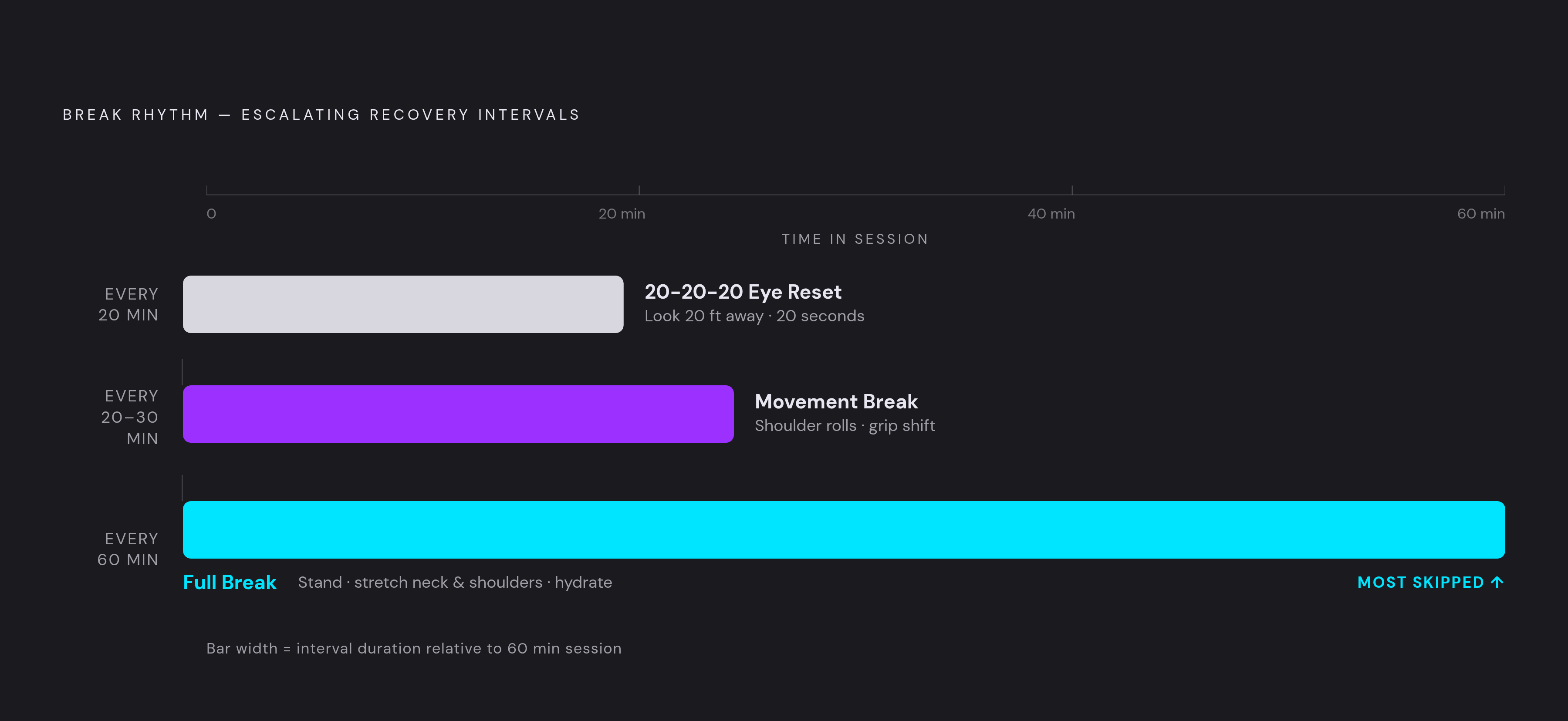
Eyes get the simplest fix in this whole piece: the 20-20-20 rule. Every 20 minutes, look at something roughly 20 feet away for 20 seconds, which resets focus and keeps strain from stacking session after session. It costs nothing, and once it's a habit, it runs on autopilot.
Muscular load quietly builds too, even with technically correct posture, because the real driver has less to do with the angle itself and more to do with how long you hold any single angle without moving. A short movement break every 20 to 30 minutes matters for a different reason than the eye rule does, even if all that means is rolling your shoulders or shifting your grip.
Once an hour, take the bigger break: stand up, stretch the neck and shoulders, walk to the kitchen, drink some water. This matters most during cloud gaming or long RPG sessions, the kind where a quest chain eats four hours before you notice, because those formats seem practically engineered to erase your sense of time. Chin tucks against forward head posture, side neck tilts, shoulder rolls, wrist flexor and extensor stretches: none of it takes more than a couple minutes combined.
Smartwatches and wellness apps now offer break reminders you can set specifically for gaming. Turn them on, because gaming is exactly the activity that kills your instinct to pause on your own. Hydration belongs in this conversation too, since fatigue and discomfort both worsen when you're dehydrated. Thirst is the first thing players ignore, since it doesn't feel urgent when there's a boss fight in progress and you're one hit from a wipe.
Managing eye strain and lighting across a long session
Mobile games run bright and saturated by design, which helps them stand out on a store page, but that same intensity works against the eyes three hours later. Nobody opens settings mid-boss-fight to tone down the color saturation, even though that visual load adds up compared to more neutral content.
Blue light adds a second layer, since it interferes with melatonin production. An evening session doesn't just cost you eye comfort; it can push your sleep back further than planned. The fix costs nothing: turn on warm-tone or night-mode filters once the sun goes down, and drop brightness to the lowest setting where you can still see clearly.
Ambient lighting in the room matters more than people assume. A pitch-dark room maximizes the contrast between screen and surroundings, which is its own kind of strain, and a low light source behind or beside the screen narrows that gap. Here's a detail almost nobody thinks about: blink rate drops noticeably during focused gaming, which is exactly how dry-eye symptoms sneak up on you. Making a conscious habit of blinking more during long sessions actually helps, as basic as that sounds.
The 20-20-20 rule and these lighting adjustments work together rather than in competition: lighting lowers the baseline strain, while the break habit does the heavier lifting on top of it.
How a physical controller changes the ergonomic equation
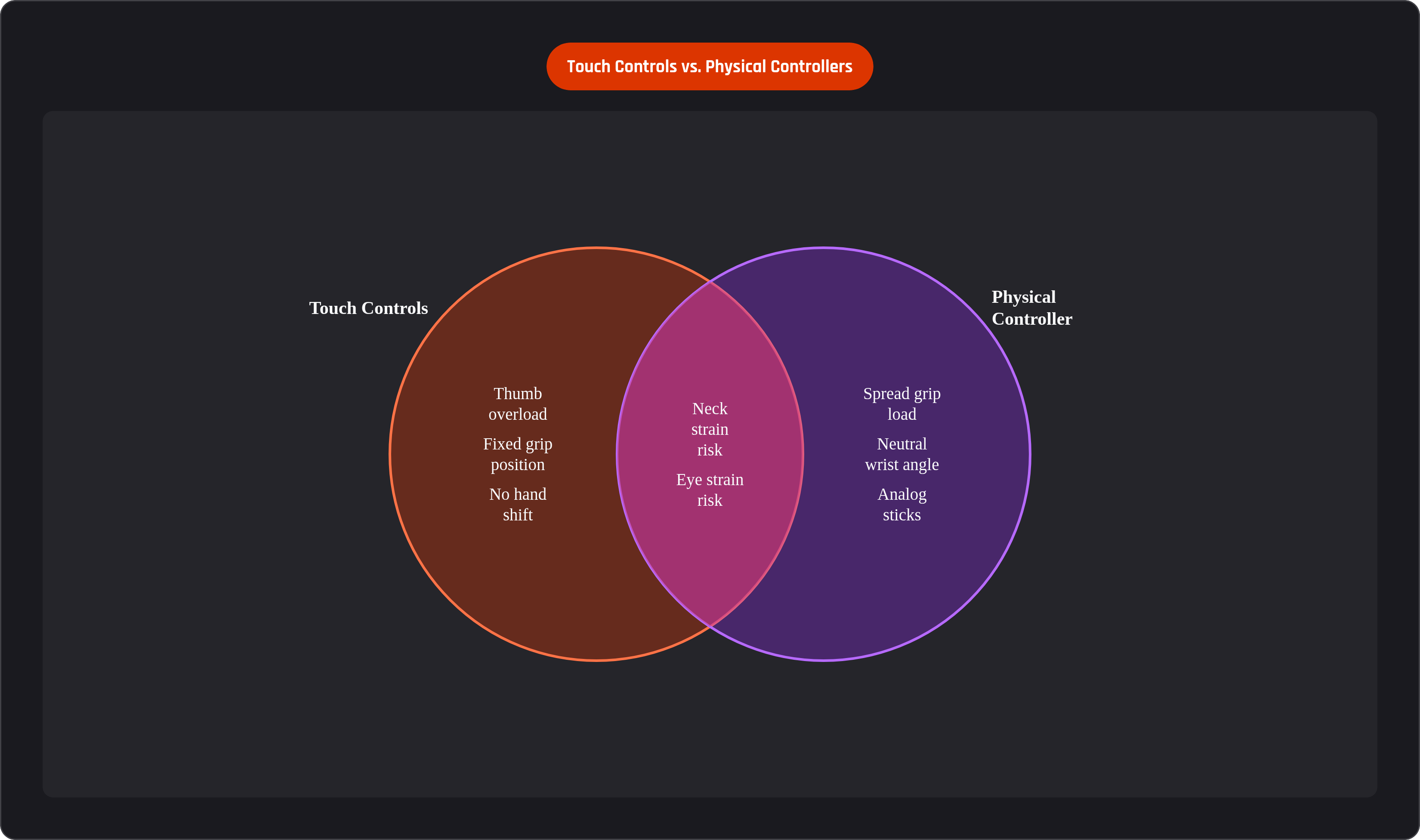
Touch controls force two things on a player: constant repetitive load pooled in the thumbs, and a fixed grip that holds the phone in the same display-facing position for the entire session. There's little room to shift your hand and let one muscle group rest while another takes over, and nothing about that setup changes for hours at a stretch.
A clip-style or telescopic controller changes that math directly. Grip load spreads across the whole hand instead of pooling in the thumbs, the thumbs land on actual analog sticks and buttons built for the job, and the wrist sits at a more neutral angle than a flat sheet of glass ever allows. The phone also sits more stably in a controller rig, cutting down on the small constant corrections your hands make to stop a bare phone from sliding or tilting in your grip. Those micro-adjustments wear you out in a way that's easy to miss, since each one is tiny on its own, but add up a few hundred of them and the fatigue is real.
Controllers also tend to angle the screen up slightly compared to a phone held flat in your lap, nudging the neck toward less extreme flexion without you having to think about it. It's not a coincidence that ergonomic design has become a stated selling point across a large share of new controllers released in recent years. The market noticed the problem before most players could put a name to it.
One honest caveat: a controller helps with grip and thumb strain, but it does relatively little for your neck or your eyes. All the posture and lighting advice above still applies no matter what's in your hands.
Choosing a controller with ergonomics and long sessions in mind
Shopping for a controller with long sessions in mind comes down to a handful of things worth checking before you buy. Grip shape and weight distribution come first: a controller should feel balanced without you having to squeeze it to keep it from tipping, because a death grip held for three hours is its own strain injury waiting to happen. Trigger and button travel matter next; shallow, stiff inputs demand more finger force per press, and that adds up across a long session in a way a five-minute demo in a store will never show you.
Stick quality deserves real attention too. Contactless magnetic sensor designs, Hall Effect and TMR are the two terms you'll run into, cut down drastically on stick drift, which is both a gameplay annoyance and a source of the over-correction that tires out your thumbs faster than it should. Wired versus wireless is the other real question: a wired telescopic controller keeps a physical connection to the phone with zero charging to manage, while Bluetooth buys you freedom of movement at the cost of remembering to charge yet another device.
Backbone is a useful reference point here, if only because it's the name most players already know. The Backbone Pro adds Bluetooth Low Energy for wireless play, working as a standalone pad even with no phone clipped in. Whether you land on Backbone or something else, the companion app model, tracking your library and session time in one place, lines up neatly with the break-scheduling habits from earlier. Having one place that shows you how long you've actually been sitting there playing matters, since your own sense of time is the least reliable instrument in the room.
The broader controller category has grown into a real multibillion-dollar market, and a clear majority of dedicated mobile players now say they prefer physical controls over touch. Modular designs, swappable components, adjustable mounts, answer the plain fact that hands come in different sizes and one fixed shape was never going to fit everyone. Price runs from budget to premium across the category, and the ergonomic benefit shows up at every tier. The real dividing line is whether you're playing bare-handed across hours of session time at all, more than which specific controller ends up in your hands.
Accessories and environment setup that complete the ergonomic picture
Raising the phone to eye level without your arms bearing the weight is probably the single most protective change available to a stationary player, and an adjustable stand or mount solves it outright. It's such an unglamorous piece of gear that most players skip it entirely, right up until their neck starts complaining loudly enough to be impossible to ignore.
Couch and bed sessions deserve their own note, since they're the ones most likely to slide into cross-legged or slouched postures without you catching it in the moment. A lap desk or a pillow tucked under the arms takes weight off the shoulders and neck that would otherwise creep in over an hour of slouching. Chair choice follows the same logic as the posture section above: back support is the variable that matters, and unsupported seated play ranks as the second-worst posture scenario behind sitting on the floor.
A couple smaller details round this out. Anti-glare screen protectors cut the urge to tilt the phone toward better light, which quietly supports better posture without any conscious effort on your part. Room temperature matters more than people expect too; a warm, stuffy room speeds up fatigue and makes it harder to hold deliberate posture once you're already tired and irritable. Cloud gaming or remote play, whether through Xbox Cloud Gaming, PS Remote Play, Steam Link, or GeForce Now on mobile, tends to run longer than local mobile sessions simply because the catalog behind it encourages that kind of marathon play. Those are the sessions where a full setup, stand, controller, lighting, all of it, earns its keep fastest.
Putting it together: a sustainable routine for regular long-session players
A pre-session checklist takes under a minute: controller attached, phone at eye level or close to it, lighting adjusted, break timer set. That's the entire setup phase, and skipping it is usually just inertia, not any real barrier standing in the way.
During the session, run the 20-20-20 rule continuously for your eyes, take a short movement break every 20 to 30 minutes, and hit a full stand-stretch-hydrate break every hour. Bookend the whole thing with a short stretch sequence: chin tucks and side neck tilts against forward head posture, shoulder rolls, and wrist flexor and extensor stretches for the hands and forearms that just spent hours making the same small motion over and over.
Afterward, notice where discomfort actually shows up. If it's the same spot session after session, that points at a specific gap, whether it's posture, grip, or the hourly break you keep skipping because the match got close and you told yourself just one more round. The physical risks here are real and the research holds up across multiple studies, but none of it is fate; a handful of habits and the right hardware in your hands go a long way toward preventing it.
Whether any of this sticks is really a question of habit versus convenience, and convenience usually wins unless you make the better option just as easy. A player who can still game comfortably in five years probably built these habits early, rather than waiting for the neck pain to show up first and force the issue. Comfort and performance stay tangled together here: staying comfortable is what lets the performance keep happening at all, hour four just as much as hour one.