GeForce Now Best Games for Mobile Players
Stream PC games on your phone without owning a gaming computer.

GeForce NOW streams more than 4,000 PC titles to a phone, running them on NVIDIA's remote servers instead of asking a mobile chipset to do the work. No local GPU, no download, just a video feed of a game running somewhere else. Still, the library is the easy part; what actually holds up on a 6-inch screen with a controller clipped to it is a much shorter list, and sorting that list out is the point of this guide.
Get the framing right first, because it changes how every recommendation below should land. GeForce NOW connects to libraries you already own: Steam, Epic Games Store, Ubisoft Connect, GOG, Battle.net, Xbox PC Game Pass. You're renting compute, not renting games. Android gets a native app through Google Play. iOS and iPadOS run it through Safari 16.4 or later at play.geforcenow.com, with a native App Store app also available. Pricing splits into three tiers: free (1-hour sessions, basic hardware), Priority/Performance at $9.99 a month (RTX-capable, 6-hour sessions), and Ultimate at $19.99 a month, running on RTX 5080 Blackwell servers, pushing up to 5K at 120fps or 360fps at 1080p, with 8-hour sessions. A 100-hour monthly cap applies across all tiers starting January 1, 2026.
Why not every PC game translates well to a phone screen and controller
Four thousand titles is a lot to sort through for a 20-minute train ride, and at that point what a mobile player actually needs is a filter.
Here's the filter that matters most: input design. A game built around keyboard shortcuts and hover-tooltips will fight you on a touchscreen or gamepad no matter how good the server-side rendering looks. HUD and text legibility matter for the same reason: a UI built for a 27-inch monitor is hard to read at phone size. Session structure counts too, since games with natural stopping points fit how people actually use their phones, in short bursts between other things. Underneath all of it, though, the deciding factor is pace. Turn-based strategy shrugs off a network stutter without you noticing. A competitive shooter does not, and that gap is exactly why esports gets treated as its own, more cautious case later in this piece.
That pace question comes down to a number, and it's the physical constraint sitting under everything else here. Cloud streaming adds somewhere between 30 and 80 milliseconds of network round-trip on top of whatever the game itself needs to process an input. Open-world and strategy games barely register this, while twitch shooters and fighting games, built around frame-perfect timing, expose it right away. None of it matters if the connection itself is shaky, either: 1080p60 needs a stable 30 Mbps, while 4K120 on Ultimate wants 70 Mbps. Match the game to both the device and the connection, and the experience gets close enough to local play that most genres stop caring about the gap. Get the match wrong, though, and the connection becomes the bigger obstacle.
Open-world and story-driven games that reward the mobile format
Cyberpunk 2077 is a strong showcase for what the platform can do. Night City is enormous, packed with side content, and rendered with ray-traced lighting and reflections a phone's own hardware has no business displaying, except the phone isn't doing the work. The rendering runs on NVIDIA's remote servers, so what shows up on screen is what high-end hardware would produce, piped down to something that fits in a pocket. Combat and traversal are third-person and controller-friendly, and the game's structure, full of save points and mission breaks, suits Ultimate's 8-hour session window if someone wants to start a heist at a desk and finish it on the bus.
Genshin Impact gets to the same result by a cleaner road. It's free-to-play, built around elemental combat and an open, anime-styled world, and because it was designed with mobile in mind from day one, its controls and UI are well-suited to smaller screens and touch input. Cloud streaming just raises the visual ceiling past what a phone's own GPU could ever render, and there's no cost of entry for someone testing whether GeForce NOW is worth paying for at all.
Some titles support picking up where you left off across devices: start on a laptop at home, load the same save on a phone later, nothing lost. That's really the lesson of this whole category, and it's worth stating plainly: games designed with save structures and controller support from the start are the only ones where cloud-to-mobile handoff actually disappears. Everything else requires more compromise.
Racing and sports games that hold up at high frame rates over the cloud
Racing games live and die on frame pacing, and RTX 5080-powered servers deliver high, consistent frame rates and quick response without anyone needing to own a gaming PC capable of running demanding titles. There's no multi-gigabyte download standing between a player and the starting line; the game just loads. Better still, the controls map onto a gamepad the way they were always meant to, triggers for throttle and brake, sticks for steering, nothing translated awkwardly from a keyboard.
Sports games as a category make a strong case for why the genre is inherently well-suited to cloud play. Players already know the control layout cold from years on console, and the action, fast as it looks, breaks down into discrete possessions. That structure gives latency somewhere to hide that it wouldn't have in a shooter's constant real-time exchange of fire.
The pattern across both, and it's the actual sweet spot of this whole format: big visual budgets paired with forgiving input timing. Anyone chasing this category for the visuals alone is missing why it actually works.
Action and combat games that use GeForce NOW's hardware headroom
Demanding action games with massive enemy hordes and detailed battlefields push a local GPU to its limit, and that's exactly where cloud streaming earns its place. GeForce NOW just takes that rendering burden off the table. Players get the spectacle and the smooth frame rate without owning anything close to a high-end rig, and because the combat system is controller-native, there's no keyboard shortcut lurking mid-fight to trip up a touchscreen player. The cinematic setpieces are also big and legible by design, which happens to be exactly what reads well on a phone screen.
Parry-based action games point somewhere slightly different, and it's worth sitting with why. Its combat is deliberate and parry-based, timing-sensitive in a real way but nowhere near the millisecond thresholds a competitive shooter demands. It argues, pretty convincingly, that cloud latency is manageable for single-player action, so long as the combat rewards reading and reacting rather than pure reflex speed.
New releases joining the library signal something about the platform beyond any single title's merits: NVIDIA is keeping the catalog current instead of letting it calcify into a museum of older titles. The pattern across this category holds: single-player action is the safer mobile bet, while asymmetric PvP is the riskier one, because an opponent sitting on a wired connection will happily exploit every millisecond a mobile player is missing.
Free-to-play multiplayer games that make GeForce NOW worth trying at no cost
Fortnite is the obvious starting point, fully optimized for NVIDIA's latest streaming tech in 2026 and supporting touch controls on mobile, no controller required. Its creative ecosystem gives both casual and competitive players something to chase, and since it costs nothing to play, it costs nothing to find out whether the whole streaming setup works in the first place.
Warframe is a long-running live-service game, and effects streamed through the cloud make a familiar game look genuinely new, all while keeping its third-person combat controller-friendly. Marvel Rivals brings established controller support and match lengths built for mobile sessions without feeling rushed. Genshin Impact belongs here too, alongside its earlier mention in the open-world section, precisely because it's free to start and doesn't lean on pay-to-win pressure to stay fun.
For players who want volume over intensity, Lost Ark and Albion Online offer hundreds of hours of top-down content at no entry cost, both running smoothly even when a world event crowds the server. Slower-paced free-to-play titles like naval combat games are a good match for a mobile connection that isn't rock-solid. NVIDIA regularly adds new titles to the library, so the free tier keeps refreshing without anyone reaching for a credit card.
Competitive and esports titles — what the platform can and cannot deliver
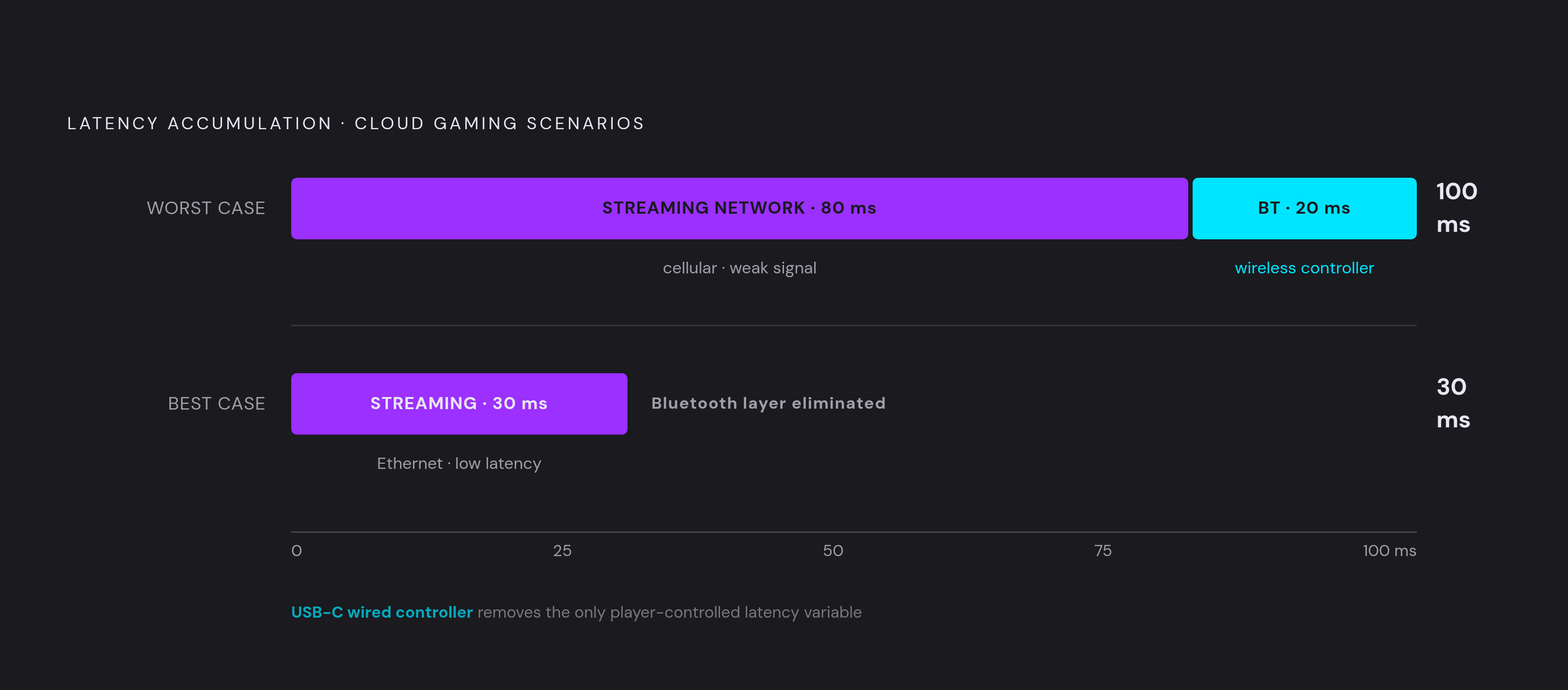
Here's the part worth being straight about, because the marketing around this is thinner than it sounds. Cloud streaming adds 30 to 80 milliseconds of network round-trip latency, and for years that number alone was enough to disqualify competitive gaming from any serious cloud conversation. Reaction-speed genres don't forgive lag; they punish it, publicly, on a scoreboard everyone watching can see.
The RTX 5080 Blackwell upgrade changes the math, but only somewhat, and that qualifier matters more than the headline number does. Ultimate tier now supports up to 360fps at 1080p, and a frame rate that high compresses the window where latency actually bites, since there's less time between frames for a delay to hide in. Input lag that once scared off competitive players is now described, in testing through 2026, as close to gone, provided everything around it is set up right. Rocket League, Counter-Strike 2, and Dota 2, the "Big Three" of esports on GeForce NOW, are all fully supported and optimized for this.
Even so, the caveats are real, and they don't disappear just because the hardware improved. Bluetooth adds another 8 to 20 milliseconds on top of streaming latency, and for CS2 or Rocket League specifically, a wired controller is the line between playable and genuinely frustrating. A stable Ethernet connection, or at minimum a strong 5 GHz Wi-Fi signal, matters more here than in any other category on this list. Ranked players facing opponents on low-latency local hardware will still feel a gap, and that gap probably isn't closing soon, upgrades or not. Casual and unranked play tends to hold up well on mobile; ranked ladders against wired PC players remain a tougher ask.
Palia makes a good counterpoint, if only because it proves the platform's range in the other direction. It's a cozy community sim, no competitive stakes at all, running at high visual fidelity via the cloud and playing well on a handheld screen. Somewhere between Palia and ranked CS2 is where every mobile player has to find a comfort zone, and that zone is narrower than the marketing around 360fps wants to admit.
Getting the connection right before launching any game
Bandwidth is the floor everything else sits on. A stable 1080p60 stream needs 30 Mbps with jitter under 30 milliseconds. 4K60 on Ultimate wants 50 Mbps. 4K120 wants 70 Mbps. These aren't soft suggestions. Fall below them and the stream starts dropping frames or compressing visibly, no matter how good the game itself is.
Wired connections generally outperform wireless, and Ethernet is the strong preference wherever it's an option. For mobile play specifically, where Ethernet obviously isn't on the table, proximity to the router on 5 GHz Wi-Fi matters more than the raw ISP speed advertised on a bill. Mobile data over LTE or 5G can hit a consistent 30 Mbps in good coverage, but it's variable in a way home Wi-Fi usually isn't, so genre choice should bend around connection quality: an open-world RPG tolerates a mobile-data connection reasonably well, while competitive esports really wants a solid Wi-Fi network underneath it.
Session continuity is one of the quieter perks here. Because the platform streams games from remote servers rather than local hardware, someone can start a game at home on a bigger screen and continue on a phone in transit, carrying their progress through the game's own save system. Before spending $19.99 a month on Ultimate, though, it's worth just running the free tier first on the actual phone and Wi-Fi that will be used day to day. If 1080p streams cleanly there, the upgrade to higher resolution is an easy call. Without clean streaming even at that baseline, no subscription tier fixes a bad connection; the $19.99 just buys a nicer-looking version of the same buffering.
Choosing a controller that doesn't add latency on top of the stream
Controller choice matters more here than it does for local play, and the reason loops back to the same latency math from earlier. Cloud streaming already costs 30 to 80 milliseconds in network round-trip; Bluetooth stacks another 8 to 20 milliseconds on top of that. For fast shooters and racing games running on Ultimate's 360fps mode, that stacked delay is the difference between a controller that feels instant and one with a lag nobody can un-notice. Wired USB-C keeps combined latency as low as the platform allows, while Bluetooth is fine for slower genres, where a few extra milliseconds simply don't register against everything else going on.
Wired USB-C solves a second problem quietly, too: it passes power through while streaming, so the controller isn't draining the phone's battery at the same time it's controlling the phone's game. Hall effect magnetic stick sensors matter for a different reason entirely, eliminating the stick drift that plagued a whole earlier generation of mobile controllers, where a character would slowly wander into a wall on its own even though nobody's touching the stick. Comfort isn't a throwaway concern either, not on a platform built around 8-hour Ultimate sessions; controllers engineered specifically for extended, phone-clamped use hold up in ways a generic pad simply doesn't by hour six or seven.
What to actually look for: USB-C wired mode as the default rather than an afterthought, contactless Hall effect or TMR stick sensors to dodge drift over long sessions, a telescopic clamp sized for current phones (The broad adoption of USB-C across modern smartphones means one wired controller now reasonably fits most current devices), and grip depth plus trigger travel built for sessions measured in hours, not minutes. The controller is the one piece of this whole cloud setup a player actually owns outright, unlike the servers, the game licenses, or the network sitting in between. Treat that purchase like it matters, instead of grabbing whatever general-purpose Bluetooth pad happened to be cheapest at the register.
How GeForce NOW compares to Xbox Cloud Gaming, PS Remote Play, and Steam Link for mobile players
The clearest dividing line is the business model. GeForce NOW rents compute: it connects to libraries a player already owns across Steam, Epic, GOG, and Ubisoft Connect, and runs those games on remote hardware. Xbox Cloud Gaming operates differently, tied to a subscription catalog rather than games a player already owns, where subscribers get a rotating set of titles without owning any of them individually.
Neither model wins in some absolute sense; they solve different problems for different people, and figuring out which problem someone actually has is most of the decision. A player sitting on a large existing Steam library gets more mileage out of GeForce NOW, since that library was often paid for years ago and would otherwise sit unplayed on a phone-incompatible PC. Someone who wants a rotating buffet of games without tracking ownership at all leans toward Xbox Cloud Gaming instead. PS Remote Play and Steam Link solve a narrower problem still, designed around hardware someone already owns at home and has running at home rather than from a remote data center, which means performance depends entirely on that one specific machine and that one specific home network, not on server-grade hardware maintained by NVIDIA or Microsoft. For a mobile player deciding where to start, the real question is whether the value sitting in an existing Steam library outweighs the value of a subscription catalog; that answer decides which door makes sense to walk through first.