How to Choose Between Nintendo Switch Models
Match features to your actual play style, because price compression has made the wrong model costly.
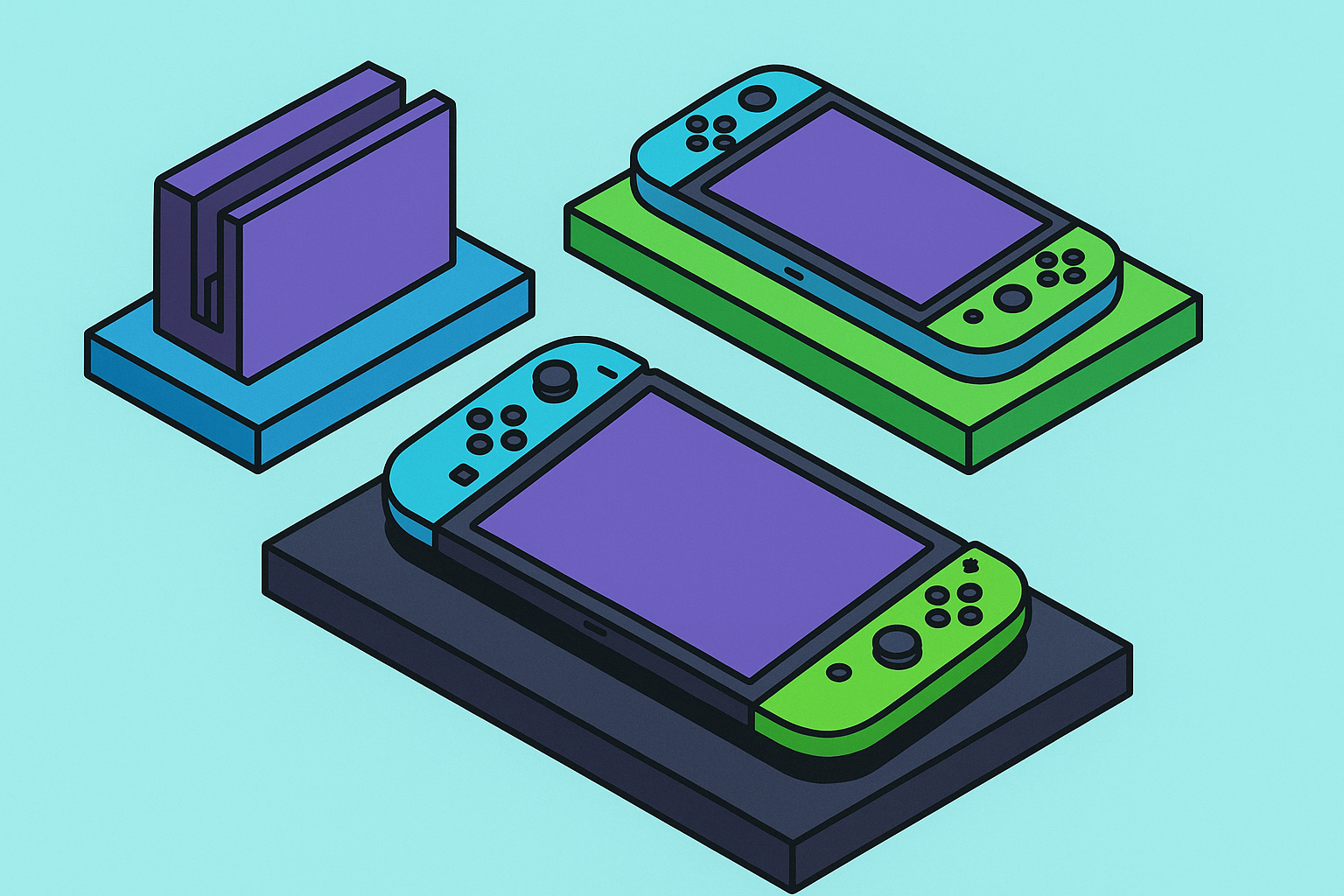
Nintendo will not say this in any press release, so someone should: these four products serve fundamentally different use cases, and conflating them is how buyers end up disappointed, like ordering a sports car and being surprised it has no truck bed.
Switch 2 ($449 until September 1, 2026, then $499.99) is the current flagship. A 7.9-inch 1080p LCD in handheld mode, 4K/60fps docked output, a 120fps handheld ceiling, and 256GB of onboard storage make it the most capable device Nintendo has ever shipped. It also plays the vast majority of Switch 1 games through backward compatibility, which matters more than it initially appears, and we will get to why.
Switch OLED (~$400) is, at its core, a premium delivery mechanism for the original Switch library. The 7-inch OLED panel produces richer contrast, wider viewing angles, and more saturated color than any LCD alternative in the lineup. The dock includes a wired LAN port, which sounds trivial until you have lived with a router two rooms away and watched your ranked match rubber-band into oblivion. Storage is 64GB. The hardware itself has not changed since launch; only its competitive context has, and that context has been unkind.
Standard Switch V2 (~$340) is the hybrid workhorse: same library as the OLED, 6.2-inch LCD, 32GB storage, and a battery revision that matters in practice more than it looks on a spec sheet. Buyers must verify they are purchasing the 2019 V2 revision and not the original 2017 model. Box art alone is unreliable confirmation; check the model number directly.
Switch Lite (~$230) is a purpose-built portable with a 5.5-inch screen, non-detachable controls, and no TV output. It is the lightest, smallest, and cheapest device in the lineup. It cannot play Switch 2 games. It cannot run the subset of Switch 1 titles that require detached Joy-Cons for local multiplayer. It is not trying to do those things. That clarity is part of its value.
The library split between Switch 1 and Switch 2 is the sharpest dividing line in this entire decision. Hardware specifications are secondary; what you can actually play is primary. Everything else is noise.
How the Price Compression Since August 2025 Changes the Value Math
Before the August 2025 tariff-driven increases, the lineup had intuitive spacing: Lite at $200, standard Switch at $300, OLED at $350, Switch 2 at $449. Each tier had a clear identity and a defensible argument. You could point at any rung and explain it without embarrassment.
Then the original hardware moved up without gaining a single new capability. Lite went to $230, standard Switch to $340, OLED to $400. The products did not change. Only the prices did.
That is worth sitting with. When a product's price rises without a corresponding improvement in what it delivers, the buyer's expectation has to recalibrate against a fixed competitive landscape. And at ~$400, the Switch OLED now sits roughly $50 below Switch 2. For any buyer already willing to spend that much, the value comparison is, to be blunt, brutal. Switch 2 brings a larger screen, dramatically more storage, backward compatibility with the existing library, and access to Switch 2 exclusives. The OLED brings a superior panel on a smaller display and nothing the V2 already offers at $60 less.
Is $50 a meaningful savings threshold when the item being saved on is a hardware generation? That is the wrong question. The standard Switch V2 at $340 is only $109 below Switch 2 at current pricing, narrowing to $160 after September 2026. The V2's argument rests on price and battery life; those remain real advantages, but the margin has compressed to the point where it is no longer decisive for most buyers.
Switch Lite at $230 retains the clearest value case of the original hardware precisely because it never tried to compete on capability. Price compression, paradoxically, did the Lite fewer favors than it did Switch 2, because the Lite's clarity comes from distance: it is cheap, portable, focused, and honest about what it is. That identity holds regardless of where the OLED lands.
But what if you never dock? A player buying hardware capabilities they will never use is not getting a deal; they are paying for overhead. Price compression does not make Switch 2 the universal answer for someone who never connects to a TV, travels constantly, and has zero interest in Switch 2 exclusives. The math changes when the feature set is irrelevant to the life you actually live.
The Buyer Who Should Get Switch 2 Right Now
Switch 2 plays the Switch 1 library, which already contained over one billion purchased games by the time the platform handed off, plus its own expanding catalog of exclusives. Mario Kart World crossed 15 million copies sold by June 2026. Donkey Kong Bananza is out. The third-party software lineup, which Nintendo described as the largest in any Nintendo system's first year, includes Elden Ring Tarnished Edition, Cyberpunk 2077 Ultimate Edition, and Civilization VII. That last sentence would have read as parody five years ago. It does not anymore, and the shift in what that says about Nintendo's third-party relationships is significant.
GameCube library access is Switch 2 exclusive, full stop. There is no workaround on Switch 1 hardware. For players with gaps in their Nintendo history, or for anyone who missed the GameCube era entirely, this is a real differentiator and not a marketing talking point dressed up as one.
The 7.9-inch 1080p handheld screen is noticeably larger than the standard Switch's 6.2-inch LCD. Four-thousand-pixel-resolution docked output and 256GB of onboard storage are practical improvements that accumulate in daily use. Switch 2 had sold over 23 million units by June 2026; third-party developer confidence and accessory ecosystem depth follow install base, and those numbers suggest the Switch 2 ecosystem is not waiting around to be validated.
Who should buy this right now: anyone who occasionally docks their Switch; anyone with an existing Switch 1 library they want to preserve; anyone planning to play Switch 2 exclusives or the GameCube catalog; teens and adults playing across a range of genres; and anyone already spending $400 or more, because Switch 2 at $449 dominates the OLED at $400 in almost every practical scenario.
The time-sensitive variable is not subtle: that $449 window closes September 1, 2026.
The Narrow Remaining Case for Switch OLED in 2026
OLED panel technology produces deeper blacks, richer contrast, and wider viewing angles than any LCD alternative in the lineup, including Switch 2's 1080p screen. For a player who games exclusively in handheld mode, never connects to a TV, and plays only Switch 1 titles, the OLED screen remains the best display experience in the original hardware generation. That is a true statement and also a fairly narrow one.
At roughly $50 below Switch 2, the OLED forces a comparison it cannot win on feature count. Switch 2 brings more storage, a larger screen, full backward compatibility, and access to every future Switch 2 exclusive. So what exactly is the OLED's winning argument? It requires the buyer to actively prefer OLED panel technology over size and resolution, to play exclusively in handheld, and to have no interest in any Switch 2 title, including whatever arrives after the current launch window.
That is a specific profile. It is also a diminishing one, as the Switch 2 library matures and the generational gap widens. Refurbished or discounted OLED units at sub-$350 pricing shift the math considerably; at full retail in 2026 against a Switch 2 at $449, the OLED's case is difficult to defend with a straight face. Anyone shopping in that price range deserves to know that.
Who the Standard Switch V2 and Switch Lite Still Actually Serve
The standard Switch V2 at $340 makes sense for a buyer who wants hybrid play at the lowest viable price, has no interest in Switch 2 exclusives, and already owns or is planning to buy Switch 1 games. The battery revision is the practical headline: 4.5 to 9 hours versus the original 2017 model's 2.5 to 6.5 hours. On a long flight, that gap is the difference between finishing a game and rationing playtime like it is a finite resource, which, on a plane over the Pacific, it effectively is.
One qualifier that cannot be skipped: buyers must verify they are purchasing the V2. Retailers do not always surface the distinction, and the original 2017 hardware still appears in stock, particularly through third-party sellers. The model number on the box is the only reliable confirmation. This is a small thing that has frustrated a non-trivial number of buyers who assumed "new in box" meant current.
The V2's $109 to $160 gap below Switch 2 is its primary remaining argument. The trade-offs are real: smaller screen, less storage, no Switch 2 access. Whether that gap justifies those trade-offs depends almost entirely on how much the Switch 2 library matters to a given buyer. For someone with no interest in it, the V2 is defensible. For someone on the fence, it is a weak case, and that conclusion is doing some meaningful work in that sentence.
Switch Lite at $230 is a purpose-built portable. It is the right device for young children, gift buyers with a firm budget, and solo travelers who play exclusively in handheld mode with no need for TV output. The limitations are real and worth stating directly: no TV connectivity, non-detachable controls, a 5.5-inch screen, 3 to 7 hour battery, no Switch 2 compatibility, and incompatibility with Switch 1 titles requiring detached Joy-Cons.
The Lite is not a budget Switch 2. It is a different device built for a different player. Framing it as a cheaper entry point to the same experience is how buyers end up frustrated, and it is a framing Nintendo's own marketing occasionally encourages, which is its own kind of problem.
Battery Life Across All Four Models and What It Means For How You Play
Stated ranges, taken directly from Nintendo's specifications: Switch 2 runs 2 to 6.5 hours, Switch V2 runs 4.5 to 9 hours, Switch Lite runs 3 to 7 hours, and the original 2017 Switch runs 2.5 to 6.5 hours, relevant only for buyers shopping used.
Real-world testing is grimmer for Switch 2. Nintendo Life's testing found the device lasted approximately 2 hours and 10 minutes playing Mario Kart World at maximum brightness. GameChat, Mouse Mode in tabletop, and the most demanding Switch 2 titles compress that lower bound further. Two hours and ten minutes is also roughly the length of a lot of domestic flights, which is either fine or a problem depending entirely on whether you remembered to charge it before leaving the house.
But here is the thing: the Switch 2 is doing substantially more work than its predecessors. More processing power, a larger display, and new hardware features all draw more current. The battery constraint is a trade-off for the capability, not a manufacturing oversight. That framing does not make a 2-hour floor more palatable on a cross-country flight, but it does clarify what you are actually buying.
Practical mitigations exist and work. Reducing screen brightness to around 50% extends playtime by roughly 30% compared to maximum brightness. Playing offline or in airplane mode eliminates background wireless activity. Disabling HDR and reducing resolution or framerate where the game allows it are additional levers. None of these are elegant solutions, but they are effective ones.
For commuters and travelers who need portable reliability across a full day, Switch V2's 4.5 to 9 hour range remains the most consistent option in the lineup. For players who primarily dock, Switch 2's battery life is close to irrelevant. Plugged in is plugged in.
Joy-Con 2's Magnetic Attachment and Mouse Mode: What's New and What's Still Being Worked Out
Joy-Con 2 attaches to the Switch 2 via magnets rather than the sliding rail mechanism of the original. Attach and detach becomes a one-motion action. It is a small improvement that registers immediately, the kind of thing you notice once and then stop noticing because it just works, which is probably the ideal outcome for a controller attachment mechanism.
The optical sensor embedded in each Joy-Con's base enables Mouse Mode, allowing either controller held sideways to function as a pointing device. The practical application, documented in Gizmodo's hands-on coverage of Civilization VII, involves using one stick for camera control and the other for zoom while optical tracking handles cursor positioning. Strategy and real-time-strategy titles benefit most clearly. Whether this expands meaningfully into other genres depends on developer adoption, which is still early enough that drawing firm conclusions would be premature.
The ergonomic tension is real and worth naming directly. Eurogamer's coverage flagged discomfort during extended Mouse Mode sessions: a flat, roughly rectangular controller held sideways in one hand is not a natural grip for sustained pointing work. A market for Joy-Con mouse grip adapters, from brands including Mumba, Hyperkin, and Lyreh, emerged specifically to address this. That accessories exist to compensate for an ergonomic gap is not necessarily an indictment of the feature; it is how hardware ecosystems typically mature. It does, however, suggest that Mouse Mode at launch is more proof of concept than finished product experience.
GameChat, accessed via the "C" button on the right Joy-Con 2, enables voice chat and screen sharing natively from the hardware without requiring a separate application or external device. Video calls are supported with an optional webcam. For a company that treated online social features as something to be tolerated rather than designed for the better part of a decade, this is a meaningful departure. Whether it translates into actual usage habits is a different question entirely.
If Mouse Mode figures heavily into your buying decision, budget for a grip. That is not a criticism; it is just useful information delivered before the purchase rather than after.
What Switch Lacks in Cloud and Remote Play, and How Mobile Controllers Fill the Gap
Nintendo Switch has no unified cloud gaming subscription tier. Cloud-compatible versions of individual titles, such as Resident Evil Village, exist as separate purchases requiring a constant internet connection. That is a fundamentally different value proposition than a streaming library, and the distinction is not a minor one.
Players who want access to Xbox Cloud Gaming, PlayStation Remote Play, GeForce NOW, or Steam Link are operating entirely outside the Nintendo ecosystem. Xbox Cloud Gaming delivers console-quality titles without local installs. PlayStation Remote Play streams the full PS5 and backward-compatible PS4 library to any compatible device. GeForce NOW provides access to over 1,500 PC games at up to 240fps on the Ultimate tier. Steam Link extends any PC library to a mobile device and supports library sharing. These are different services with different catalogs, and Nintendo has chosen not to compete with any of them directly, which is either a strategic choice or a gap, depending on your perspective.
The friction point for all of them on a smartphone is physical controls. Touch input on a 6-inch screen is workable for certain genres and inadequate for most. Certain mobile gaming controllers connect to a smartphone and provide console-level physical controls for any cloud or remote play session. The Backbone One, a smartphone controller paired with a companion app that turns a phone into a handheld gaming platform, is one widely used option in this space. Xbox Cloud, PlayStation Remote Play, GeForce NOW, and Steam Link all function through compatible apps on those devices. For a player who wants both a dedicated Nintendo handheld and access to the broader cloud ecosystem, pairing Switch with a compatible mobile controller on their phone covers both without requiring a second dedicated console, which is a more elegant solution than it initially sounds.
That combination is particularly sensible for Switch owners who travel and want their full Xbox or PlayStation library accessible without adding hardware weight. Switch handles Nintendo's catalog; the phone with a compatible controller handles the rest.
Matching the Right Model to How You Actually Play: A Direct Decision Framework
Four questions resolve this for most buyers. They work best asked in sequence, and the sequence matters.
Do you ever want to play on a TV? If no, Switch Lite remains viable. If yes, Switch Lite is eliminated before any other consideration applies.
Do you want access to Switch 2 exclusives or the GameCube library? If yes, only Switch 2 applies. No original Switch hardware can bridge that gap, and no amount of price sensitivity changes it.
Is your budget firmly under $300? Switch Lite at $230 is the answer. If the budget extends to $340, Switch V2 enters the conversation. If the budget reaches $350 or above, the original lineup's value cases compress significantly, and the OLED-to-Switch-2 comparison becomes the only one worth having.
Are you spending $350 or more? At nearly every point in that price range, Switch 2 is the stronger recommendation for almost every buyer who reaches that threshold. The $50 gap between OLED and Switch 2 is not, for most people, a sufficient reason to choose the older hardware generation. That is a direct claim, and it is defensible.
So where does that leave everyone? The all-around player or Switch 1 upgrader should get Switch 2, ideally before September 1, 2026. The dedicated handheld-only player with no interest in Switch 2 exclusives should consider Switch OLED if display quality is the priority, or Switch V2 if battery life or a lower price matters more. The young child or budget-constrained gift recipient is a Switch Lite buyer, with clear-eyed acknowledgment of what the device cannot do. The existing Switch 1 owner who plays primarily handheld has no compelling reason to upgrade to an OLED; Switch 2 is the only meaningful step up, and anything else is a lateral move at a higher price.
For players who want cloud and remote play access alongside their Nintendo library: a smartphone and a compatible mobile gaming controller covers Xbox Cloud Gaming, PlayStation Remote Play, GeForce NOW, and Steam Link without adding a second dedicated console. Switch handles Nintendo; the phone handles the rest.