Gaming Console Storage Upgrade Options by Platform
Each platform locks you into different storage hardware, so buying blind wastes money.

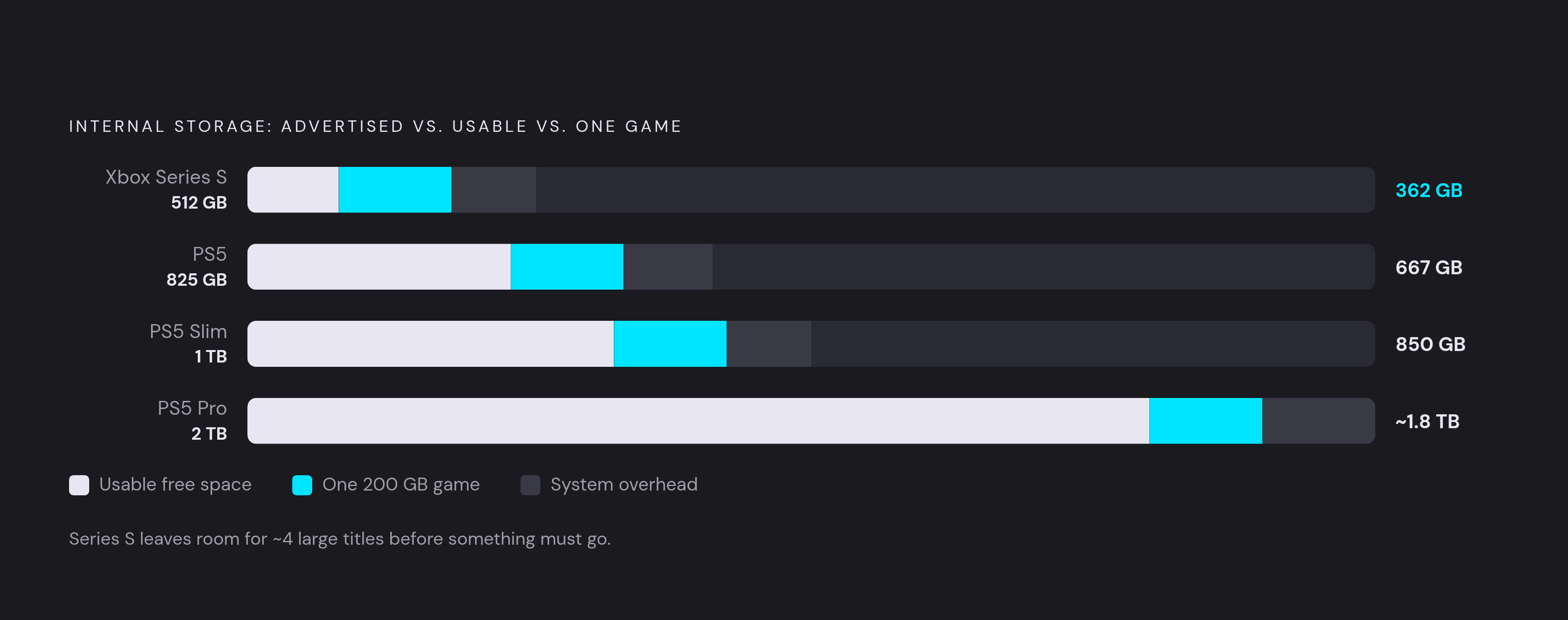
Game installs have crossed a line where the storage that ships in the box stops being enough within months, not years. Some individual titles now clear 150GB on their own, and a fully loaded Call of Duty install, with every map pack and audio option checked, can push past 200GB. Modern PS5 titles regularly exceed 100GB, adding to the pressure on available drive space. GTA 6 releases November 19, 2026 and is expected to be around 200GB at launch, with post-launch updates pushing it higher. Do the math on a stock console and the squeeze becomes obvious. A PS5's 825GB drive actually gives players about 667GB after the OS takes its share, the PS5 Slim nudges that to roughly 850GB usable, and even the PS5 Pro's 2TB drive starts feeling tight once a handful of AAA titles sit side by side. The Xbox Series S has it worse: 512GB internal shrinks to 362GB usable, which is room for about four large modern games before something has to go. None of this is a complaint about developers making bloated games. It's an arithmetic problem, and the fix is knowing which upgrade path your specific console actually supports before a wallet gets involved.
Why each platform's upgrade path is structurally different
PS5, Xbox Series X|S, and Nintendo Switch 2 each lock players into a fundamentally different storage architecture, making cross-platform advice misleading and platform-specific knowledge essential. Generic shopping advice falls apart fast as a result. The PS5 opens an M.2 NVMe slot to the general market, with speed requirements attached but real competition among drives. Xbox Series X|S goes the opposite direction: its rear expansion slot only takes cards from certified manufacturers, and a standard M.2 NVMe drive, however fast, is not physically or electrically compatible with that slot. No adapter or firmware patch bridges that gap. Nintendo Switch 2 asks for microSD Express specifically, and older microSD cards from the original Switch slide into the slot just fine but can't install or run Switch 2 games, only shuffle screenshots and video clips around.
Someone who searches "best SSD for gaming" and orders the fastest M.2 drive they can find ends up with a part that works beautifully in a PS5, does nothing for an Xbox, and won't physically function as game storage in a Switch 2. That's the reason platform-specific research has to come before the credit card does, and it's the organizing logic behind every section that follows.
PS5 storage: the open M.2 slot and external drives
Sony built the PS5 around an open M.2 slot, so the drive market genuinely competes for a player's money, but Sony didn't leave the door wide open. Specific requirements narrow the field considerably, and skipping the compatibility check is how people end up returning drives. The console wants PCIe Gen 4 NVMe with sequential read speeds of at least 5,500 MB/s; slower drives don't necessarily get rejected outright, but they trigger a performance warning during validation that tells the buyer they undershot. Form factor matters too. The standard form factor is M.2 2280, and several shorter sizes are also natively supported: 2230, 2242, 2260, 2280, and 22110. Sony's official support page confirms all of these M Key sizes fit the PS5's SSD slot natively, with no adapter required for any of them. The capacity range runs from 250GB up to 8TB.
The Samsung 990 PRO is a well-regarded example, with sequential reads well above Sony's minimum and a built-in heatsink version that requires no extra parts. That heatsink detail isn't decoration. The PS5's internal slot has a tight height ceiling, around 11.25mm, so a drive with the wrong heatsink simply won't close the panel, and fitment becomes a real purchasing variable rather than a cosmetic afterthought. Shoppers tend to overbuy on endurance: a 1TB drive rated for at least 300 TBW covers the PS5 comfortably, since its write pattern comes in bursts rather than sustained heavy loads, so chasing a drive with double or triple that endurance rating doesn't buy much in practice. Installing one means popping the side panel off and formatting the new drive through system settings, a process that's mechanically simple even though it does mean opening up the console. The installation itself typically takes under 10 minutes once the drive is in hand.
A USB drive serves a different and more limited purpose on PS5. It functions purely as an archive: parking games you're not currently playing, storing your PS4 library, and holding screenshots and clips. The PS5's USB ports cap throughput even for fast external SSDs, fast enough for PS4 games and file transfers, but not for PS5 gameplay. So external storage earns its keep for a specific type of player: someone with a deep PS4 back catalog, a PS Plus subscriber cycling through the monthly game rotation, or anyone who wants to shelve finished PS5 titles without deleting them outright. The Seagate Game Drive for PS5, a 5TB external unit, is built for that archival job rather than for active play.
Xbox Series X|S storage: a proprietary ecosystem that is starting to open up
Xbox Series X|S owners get exactly one route to native-speed expansion: a proprietary card slot on the back of the console that only accepts drives from certified manufacturers. That's been true since launch, and it hasn't loosened, but the list of who's allowed to make those cards just got longer. As of August 10, 2026, three brands hold certification: Seagate, Western Digital's WD_BLACK line, and, newly, SanDiskc26. Tom's Hardware reported that Western Digital "used to make these add-on cards" but "can no longer" sell them, leaving Seagate and SanDisk as the only current options, with SanDisk's C50 serving as a direct replacement for the WD Black cards. Xbox Series X|S players have only one path to native-speed game storage expansion, Microsoft-certified proprietary cards, but the certification of SanDisk in August 2026 makes it the third certified competitor in a market Seagate effectively owned for years, following Western Digital's WD_BLACK line, which entered in 2023. Every certified card, regardless of brand, runs on Xbox Velocity Architecture and delivers the same 2.4 GB/s transfer speed as the console's built-in SSD, so the competition here is about price, capacity, and durability rather than raw performance.
SanDisk's entry, the Optimus GX C50, comes in 512GB, 1TB, and 2TB tiers, and buyers should know Amazon pricing on these runs noticeably higher than SanDisk's own storefront for the identical card. Capacity ceilings still separate the brands. Seagate remains the only brand offering a 4TB capacity, which WD_BLACK does not currently match. Every certified card, no matter the brand, supports Quick Resume, the feature that lets a player jump between several suspended games without a full reload, and that's a capability external drives simply don't offer. ETA PRIME's hands-on demonstration showed expansion cards can be swapped between Series X and Series S.
External drives still have a role on Xbox, but the same Quick Resume gap applies to them as it does everywhere else in this ecosystem. Unlike the PS5, Xbox actually lets players install and run Xbox 360 titles, other backward-compatible games, and even some current titles straight off a USB drive. What external storage can't do is support Quick Resume or run next-gen titles at the console's native speed. The Seagate Game Drive for Xbox, a 2TB external unit, is a concrete lower-cost option for backward-compatible titles and archival storage.
The Series S is where this whole calculation matters most. Drop a 1TB expansion card into a Series S and its usable storage jumps from 362GB to more than 1.3TB, going from about four large games to comfortably holding around fifteen. The Xbox Series S ships with 512GB internal, yielding 362GB usable, effectively four large modern games.
Nintendo Switch 2 storage: microSD Express is the only expansion path, and older cards don't qualify
Anyone assuming their old Switch memory card just carries over to a Switch 2 is wrong in a way that actually costs them functionality, not just convenience. Switch 2 requires microSD Express cards specifically for storing and running games. A standard microSD card from the original Switch will slide into the new console's slot without any resistance, since the physical fit is the same, but it's limited strictly to moving screenshots and video, nothing that touches actual game installation or play. This isn't a restriction Nintendo is likely to patch away with a future update. Standard microSD cards from the original Switch are physically compatible with the slot but limited to screenshot and video transfers only.
The verified list of compatible cards is still short, though it's expanding. As of mid-2026, SanDisk and Samsung carry Nintendo's official license, while Lexar and PNY make unlicensed cards that have tested as compatible without issues. A 256GB microSD Express card provides baseline expansion sufficient for roughly 8–12 AAA games. Engadget has tested cards from SanDisk, Samsung, Lexar, and PNY, among others, against the Switch 2.
Cloud gaming reduces the storage problem without solving it
For a player with solid broadband, cloud gaming makes the entire storage conversation moot: the game never touches the local device's drive. That solution requires solid broadband and a game covered by the subscription library, and it still leaves competitive players dealing with frame timing over the connection. Nvidia's GeForce Now streams games a player already owns across Steam, Epic Games, Ubisoft Connect, and GOG, covering a genuinely large library without a single local install, and its Ultimate tier pushes high resolution and high frame rates rather than a compressed, laggy approximation. Xbox Cloud Gaming and PS Plus Premium work differently: both stream titles bundled into their subscriptions, but both also let players stream select games from libraries they've purchased outright, a distinction that matters a lot if the goal is playing something already owned rather than picking from a curated list.
Bandwidth requirements aren't nothing. Xbox Cloud Gaming's own setup guidance, updated in August 2026, lays out a minimum connection speed to get started and a higher recommended threshold if a player wants consistently sharp, glitch-free output. The service's output resolution improved over the course of 2026, narrowing the visual gap against playing natively, but its frame-rate ceiling still makes it a rough fit for competitive shooters where every millisecond of input lag shows up on screen. Congested home Wi-Fi or a shaky rural connection still introduces latency that turns cloud gaming into a supplement for casual play rather than a full replacement for anyone competing seriously. The technology holds up for what it's built for. It just isn't built for everything.
PS Remote Play and Steam Link are not cloud platforms at all, even though they get lumped in with the category constantly. Both stream from a player's own PS5 or PC over the same home network, and the source device still needs the game fully installed with the storage to hold it. Cloud gaming bypasses storage only when a subscription library covers the title and the connection is strong enough to carry it. For an owned game outside that library, or for competitive play where frame timing matters, storage and local hardware are still very much part of the equation.
How mobile gaming sidesteps storage and platform lock-in
A phone with a decent controller attached has become a legitimate primary gaming platform for a growing number of players, and cloud streaming is a big reason why storage stops being relevant for the games those services carry. GeForce Now, Xbox Cloud Gaming, and Amazon Luna all run on mobile devices, streaming games without any local install whatsoever, so a phone's onboard storage never enters the equation for anything played through those apps. This isn't a fringe use case propping up a small niche. Grand View Research found mobile gaming closed out 2025 as the single largest category in the entire gaming industry by scale.
Growth has slowed from its earlier pace, but by revenue mobile still leads every other category, and 2026 has seen competitive players, streamers, and developers start treating phones as a primary platform rather than a fallback for when a console isn't handy. What actually holds mobile back isn't storage or processing power at this point. Touch controls remain the real ceiling, the thing standing between a phone and genuine console-replacement status for genres that need precise, tactile input.
The ROG Xbox Ally takes a different route: it breaks from every console pattern described above. It's a Windows handheld, so it sidesteps proprietary storage rules altogether: games run from an internal SSD, a microSD card, or an external USB-C SSD, with no certification gate blocking any of them. ASUS's own official guides document internal NVMe SSD upgrades and microSD cards as the supported storage expansion paths for the device. Performance on the ROG Xbox Ally comes down to something refreshingly simple: how fast the drive itself is, full stop, without a manufacturer picking winners among storage brands the way Microsoft's console does.