Handheld Gaming Console Screen Quality Breakdown
Four screen specs determine what you're actually getting in a handheld gaming device.
Handheld gaming screens come down to four specs you can actually measure: resolution, refresh rate, panel type, and brightness. Once you know what each one does to the image sitting eight inches from your face, you can look at any device, phone strapped into a controller included, and know roughly what you're paying for before you hand over a dollar.
Resolution sets pixel count, and pixel count sets sharpness, but the number printed on the box lies without context. A 1080p panel crammed into a 7-inch screen looks noticeably crisper than that same 1080p spread across a 10-inch tablet, because pixel density decides how clean text and menu edges look up close, more than raw resolution does. Refresh rate is a separate axis entirely. Measured in Hz, it controls how many frames the screen redraws per second, and 60Hz is the number most people quietly accept as fine for turn-based games or anything slow enough to forgive it. Push into 90Hz or 120Hz and fast genres, shooters, fighters, racers, start to feel sharper in motion, with less blur trailing behind anything that moves. That upgrade only pays off if the game engine or the streamed video feed is actually producing frames fast enough to fill it, though; feeding a 120Hz screen a 30fps signal is like buying a sports car and leaving it parked in a school zone.
Brightness, measured in nits, decides whether you can see anything once you step outside, and HDR support stretches the gap between a scene's darkest shadow and its brightest highlight. None of these four specs work alone; they multiply against each other. A 120Hz OLED panel running at 1,000 nits and a 60Hz LCD panel running at 400 nits can both get marketed as "1080p," and yet they're barely the same category of screen. That gap is really what this whole piece is about, and panel type, OLED versus LCD, is where it opens widest.
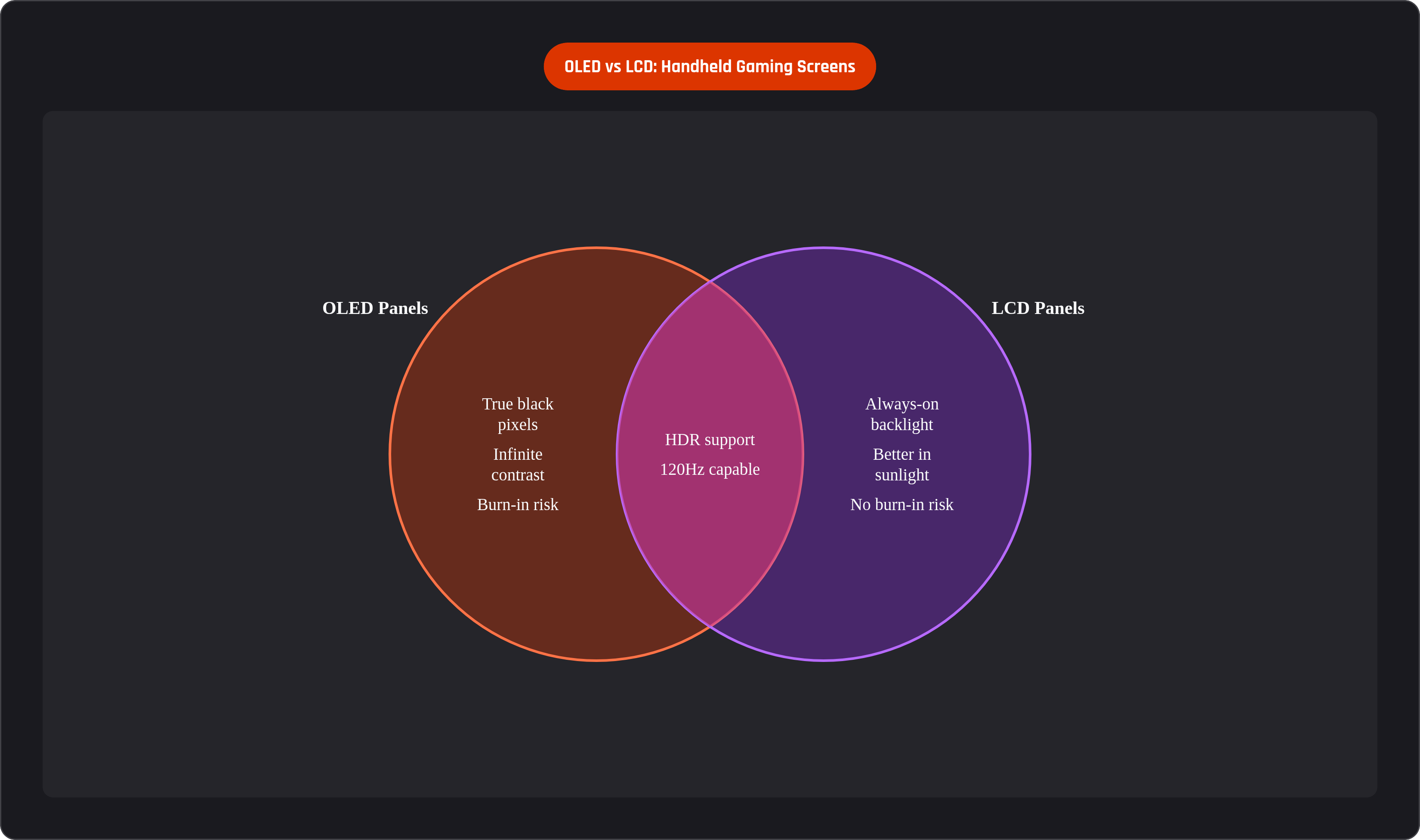
Why OLED and LCD produce fundamentally different images
LCD screens run on a single backlight sitting behind a layer of liquid crystal. That backlight stays on constantly, lighting up every pixel at once, so a pixel that's supposed to be pure black is still getting light forced through it. The result is a grayish black instead of a true one, and bright objects near dark ones tend to bleed light outward, something anyone who's watched a night scene on an LCD monitor has seen and probably chalked up to "that's just how screens work."
OLED flips the whole setup. Each pixel is its own light source, capable of switching off individually and completely, producing zero light instead of "close to zero." Calling that an "infinite contrast ratio" isn't marketing spin; it's describing an actual optical property of the display. OLED pixels also respond in under 0.1 milliseconds, fast enough that motion doesn't drag a smear behind it. LCD crystals, on the other hand, have to physically twist into a new position to change what they're showing, and that twist takes a few milliseconds. Sounds trivial until you're tracking a fast-moving sprite across the screen and it leaves a faint ghost trailing it.
OLED carries real trade-offs, and this is the part people skip past when they're busy being excited about black levels. Static elements like health bars or minimaps can wear down specific pixels faster than the ones around them, leaving a faint permanent silhouette after enough hundreds of hours. Modern panels run background pixel-refresh cycles to slow this down, so it's a real risk rather than an emergency, but it's not nothing either. OLED also dims noticeably in direct sunlight, while LCD panels tend to hold their picture better outdoors, and LCD is immune to burn-in, full stop. Which panel is "right" really depends on where and how you're actually playing, and that's a question worth asking again for every device below.
How the Nintendo Switch 2's LCD holds up against OLED expectations
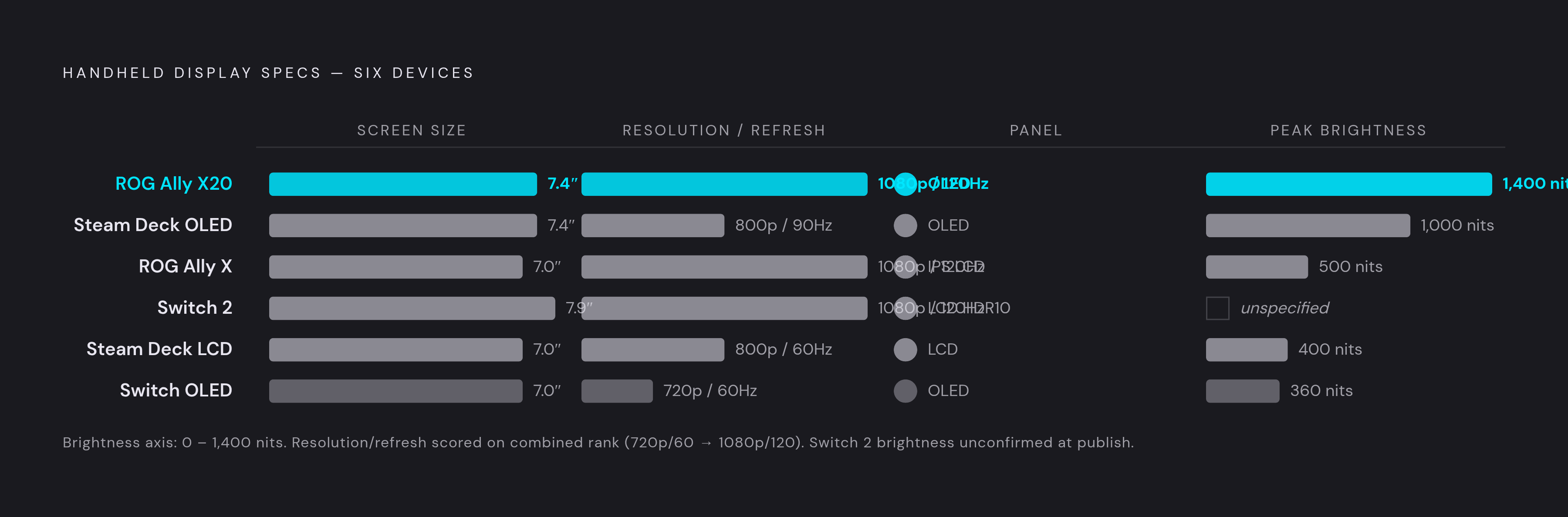
Nintendo's Switch 2 ships with a 7.9-inch LCD running 1920x1080 at 120Hz, with HDR10 support. Stack that against the Switch OLED, a 7-inch, 720p, 60Hz panel with no HDR at all, and the Switch 2 wins on nearly every number you can point to except one: the OLED still produces deeper blacks and better contrast, because that's simply what OLED does.
Going back to LCD carried real engineering logic behind it, even though online reaction treated it like a cost-cutting shortcut. Hitting HDR10 and 120Hz at the same time required a wide-color-gamut LCD, and that's a combination the older OLED panel in the Switch OLED couldn't deliver together. HDR10 on an LCD panel does meaningfully lift perceived contrast, even without OLED's per-pixel black levels; it's a different mechanism producing a similar-ish result, and it's a long way from the flat image older LCDs used to put out.
The launch reaction was loud, and honestly, kind of predictable. Nintendo spent years training players to expect OLED-quality blacks, so when the follow-up console showed up with an LCD, the contrast downgrade felt bigger than the resolution and refresh-rate upgrade, even though objectively you're getting more usable screen across more of your play sessions. Play mostly in a dim room at night? The Switch OLED's contrast edge is real, and you'll notice it. Play in daylight, on a train, or anywhere with mixed lighting? The Switch 2's brighter, sharper, faster panel is doing more useful work for you. Given Nintendo's habit of releasing OLED revisions a few years into a console's life, don't be shocked if an OLED Switch 2 shows up eventually.
What the Steam Deck OLED upgrade actually changed, and what it didn't
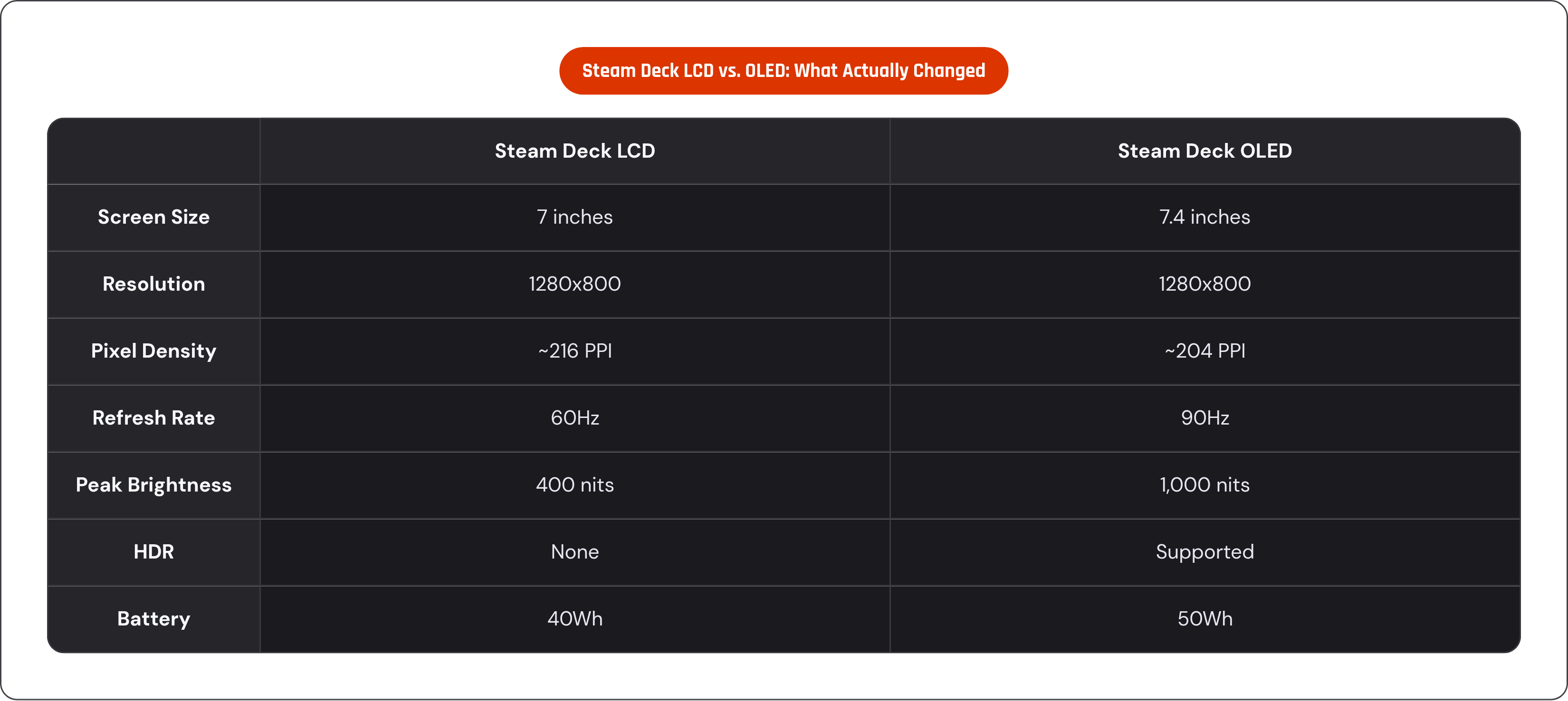
Valve's Steam Deck comparison is genuinely useful because it isolates panel type about as cleanly as anything in this piece. The original Steam Deck LCD, discontinued in November 2023, ran a 7-inch panel at 1280x800, 60Hz, 400 nits, no HDR. The Steam Deck OLED bumped the screen to 7.4 inches at that same 1280x800 resolution, but jumped to 90Hz, 1,000 nits, and added HDR. Pixel density actually dropped slightly, from around 216 PPI on the LCD to about 204 PPI on the OLED, since the screen got physically bigger without gaining resolution. Resolution, in other words, had little to do with the improvement people actually noticed.
Tom's Guide called the OLED screen "the definition of a game-changer," and having used both myself, that's not a review quote dressed up as hyperbole. Colors got richer, blacks actually went black instead of dark gray, the washed-out look you'd get viewing the LCD at an angle disappeared, and 90Hz smoothed motion noticeably over 60. The part people miss is the battery angle: OLED pixels that are off draw zero power, and combined with a larger 50Wh battery (versus 40Wh on the LCD model) and a more efficient chip, Valve landed 30 to 50 percent more playtime on the OLED unit. That's a direct mechanical consequence of how OLED produces black.
Price is where the story gets less flattering. After Valve raised Steam Deck OLED prices in May 2026, pushing the 512GB model to $789 and the 1TB to $949 on the back of a global memory-chip shortage, the value math shifted under everyone's feet. The upgrade itself is still real and still worth having. It just costs more to get today than it did on release day, and that's worth knowing before you walk in expecting launch pricing.
Where 120Hz IPS LCD lands in the ROG Xbox Ally X, and the OLED edition that followed
ASUS's ROG Xbox Ally X, released in 2025, runs a 7-inch IPS-level anti-glare LCD at 1920x1080, 120Hz, 500 nits, 100% sRGB coverage, and Gorilla Glass Victus on top. The anti-glare coating paired with 500 nits is basically a direct answer to LCD's traditional strength: this is a screen built for a sunny patio or a bright office just as much as a dark bedroom. Add 120Hz at 1080p on a 7-inch panel plus FreeSync Premium to cut down on tearing, and you've got a genuinely strong screen for fast games, assuming the frame rate feeding it can actually keep up.
That last part matters more than it sounds like it should. For cloud gaming and remote play specifically, a 120Hz panel is only as good as the stream reaching it. Pull a 60fps cloud stream and that extra headroom mostly smooths frame delivery rather than unlocking any true 120fps motion.
Then in June 2026, ASUS announced the ROG Xbox Ally X20, a 20th-anniversary limited edition that swaps the LCD for a 7.4-inch OLED panel, still 1920x1080, still 120Hz, but now hitting 1,400 nits peak brightness with FreeSync Premium Pro. That's the brightest screen in this entire comparison, OLED or LCD, full stop. ASUS moving this line from LCD to OLED within roughly a year says something about where the market's heading: 120Hz IPS LCD, which felt like a premium spec not long ago, is quietly turning into the floor instead of the ceiling.
What cloud-first and remote-play screens are actually optimized for
Cloud-first devices make one thing obvious on purpose: winning a spec sheet fight was never the goal. Take a cloud-gaming handheld built around Xbox Cloud Gaming, GeForce NOW, and Steam Link. A 7-inch LCD at 1080p, 60Hz, and that's a deliberate choice, because a cloud stream gets bottlenecked by your internet connection, not by your hardware. Put a sharper, higher-resolution panel on a device like that and you've just paid for detail the incoming video stream can't actually deliver.
Sixty Hz makes similar sense once you consider that most cloud services top out around 60fps reliably anyway; a 120Hz screen on a cloud-only device would mostly sit there unused. Sony's PlayStation Portal follows the same logic with its 8-inch, 1080p, 60Hz LCD, tuned specifically for the PS5 remote-play stream it exists to receive, not for anything rendered locally.
Network quality is the variable no screen spec can paper over. NVIDIA recommends at least 15 Mbps for 720p/60fps streaming, 25 Mbps for 1080p/60fps, and 45 Mbps if you're chasing 4K at 120fps. Latency matters more than bandwidth in practice, though; you want under 40ms to your nearest server, and if you're running NVIDIA's Cinematic Quality Streaming mode, budget for 100 Mbps minimum. A ResetEra thread from 2026 captured this well: one user with a 4K OLED monitor and a wired ethernet connection, about as ideal a setup as exists, still found GeForce NOW streams "quite blurry" in Unreal Engine titles. That's server-side compression and upscaling, and no amount of money spent on a nicer screen fixes it. The flip side showed up in the same thread: another user found a 60fps stream to the PlayStation Portal looked and played better than a locally rendered 30fps game running on the Switch 2. Frame rate consistency delivered over a stream beat a worse local frame rate, and that's worth sitting with, because it means screen quality is downstream of a lot of other decisions. If you're buying into the cloud-gaming category, the smarter spend is usually a router over a screen.
Where smartphones sit against these screens, and what a controller changes about the equation
Here's the part that catches people off guard if they haven't shopped for a phone lately: flagship smartphones now ship with OLED panels, 120Hz refresh rates, brightness that meets or beats most of the dedicated handhelds we've covered, and resolutions higher than 1080p. On paper, a modern flagship phone screen isn't just competitive with a Steam Deck OLED or a Switch 2; in several categories it's straight-up ahead of them. As a pure spec comparison, the phone usually just wins.
So why isn't everyone gaming on their phone, then? A phone screen, no matter how good, doesn't come with buttons. It offers no analog sticks, no triggers, no d-pad, nothing but a flat sheet of glass that a game has to fake physical controls onto. Touch input adds latency between deciding to do something and the game registering it, and your thumbs end up sitting directly over whatever you're trying to see. Landing a headshot or nailing a platforming jump with your thumb blocking the exact pixel you need becomes an exercise in frustration instead of reflex.
That's the real gap, and because it's a hardware problem, it has a hardware fix: clip on a controller and you've added physical buttons and sticks without touching the display at all. The screen's OLED panel, its 120Hz refresh, its peak brightness, none of that changes. It just becomes usable the way a controller-native handheld already is. For cloud gaming specifically, Xbox Cloud Gaming, PS Remote Play, GeForce NOW, Steam Link, a phone with a controller clipped on is functionally a cloud handheld with a screen that rivals or beats purpose-built hardware, and you never paid a display premium to get there. There's a bonus most people overlook, too: the phone brings its own 5G connection, so cloud gaming away from home runs on mobile data instead of praying the coffee shop Wi-Fi holds up. Mobile gaming's real bottleneck has mostly been the controls, and once you fix the controls, the screen was good enough the whole time.
How to read a spec sheet when choosing between these devices
No single spec wins in every situation, and if you take one thing from this whole piece, take that. The right screen depends entirely on where and how you actually play, so match the spec to the habit instead of chasing whatever number looks biggest on the box.
Playing mostly at night, in a dark room, favoring cinematic or story-driven games? OLED's contrast advantage shows up exactly there, which makes the Steam Deck OLED or the ROG Ally X20 the strongest dedicated options, with a good flagship phone screen close behind. Chasing fast-paced genres, shooters, fighting games, anything where a tenth of a second matters? Refresh rate outranks panel type here, and both the Switch 2 and the Ally line clear 120Hz without breaking a sweat. Playing outdoors or on the move? LCD's brightness edge in direct sunlight is real, OLED visibly dims under the sun, and 500 nits will matter more to you in that exact moment than any contrast ratio ever will. Sticking to cloud gaming or remote play? Your network carries more weight than the panel ever could, and 60Hz at 1080p already covers what most streaming services can actually deliver anyway.
Line up the Switch 2, Steam Deck OLED, ROG Ally X, and the cloud-first handhelds side by side, and no device wins every column, because none of them was built to. Each reflects a deliberate trade-off aimed at a specific kind of player, not a corner someone cut to save a few dollars. Watch HDR support closely too: it's a meaningful lever wherever a panel supports it, and the Switch 2's HDR10 LCD alongside the Steam Deck OLED's HDR both add perceived depth that narrows the gap between the two panel types, even if it never fully closes it. Panel type remains the single spec with the biggest visual payoff per dollar spent upgrading, but only under the conditions where it actually shows up: dim rooms, still images, color-sensitive content.
If you're already carrying a flagship phone in your pocket, most of this decision has already been made for you; the screen question is effectively answered. What's left is the controller question, since that's the actual purchase deciding whether the screen already sitting in your hand is usable for serious play. Before you spend anything, ask where you play most, what genres you're chasing, whether you're rendering locally or streaming, and whether the phone you already own has a screen good enough that the only thing standing between you and a real handheld is a controller you haven't bought yet.