Cloud Gaming on Mobile Data While Traveling
Master four variables to stream games reliably while traveling.
Cloud gaming on mobile data while traveling works in 2026, but not automatically. It works when the traveler understands four variables they can actually control: how much data a session burns, what the local network can realistically deliver, which service matches their existing game library, and a handful of settings most people never touch. Get those four right and streaming a game from a hotel room in a distant city feels close to playing at home. Get them wrong and it's a spinning wheel over a still image, which, let's be honest, is a pretty expensive way to stare at a loading screen.
Cloud gaming while traveling versus gaming at home
At home, cloud gaming runs on a connection that barely changes hour to hour: fixed bandwidth, no data cap worth worrying about, and a router that's been sitting in the same spot doing the same job for years. Traveling flips every one of those assumptions. Signal strength swings depending on which side of the train you're sitting on. Data plans have ceilings. And latency, the delay between pressing a button and seeing it happen onscreen, becomes a mystery variable instead of a known quantity.
So the real question for a traveler isn't "does cloud gaming work." It clearly does, at scale. Xbox Cloud Gaming alone logged 1.7 billion hours of streaming in 2025, up 45% from the year before. It works inside limits a traveler can't fully control: a foreign carrier's network, a hotel's shared bandwidth, and a data plan with a number on it that everyone ignores until it's zero. Most of that 1.7 billion hours happened on home Wi-Fi, where the infrastructure has had years to mature. Mobile data during travel is the part of the system still being stress-tested in the wild, one jet-lagged hotel checkout at a time.
How much data cloud gaming uses on a trip
Video buffers ahead of where you're watching. Cloud gaming can't do that. Every frame has to arrive the instant it's needed. The stream runs continuously at whatever bitrate the service has chosen, with no slack to bank ahead of time. That distinction matters more than most people realize before their first international trip with a data cap.
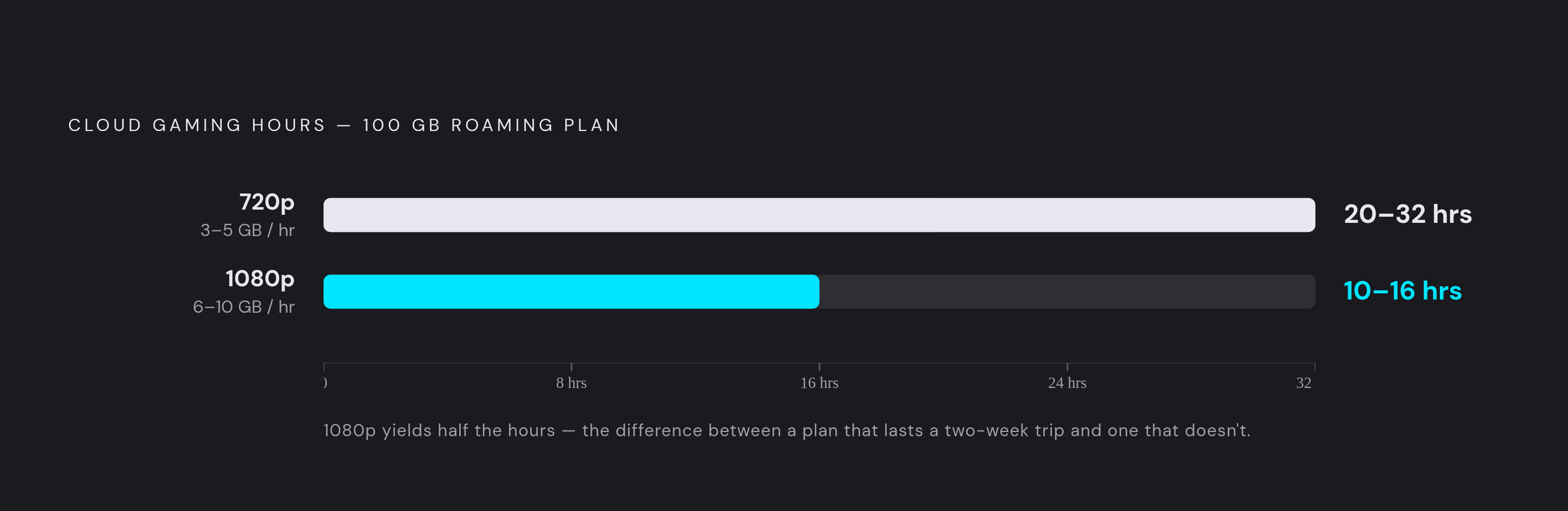
At 720p, expect somewhere in the range of 3 to 5 GB per hour. Stretch a 100 GB data allowance across that and it's good for roughly 20 to 32 hours of play, depending on the game and how much motion is onscreen. Bump the resolution to 1080p and that same 100 GB shrinks to somewhere between 10 and 16 hours, the gap between a data plan that lasts a two-week trip and one that taps out somewhere over the ocean. The gap between a data plan that lasts a two-week trip and one that taps out somewhere over the ocean is a large difference. It's the gap between a data plan that lasts a two-week trip and one that taps out somewhere over the ocean.
A single long 1080p session, the kind that eats an evening after a day of sightseeing, can chew through a meaningful slice of a typical mid-tier roaming plan in one sitting. Resolution is a budget line on the road, not just an image-quality setting. It's a budget line.
What 5G delivers for travelers in 2026
5G carried 48% of mobile data traffic worldwide by the end of 2025, and that share is projected to climb to 85% by 2031. Total network data traffic, counting both mobile and fixed wireless access, grew 22% year-over-year in the first quarter of 2026. The infrastructure is clearly moving in the right direction, and edge computing paired with AI-assisted compression has pushed latency down meaningfully in many metro areas, moving closer to the threshold where cloud gaming stops feeling like a compromise and starts feeling like a console.
On the ground, that translates into numbers that vary by service and by how many other people are on the tower at the same time. GeForce NOW over 5G can deliver low latency on a strong signal, but performance tends to degrade during peak hours, remaining workable for turn-based RPGs and strategy titles while feeling shakier for anything that needs a split-second parry. Boosteroid, when a traveler is near one of its European data centers, tends to offer competitive latency on Wi-Fi, with 5G adding some overhead on top of that.
Where does this fall apart? Coverage still clusters around city centers. Step outside an urban core, cross a border, or sit in a regional airport during a layover, and the connection often drops back to LTE or worse. Crowded venues, stadiums, transit hubs, and tourist plazas at 2pm in August all create peak-hour congestion that spikes latency without warning. And international roaming plans have a nasty habit of throttling 5G down to LTE speeds after a certain data threshold, even on plans marketed as unlimited. Read the fine print before assuming "unlimited" means what it sounds like.
Choosing the right service for the way you travel
No single cloud gaming service is the right answer for every traveler; it comes down to what a person already owns and already pays for. That's just how the economics of game libraries work.
Someone with a Steam library streams those exact owned games through GeForce NOW, no re-buying required, and as of mid-2026 the service supports over 4,500 titles according to figures from NVIDIA. It runs through Safari on iOS and a native app on Android. NVIDIA added a 100-hour monthly play-time cap starting January 1, 2026, applied to Performance and Ultimate tier subscribers (Founders members are exempt). Performance and Ultimate members pay to unlock more time beyond that. So travelers on those tiers need to track hours played, not just gigabytes burned.
A Game Pass Ultimate subscriber is already set up for Xbox Cloud Gaming, which testers consistently describe as having the most polished touch-control implementation of any mobile cloud option, and the jump to 1440p in 2026 closes a lot of the visual gap with rivals. Its bitrate ceiling sits lower than GeForce NOW's, though, which is a quiet advantage for travelers: lower peak bitrate means more predictable, and generally lower, data burn per hour. Microsoft cut the price of Game Pass Ultimate on April 21, 2026, after a 2025 price hike, so it's worth checking current pricing before signing up.
PS5 owners have PS Remote Play, which is free and streams from the console sitting at home rather than from a company's server farm. That has two nice side effects: the game library and save files are already exactly as left, and the bandwidth floor is low relative to the other options here. At 540p or 720p presets, that's genuinely workable even on a mediocre hotel connection. The Android app was updated to version 9.1.0 as of May 27, 2026.
Steam Link streams from a home gaming PC left powered on, and it's the only option here with Remote Play Together, letting friends join a session without owning the game themselves, useful for anyone traveling with a co-op partner. Valve's own guidance, though, frames its bandwidth needs as higher than PlayStation's minimum, so it's less forgiving when the signal dips.
Budget-conscious travelers in a region near a Boosteroid data center get competitive latency with Xbox Cloud Gaming at $7.49 a month on an annual plan, less than half the price. Amazon Luna comes with a big asterisk: Amazon shut off streaming access to third-party purchased games on June 10, 2026, and removed the "Bring Your Own Library" feature on June 3, 2026, with save data available for download for a limited window afterward. The Luna+ catalog now covers a more limited set of games, and a new Remote Play feature launched September 10, 2026, lets one subscriber host up to seven guests, the cheapest co-op setup on this list. That catalog reduction is a real trade-off to weigh before subscribing.
PlayStation Plus Premium's cloud streaming tier, separate from Remote Play, runs games on Sony's own servers rather than a home console, but it has no browser client and is limited to PlayStation hardware plus the official Windows app. No phones, no smart TVs, no Mac. For a piece about mobile travel gaming, that basically rules it out.
For data efficiency specifically, PS Remote Play's variable bitrate scales down substantially, Xbox Cloud Gaming has a moderate ceiling, and GeForce NOW can push considerably higher. Plan the data budget around whichever end of that range applies.
Settings and habits that stretch your data and keep latency low mid-trip
Resolution is the biggest lever by far. Dropping from 1080p to 720p meaningfully cuts data use, and on a typical phone screen held at arm's length, the difference is often hard to notice anyway. That's not a knock on anyone's eyesight, it's just phone-screen physics.
Before leaving home, download anything with an offline mode for flights and dead zones, since no cloud service works without a signal. Log into every service being considered and test it on actual mobile data, not on hotel Wi-Fi discovered after arrival; a service that streams beautifully over a home fiber connection can behave completely differently over a carrier's network. Dig into each app's settings and set the quality preset to the mobile-data or data-saver option instead of leaving it on auto. And if GeForce NOW is part of the plan, check the remaining hours in the monthly cycle before departure, since the cap applies regardless of where you're playing.
During a session, run a quick speed test and ping check before launching a stream. If latency reads notably high, that's a signal to switch to something more forgiving, a strategy game instead of a shooter, or just wait for a better window. Background app refresh, automatic app updates, and cloud photo backup all compete for the same bandwidth a game stream needs, so turn them off first. A video call running on the same hotspot will spike latency for everyone sharing it, so isolate the gaming device where possible. And streaming while in motion, on a train, in a car, is asking for trouble; find a stationary spot and let the connection settle rather than gaming through a moving signal handoff.
As for genre strategy: save turn-based RPGs, card games, strategy titles, and narrative adventures for uncertain connections, since a half-second of lag barely registers in those genres. Save action games and anything competitive for moments when the 5G signal is confirmed strong.
The controller question: why touch controls are the wrong default for travel gaming
Touch controls work, technically. Fingers hovering over a glass screen can absolutely move a character and press a button. But it's not the experience the game was built around, and anyone who's tried to land a precise jump with a thumb blocking half the screen knows the difference immediately.
Xbox Cloud Gaming's touch overlay is among the more refined implementations available, and it still can't replicate what an analog stick does for aiming, platforming, or anything that needs fine motor control. A physical mobile controller fixes this without adding a console-sized brick to a carry-on, which is really the whole appeal of cloud gaming in the first place: all the hardware stays behind, except for a controller that fits in a jacket pocket.
For travel, the choice usually comes down to wired versus Bluetooth. A wired USB-C controller skips the Bluetooth pairing dance entirely and can pass power through to the phone while playing, which reviewers describe as close to mandatory for any session running longer than about 90 minutes (nobody wants their game and their battery dying at the same time). Bluetooth controllers pair across multiple devices and pack lighter, but that convenience comes with a pairing step and one more battery to keep charged. Either way, on both Android and iOS, Bluetooth is the only route for a controller that doesn't plug directly into the port, so pair it in the phone's Bluetooth settings before opening the game, not after the stream is already running and timing out.
Putting it together: what a realistic cloud gaming travel setup looks like
The traveler who gets good results from cloud gaming abroad usually isn't running the newest phone or paying for the priciest plan. They're the one who did five minutes of setup before leaving the house.
Know the data cap and the roaming terms cold, and do the math on hours of play at 720p (3 to 5 GB an hour) against whatever the plan allows. Match the service to whatever library already exists, PS Remote Play for PS5 owners, Xbox Cloud Gaming for Game Pass Ultimate subscribers, GeForce NOW for a Steam or Epic collection. Set every service to 720p before leaving home Wi-Fi, not after landing somewhere with worse signal. Check GeForce NOW's remaining monthly hours ahead of departure if that's the service in play. Pack a controller, wired or Bluetooth, with passthrough charging if it's wired, and test the pairing before the trip starts, not in a cab on the way to the airport.
The honest ceiling looks something like this: cloud gaming on mobile data in 2026 handles single-player RPGs, strategy, narrative games, and casual titles well on a solid 5G connection. It does an adequate job with action games on stable LTE at 720p. It stays shaky for competitive multiplayer that demands sub-20-millisecond reactions, unless the 5G signal is genuinely strong.
None of this is a niche concern anymore. The cloud gaming segment aimed at travelers is projected to grow from $3.2 billion in 2025 to $4.1 billion in 2026, a 28.1% compound annual growth rate that puts it on track for $11.03 billion by 2030. Infrastructure investment is following demand, not the other way around, and the gap between "works at home" and "works on the road" keeps closing. It just hasn't closed all the way yet, and knowing exactly where the seams still show is what separates a smooth trip from a very long loading screen somewhere over the ocean.