Emulating Retro Games on iPhone
Apple's 2024 policy change now lets you legally emulate classic games on iPhone.
For most of iPhone's history, playing an emulated copy of a classic game meant jailbreaking the phone or installing a developer certificate that expired on a schedule as reliable as it was annoying. The April 2024 revision to App Store Guidelines §4.7 ended that. Retro game emulators are now explicitly permitted on the App Store, worldwide, with no jailbreak, no certificate renewal, and no sideloading required. This piece walks through which emulators to use for which systems, where iPhone hardware runs out of room, and how to get real buttons under your thumbs.
Apple's 2024 App Store rule change and iPhone retro gaming
Before April 2024, the barrier to emulation on iPhone wasn't technical. It was bureaucratic. A sideloaded app built on a free developer certificate stopped working every seven days, forcing anyone who wanted to keep playing through a rebuild-and-reinstall ritual that filtered out all but the most dedicated. Jailbreaking solved the expiration problem but introduced a security and stability trade-off that most iPhone owners weren't willing to make for the sake of replaying an old favorite.
Apple's guideline change removed that filter. Emulator apps can now live on the App Store the same way any other app does: downloaded once, updated automatically, no workaround required. That single policy shift is why this guide exists at all, and why the phone already sitting in your pocket is suddenly worth taking seriously as a retro gaming device rather than a curiosity for people willing to fuss with configuration profiles.
iPhone hardware limits for emulation
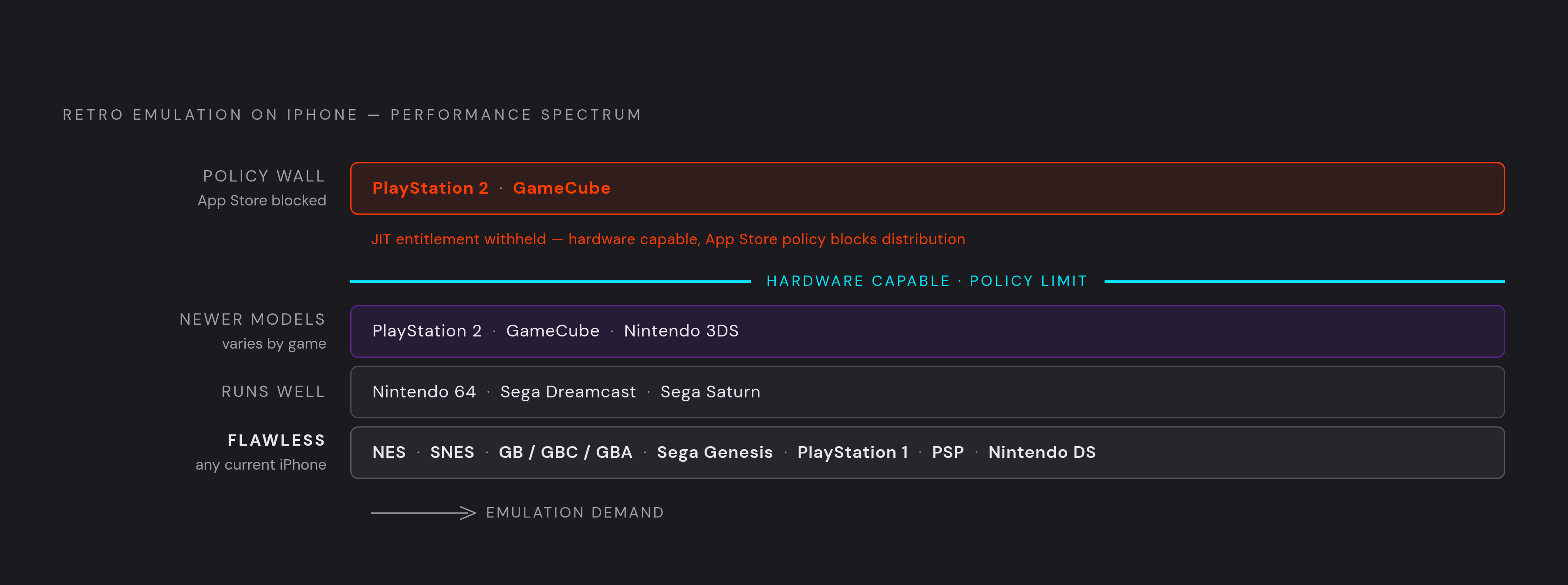
A modern iPhone has more than enough processing power to handle the overwhelming majority of retro game history. NES, SNES, the full Game Boy line (GB, GBC, GBA), Sega Genesis, PlayStation 1, PSP, and Nintendo DS all run flawlessly on any current iPhone. Step up a tier and Nintendo 64, Sega Dreamcast, and Sega Saturn run very well. Climb further and you reach PlayStation 2, GameCube, and Nintendo 3DS, where performance becomes possible on newer models but varies by game and by chip generation.
The ceiling on iPhone emulation is set by App Store policy. PS2 and GameCube emulation requires something called JIT, or just-in-time compilation, where the emulator writes new instructions into memory and runs them on the fly while a game is in motion. iOS normally blocks any App Store app from doing that unless Apple grants a special entitlement for dynamic code signing, and Apple doesn't extend that entitlement to third-party apps distributed through the Store. DolphiniOS, the emulator that handles GameCube and Wii, is the clearest example: it can't appear on the App Store because of this exact restriction, even though the iPhone running it has plenty of horsepower to spare. That's a policy wall, not a performance failure, so don't blame your phone when an emulator you want simply isn't allowed to exist in the place you're looking for it. Even an older iPhone handles everything through PS1 and PSP without strain, and the newer the phone, the higher you can climb past that.
Delta: the right starting point for Nintendo systems
Delta is where most people should start, and for a simple reason: it covers the widest spread of Nintendo systems in one free, polished app that asks almost nothing of you in return. Point it at NES, SNES, Game Boy, Game Boy Color, Game Boy Advance, Nintendo DS, and Nintendo 64, and it handles all of them with no configuration menu standing between you and the game. A 2026 beta, Delta 2.0, added Sega Genesis to that list, though the full public release of that version hadn't shipped as of this writing.
Delta 2.0 isn't just a system-count bump. It brought a redesigned interface built around a "Liquid Glass" aesthetic tuned for iOS 26, a new Genesis controller skin with a landscape variant added in the second beta, and RetroAchievements support across Game Boy Color, Game Boy Advance, and DS. Plug in a physical MFi controller and Delta picks it up automatically, no pairing menu required. What Delta doesn't do is PlayStation, Saturn, Dreamcast, or arcade systems, and that's by design: it's a Nintendo-first app with Genesis tacked on, not a universal solution. For those systems, you need the apps covered next.
RetroArch: the broadest system coverage for readers willing to learn its interface
Once you've outgrown what Delta covers, RetroArch is the answer. Its core library stretches across NES, SNES, Game Boy Advance, N64, PlayStation, Nintendo DS, Sega Genesis, Atari, and dozens of other systems beyond, each one installed as a separate downloadable core. No single-system app reaches that far.
The cost of that reach is friction. RetroArch consistently gets ranked as S-tier for system coverage and B-tier for iOS usability, and that gap between the two grades is the honest way to think about the app: more systems, more menus, more time spent figuring out where a setting lives before you ever load a game. Its App Store build also runs without JIT support, so demanding cores fall back to interpreter mode instead of the faster dynamic recompilation a jailbroken or sideloaded build could use. None of that makes RetroArch a worse choice than Delta. It makes it a different one, suited to readers who specifically want PS1, Saturn, Dreamcast, or arcade titles and are willing to spend ten minutes learning an interface to get there.
PPSSPP: the dedicated option for PSP games
RetroArch can technically touch a lot of ground, but PSP is a case where a dedicated app beats a general-purpose core. PPSSPP is built for exactly one system, and its own App Store listing states it's the original and only PSP emulator for mobile devices. Being purpose-built lets it upscale PSP games well past their native resolution, which matters more on a modern iPhone display than it ever did on the PSP's own modest screen.
On a newer, more capable chip, most of the PSP library runs at full speed, demanding titles included. A March 2026 development preview for Provenance (covered next) announced a full cheat code system with online lookup, configurable CRT shaders, complete button remapping, DOSBox keyboard support, and the early groundwork for netplay, signs that PSP emulation on iOS is still actively being built out. The PSP library itself makes a strong case for bothering with any of this: a meaningful number of PSP exclusives have never been rereleased on a current storefront, so emulating a cartridge or disc image you already own is the only legal route back to them.
Provenance and Folium: the cases for multi-system and 3DS coverage
Two more apps round out the picture, each solving a problem Delta, RetroArch, and PPSSPP don't. Provenance is the one to reach for if breadth is the priority: it supports 38+ systems in a single app, from Atari 2600 up through PlayStation 2, including niche platforms like PC-FX and Virtual Boy that rarely get emulator support. It pairs that range with automatic box art, iCloud sync, Siri shortcuts, and full tvOS support with TopShelf integration, making it one of the only iOS emulators built to work as well on an Apple TV as it does on the phone in your hand.
Recent updates have added online cheat code lookup pulled from the libretro database, an in-app controller guide, wider cheat support across multiple cores, and configurable CRT shaders for anyone chasing a more authentic CRT-era look. Core functionality is free when sideloaded, and the App Store build layers in optional Provenance Plus features on top. Folium occupies its own lane entirely: it's the first emulator to bring Nintendo 3DS emulation to iPhone, alongside Game Boy, Game Boy Color, Game Boy Advance, and DS support. 3DS emulation is a technically demanding problem to solve on mobile hardware, and Folium's performance there is still experimental and varies by game and chip. Neither app is a better overall pick than Delta or RetroArch. Provenance is the right call for someone who wants one app and a living room screen; Folium is the right call for someone who specifically wants 3DS and nothing else quite offers it yet.
Where to get ROMs and the law on emulation
Emulation itself is legal. Downloading a ROM of a commercial game you don't own is copyright infringement in most countries, regardless of how old the game is or whether anyone still sells it. Those are two separate facts, and conflating them is where most confusion about this topic comes from.
Courts have repeatedly held that reverse-engineering hardware for the purpose of interoperability is protected activity, and that precedent has held for more than two decades. As of 2026, no court has ruled that creating or distributing an emulator itself is illegal. The ROM side of the question has sharper edges: homebrew ROMs and games a rights holder distributes freely are fine to download, while commercial ROMs pulled from the internet are copyright infringement no matter how obscure the game. Nintendo's lawsuit against the Yuzu emulator, which argued the app facilitated piracy at scale in connection with leaked copies of The Legend of Zelda: Tears of the Kingdom, pushed the whole ROM community to recalibrate. Sites that once hosted files shifted toward publishing guides on dumping your own physical cartridges instead, a safer and more defensible practice. For anyone who'd rather skip the gray areas altogether, Nintendo Switch Online, the PlayStation Store, and GOG all sell legitimate downloads of older games directly.
Why touchscreen controls fall short for most retro games
Touchscreen controls hold up fine for something simple, a Game Boy puzzle game asking for nothing more than a directional tap. They fall apart the moment a game asks for shoulder buttons, an analog stick, or a d-pad input timed to the frame, which describes most of the retro library. The problem is physical: a flat pane of glass can buzz under your thumb, but it can't give you the same tactile certainty as a button that clicks. In games built around mechanical timing, platformers, fighters, and action RPGs, a half-second of hesitation means landing a jump or starting the level over. Reviewers testing Delta with Pokémon games noted the same pattern: older titles simply play better with real buttons than with haptic feedback standing in for them. The iPhone controller market has matured enough to offer a real answer to that problem, which is the subject of the next section.
Choosing a controller
The right controller comes down to form factor and where you actually play. Clip-on controllers turn the phone into something closer to a dedicated handheld, good for sessions where the phone leaves your hands rarely. MagSafe snap-on controllers suit lighter, shorter sessions where you want the option to detach quickly. Bluetooth controllers, paired rather than physically attached, make the most sense for couch play in front of a TV, particularly paired with Provenance's tvOS support.
System choice narrows the picture further. PS1 and PSP emulation specifically reward a symmetrical stick layout, since both systems were designed around the DualShock's mirrored stick arrangement. The SCUF Nomad, an iPhone-only controller, uses exactly that symmetrical configuration. Across the category more broadly, 2026's defining hardware shift has been the arrival of Hall Effect joysticks, which sense stick position magnetically instead of through physical contact and eliminate the drift that plagued earlier mobile controllers. The Mocagen MC1 builds its Hall-effect joystick to a rated lifespan 2.5 times longer than a conventional stick, a sign of how much the reliability bar has moved for controllers built specifically around the retro gaming case iPhone has only recently been allowed to serve openly.
Sources
- Provenance - Free iOS & tvOS Retro Game Emulator
- RetroArch - App Store - Apple
- Download RetroArch - Classic Games on Windows, Mac, Linux, Android, iOS & Consoles
- PPSSPP - PSP emulator - App Store - Apple
- GitHub - Provenance-Emu/Provenance: iOS & tvOS multi-emulator frontend, supporting various Atari, Bandai, NEC, Nintendo, Sega, SNK and Sony console systems… Get Started: https://wiki.provenance-emu.com |
- App Store (Recommended)