Sunshine and Moonlight vs Steam Link
Self-hosted control or plug-and-play ease: which fits your setup.
Sunshine/Moonlight and Steam Link offer two routes to PC gaming on another screen. The choice is between control over a self-hosted setup and ease of use with no setup friction, and neither is best for everyone. That architectural split explains where each tool excels, from competitive play on a phone to an effortless session away from home.
Why the choice between Sunshine/Moonlight and Steam Link is really one architectural question
Both tools turn a second screen into a window onto a gaming PC, but they put responsibility in different places. Sunshine/Moonlight gives the user a self-hosted pipeline to configure and control. Steam Link wraps streaming into Valve’s existing Steam environment. One exposes the machinery behind the experience. The other aims to make that machinery disappear.
The distinction starts with what gets installed. Moonlight is only a client, which displays and controls a stream supplied by a host. Today that host is almost always Sunshine, since NVIDIA shut down GameStream on March 29, 2023. Steam Link needs no separate host application because a PC signed into Steam can serve that role once Remote Play is enabled in Settings. An arrangement’s fit with the player’s setup and willingness to manage it matters more than the length of an application’s feature list.
How Sunshine/Moonlight's self-hosted pipeline produces lower latency
On Windows, it captures frames through the Windows Desktop Duplication API, encodes them directly using the GPU’s NVENC, AMF, or QuickSync hardware encoder, and sends the stream to Moonlight. The path has fewer processing layers than Steam Link’s route through Valve’s client and relay stack, even when no actual relay is involved. Less processing between the game and the client leaves more room for a responsive stream.
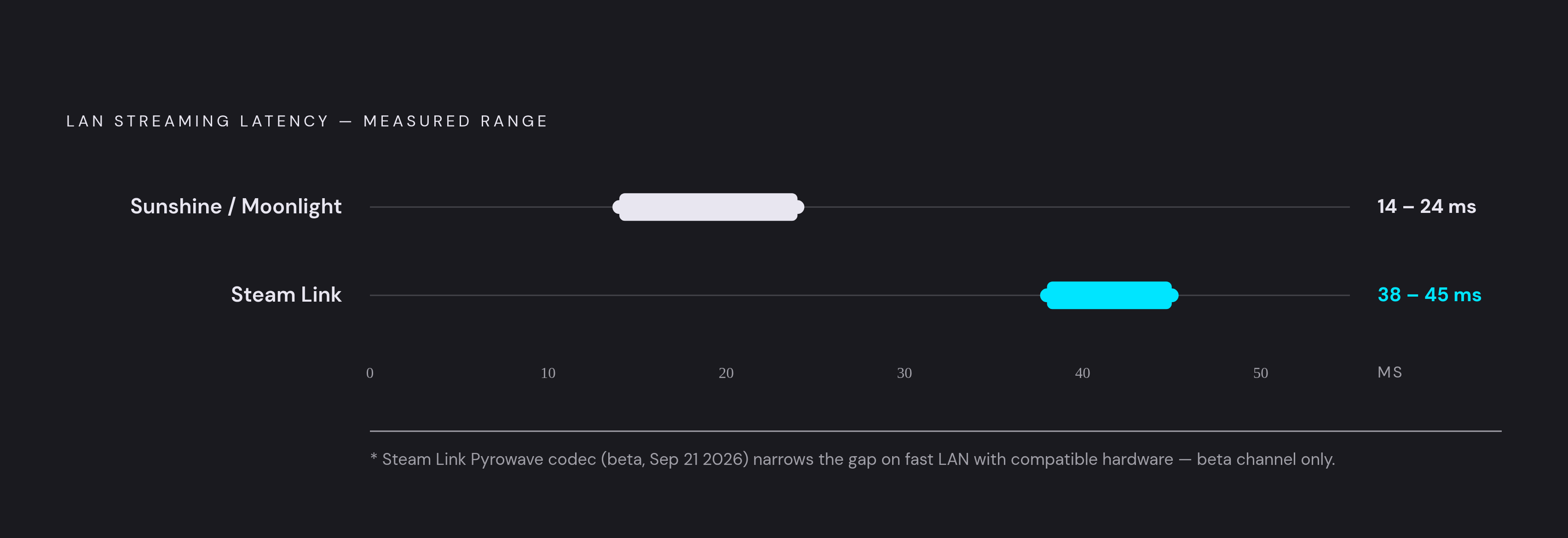
Independent LAN testing measured Sunshine/Moonlight at 14–24ms against 38–45ms for Steam Link on comparable hardware. No independent test used exactly the same equipment for both applications, so those results cannot show how much delay Steam Link always adds. Wireless client quality, host GPU age, and network conditions remain larger variables for most users. On a phone with a physical controller, however, fast-paced competitive play is precisely the setting in which a shorter delay can become perceptible.
Sunshine also exposes controls for bitrate limits, frame pacing, V-Sync behavior, and codec selection that Steam Link’s more automated pipeline does not expose. Tuning takes work, but it can shave off more milliseconds. Moonlight supports H.264, HEVC, and AV1, with AV1 requiring a capable encoder such as Nvidia RTX 40-series, Intel Arc, or AMD RX 7000-series hardware. Whether Steam Link supports AV1 depends on the host/client hardware in use. Codec choice therefore adds flexibility, although it cannot make an unsuitable network behave like a good one.
What Steam Link's tighter Steam integration actually buys you
Steam Link’s native VR support shows most clearly what being part of Steam adds that Sunshine/Moonlight cannot match. It supports Meta Quest 2, 3, and Pro, as well as Apple Vision Pro, while Sunshine/Moonlight does not cover that use case. Steam Link’s Quest client came out in November 2023, and hand tracking was added in October 2024. These are not conveniences layered over an otherwise interchangeable tool, but reasons to choose a different streaming architecture.
Installing Steam Link on the client and signing into the same Steam account lets it find the host automatically on the local network. There is no separate host application to install and no LAN port forwarding to arrange. Steam Input support also covers all Steam Input-compatible controllers, and pairing the controller with the client reduces input lag compared with connecting it to the host PC. Valve’s 2026 Android updates specifically improved Nintendo Switch Pro controller support, correcting face-button mapping problems in some games.
The social advantage is just as concrete. Remote Play Together lets guests join games hosted on a friend’s PC by clicking a link, without an account or setup on the guest side, and Sunshine/Moonlight has no equivalent. Steam Link streams the whole Big Picture session, including non-Steam shortcuts, so Epic Games Store titles, Game Pass games, emulators, and the desktop can be streamed. Compatibility varies, however, and the workflow still passes through Steam, making Sunshine/Moonlight more flexible for a mixed-launcher library.
Valve's Pyrowave codec and what it does to the latency gap
Valve’s experimental Pyrowave codec complicates any simple verdict that Moonlight wins on latency. Hans-Kristian Arntzen created the codec, which reached the Steam Client Preview/Beta channel on September 21, 2026. An October 1, 2026 beta update improved automatic bitrate and raised the manual bitrate limit to 1 Gbit/s. Steam Link version 1.4.5, released October 27, 2026, added Pyrowave support on NVIDIA Shield TV. Valve later announced that the Apple and Android mobile beta also received it.
Pyrowave changes which part of the GPU does the work. Valve describes it as a high-bandwidth, low-latency codec that shifts encoding from the GPU’s fixed-function video engine to its shader array. Arntzen says this allows extremely low latency without having to worry about what the fixed-function hardware can do. Pyrowave uses substantially more bandwidth than conventional streaming codecs, so its advantage depends on a network that can accommodate it.
For a phone on a fast home Wi-Fi 6 or 6E network, that trade can be plausible. On congested Wi-Fi, it is not. Pyrowave narrows the latency gap under specific conditions, including a fast LAN, compatible hardware, and the beta channel. It remains available only in beta/preview in the material available for this comparison. Valve also limits it to flat-screen Remote Play, so Steam Link VR does not receive the same latency change.
Steam Link now has a way to lower latency without the same need to set up the codec by hand, as long as the player accepts beta software and the bandwidth it needs. Sunshine/Moonlight still gives players more ways to tune raw performance. The distinction is no longer simply speed against convenience. It is also whether a particular network can support Valve’s newer shortcut.
Library scope, device reach, and the cases where Moonlight/Sunshine is the only answer
Steam Remote Play streams the Steam client and games launched through it, which becomes a constraint when a title cannot be added cleanly as a non-Steam shortcut. Sunshine/Moonlight can instead stream the full desktop or any application without that launcher restriction. A mixed library does not automatically rule Steam Link out.
Device support creates another boundary. Moonlight’s client range spans Android, iOS, Apple TV, Chromebooks, LG webOS TVs, and Raspberry Pi 4. Community ports let it run on Nintendo Switch, PlayStation Vita, Wii U, and Xbox One/Series consoles through the Microsoft Store or developer-mode sideloading. Some of those endpoints sit outside Steam Link’s intended reach. Sunshine is also GPU-agnostic, supporting NVIDIA, Intel Arc, and AMD rather than retaining the vendor lock of the old GameStream-dependent arrangement.
Headless and virtual-display rigs introduce a more specialized requirement. Apollo handles the native resolution for each client, which Steam Link does not do, while Artemis is the matching Moonlight-Android fork built for Apollo’s extra features. These are optional advanced features for ordinary streaming. Their relevance is that a self-hosted arrangement leaves room for a setup tailored to the client. A phone and a more unusual display need not force the same configuration.
The payoff on a phone is controller input that the game can understand natively. Sunshine presents a virtual controller to the host, so a physical controller attached to the client appears to the game as a native gamepad. It supports full Xbox vibration, PS5 DualSense adaptive triggers via USB, and gyro motion input. At the same time, Moonlight decodes the stream on the phone. That round trip makes a controller-equipped phone feel like a console.
Moonlight’s stable v6.2.0 release, dated October 4, 2026, has on-screen touch overlays for playing on a phone. Those overlays provide a fallback, but a physical controller remains far better for substantial gaming sessions. That choice matters more after putting work into capture, encoding, and delivery.
Remote access outside the home: where the security and complexity gap opens up
Steam Link Anywhere sends remote connections through Valve’s infrastructure without needing an open port on the home router, so it has a smaller attack surface with nothing extra to set up. Sunshine has no equivalent built-in relay. Remote Moonlight use instead requires direct port forwarding, which exposes the host to the internet, or a mesh VPN such as Tailscale. The VPN avoids the open-port risk but adds setup work.
Bandwidth also becomes a different constraint outside the home. Steam Link’s “Fast” preset uses less bandwidth than “Beautiful,” while “Unlimited” reaches up to 250 Mbps when both the Steam client and app support the higher limit introduced in June 2026. Pyrowave’s five-to-ten-times bandwidth multiplier makes it a home-LAN proposition, so WAN streaming returns to conventional codecs on both platforms. None of this makes Sunshine inherently dangerous. It means the user must make a routing and security choice that Steam Link handles automatically, a distinction an in-home-only player need not navigate.
How to match the right tool to your actual setup
The practical recommendation starts with requirements that cannot be negotiated. Choose Sunshine/Moonlight when the library spans Epic, GOG, emulators, or Game Pass through the Xbox app and unrestricted application streaming is the goal. It is also the fit for endpoints Steam Link was not built for, including Raspberry Pi, Xbox consoles, LG webOS TVs, and a homebrew Nintendo Switch. Device support comes before performance comparisons. A lower latency figure is irrelevant if the client cannot run on the intended screen.
Choose Sunshine/Moonlight as well when the priority is the lowest achievable latency for fast-paced competitive games and setup time is an acceptable cost. Its controls suit players who want high resolution at high framerates on hardware other than Apple Vision Pro. For a headless or virtual-display rig, Apollo’s per-client native resolution handling provides a further reason to take this route. Here, customization solves a concrete problem. It is not tuning for the sake of having more settings.
Choose Steam Link when the library lives in Steam and getting into a game within minutes is the priority. Remote Play Together and native support for Meta Quest 2, 3, and Pro or Apple Vision Pro are stronger reasons still. For travel, its remote infrastructure avoids the need to open router ports. On a fast home LAN, Pyrowave also offers a low-latency option for players comfortable with the beta channel.
Running both is a legitimate answer too. Steam Link can handle quick games on the couch from the Steam library, while Moonlight handles competitive games with tuned settings or non-Steam titles. On a phone with a physical controller clipped on, either works, though Sunshine/Moonlight’s broader codec control offers more scope to make the most of the hardware. Pairing either with Steam Big Picture provides a console-style interface on the small screen. Touch is available as a fallback in both, but the physical controller removes touch input’s latency and accuracy compromises, making the experience worth protecting with the right pipeline.